


1,爬虫-爬虫介绍-jupyter使用-爬取指定词条-fiddler抓包-爬取ajax请求的页面
通过编写程序,模拟浏览器上网,然后让其去互联网上抓取数据的过程,

requests模块:原生的一个基于网络请求的模块,模拟浏览器发起请求.
爬虫-爬虫初识
https://www.cnblogs.com/bobo-zhang/p/9645024.html
批量接口测试
表单形式的提交:
import requests
url='http://xx.13.235.xx:8088/login/'
data="name=xx&pwd=xx"
headers = {
    'Content-Type': "application/x-www-form-urlencoded", # 注意需要有请求头信息
    'Accept':'application/json'
    }

reponse=requests.post(url=url,data=data,headers=headers)
ret1=reponse.json()
ret2=reponse.text
print(ret1,type(ret1)) # 直接就是字典的数据类型
print(ret2,type(ret2)) # str类型,需要反序列化


批量注册形式:
import requests
url='http://xx.13.235.xx:8088/api/reg/'
# url='https://baidu.com/'

headers = {
    'Content-Type': "application/x-www-form-urlencoded",
    'Accept':'application/json'
    }
for i in range(2,1000):
    data="name=xx_{}&pwd=xx_{}".format(i,i)
    reponse=requests.post(url=url,data=data,headers=headers)
    ret1=reponse.json()
    print(ret1,type(ret1))
先安装软件,
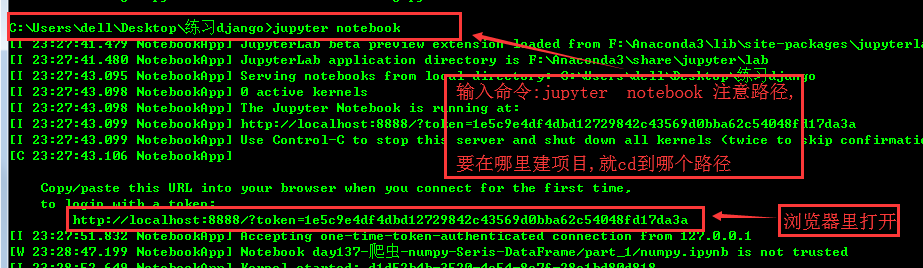
jupyter使用:


爬虫做过的,

通过5个基于requests模块的爬虫项目对该模块进行学习和巩固
基于requests模块的get请求
需求:爬取搜狗指定词条搜索后的页面数据
基于requests模块的post请求
需求:登录豆瓣电影,爬取登录成功后的页面数据
基于requests模块ajax的get请求
需求:爬取豆瓣电影分类排行榜 https://movie.douban.com/中的电影详情数据
基于requests模块ajax的post请求
需求:爬取肯德基餐厅查询http://www.kfc.com.cn/kfccda/index.aspx中指定地点的餐厅数据
综合练习
需求:爬取国家药品监督管理总局中基于中华人民共和国化妆品生产许可证相关数据http://125.35.6.84:81/xk/


爬取糗事百科的图片,
爬取好段子的图片
爬取煎蛋的图片(进行了加密)
爬取电子书
带验证码的人人网登录,
梨视频的视频爬取


爬取boss直聘的数据
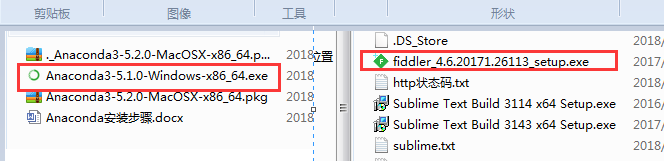
必读:---jupyter使用指南:http://www.sohu.com/a/206007674_100066998
https://www.cnblogs.com/zhao441354231/p/6056798.html
//

//
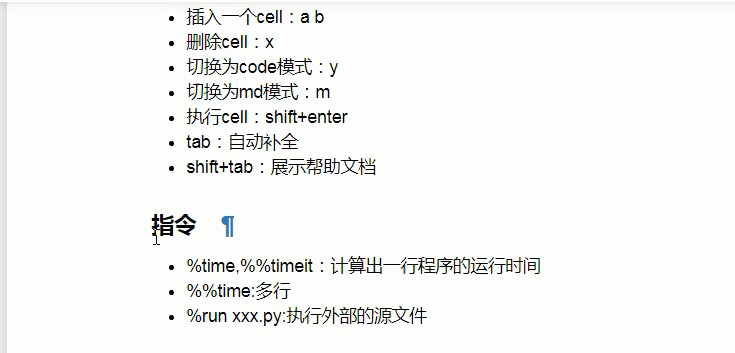
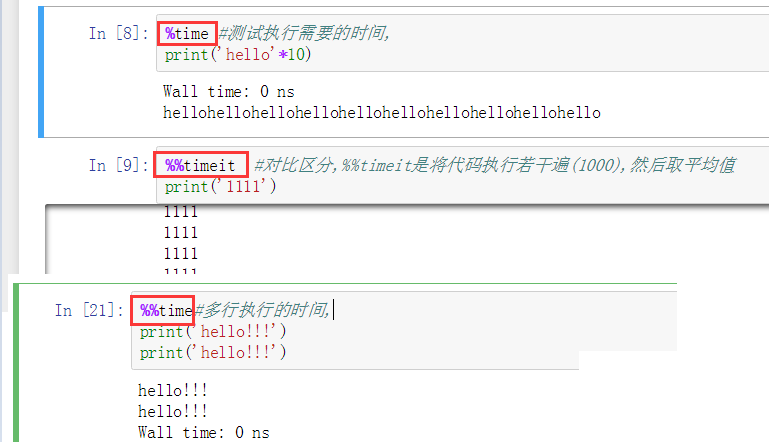
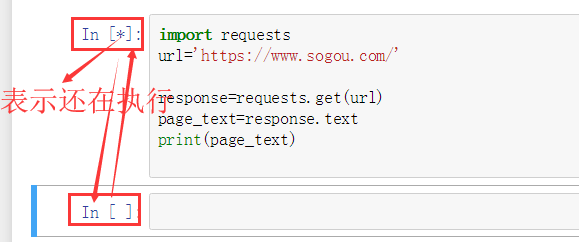
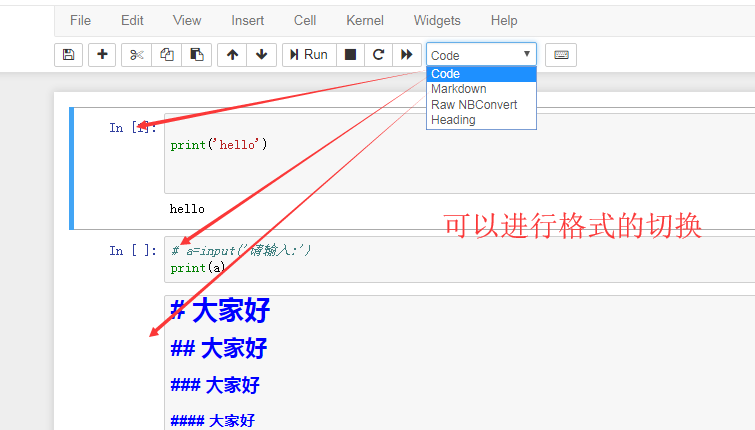
快捷键的使用
/
//
//
//
注意路径的问题,
//
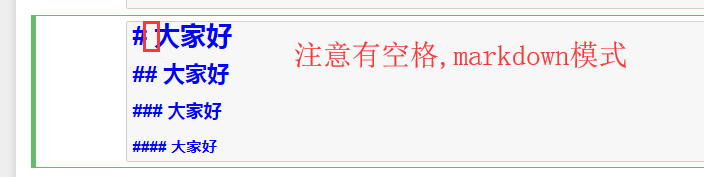
markdown里面还可以插入html代码,需要执行一下,
以上是工具使用的介绍
//
爬虫:

请求的时候,对于url,问号前面的都保留,后面跟key=value来写就行,不同的引擎,key的形式可能不同,
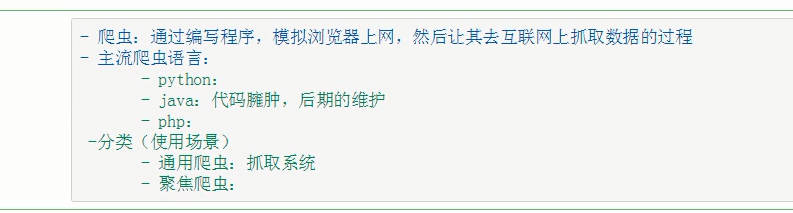
通用与聚焦分别对应全局获取与局部获取,
robots.txt协议,http://www.baidu.com/s?ie=UTF-8&wd=robots
简单的查看反爬协议:http://baidu.com/robots.txt
不遵从robots.txt协议就破解了这个反爬机制,
反爬机制与反反爬策略,
//
fiddler的配置
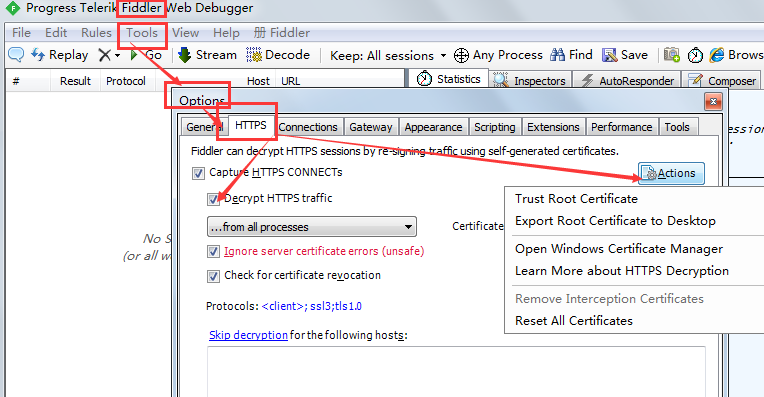
点击Export Root Certificate to Desktop还可以把证书导出来,
//
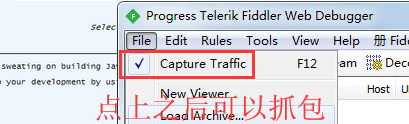
有对勾才可以抓包,
//
import requests
url='https://www.sogou.com/'

response=requests.get(url=url)
# page_text=response.text    #拿到字符串类型,
page_text=response.content   #拿到bytes类型
# print(page_text)

# with open('./sougou.html','w',encoding='utf-8')as f:
#     f.write(page_text)

# with open('./sougou1.html','wb')as f:
#     f.write(page_text)

response.url #:获取请求方式
response.headers['Content-Type']  #获取请求头,是一个字典,
response.status_code  #:获取状态码
指定此条的爬取
import requests #引入模块

url='https://www.sogou.com/web'  #提供要查询的url

#伪装请求头,伪装成浏览器
headers={
    'User-Agent':'Mozilla/5.0 (Windows NT 6.1; WOW64) AppleWebKit/537.36 (KHTML, like Gecko) Chrome/63.0.3239.132 Safari/537.36'
}

#写入要查询的此条
param={
    'query':'爬虫'
}

response=requests.get(url=url,headers=headers,params=param)
page_text=response.content

with open('./citiao.html','wb')as f:
    f.write(page_text)
对于fiddler与谷歌浏览器不能配合使用的问题,可网上找答案.
//
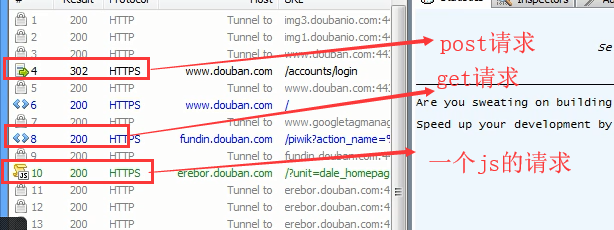
查看抓包对于的内容,

fiddle抓包:
    1.有一个绿色箭头的是post的请求;
    2.有一组<>的是get请求;
/
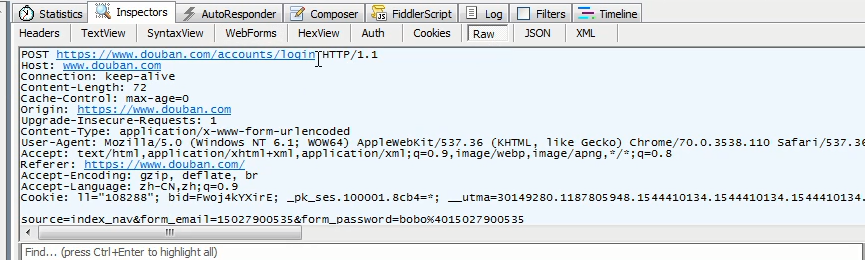
/
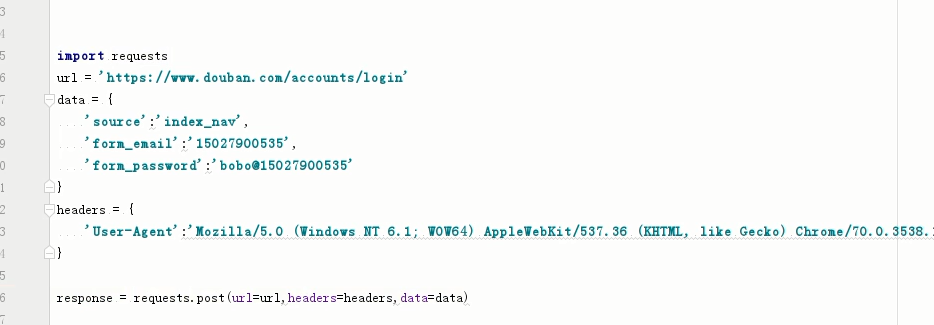
登录豆瓣:
/
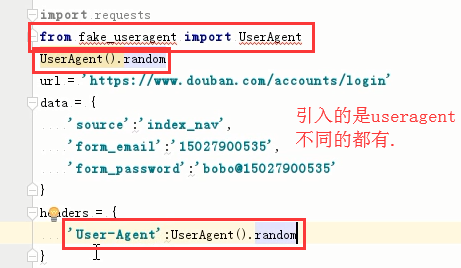
/

/
使用代理ip

/
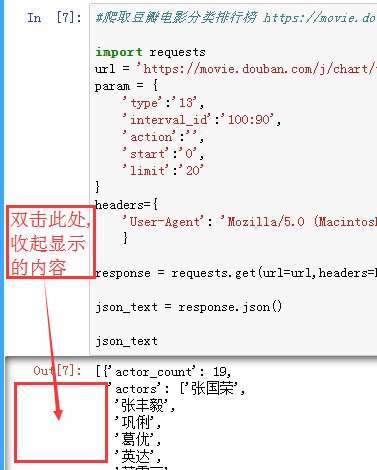
基于requests模块ajax的get请求
-
需求:爬取豆瓣电影分类排行榜 https://movie.douban.com/中的电影详情数据
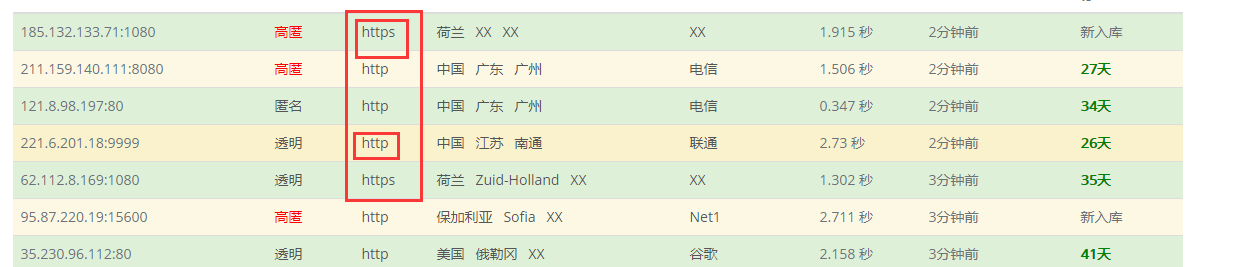
代理 IP,网址:http://www.goubanjia.com/
根据协议类型,选择代理IP
//
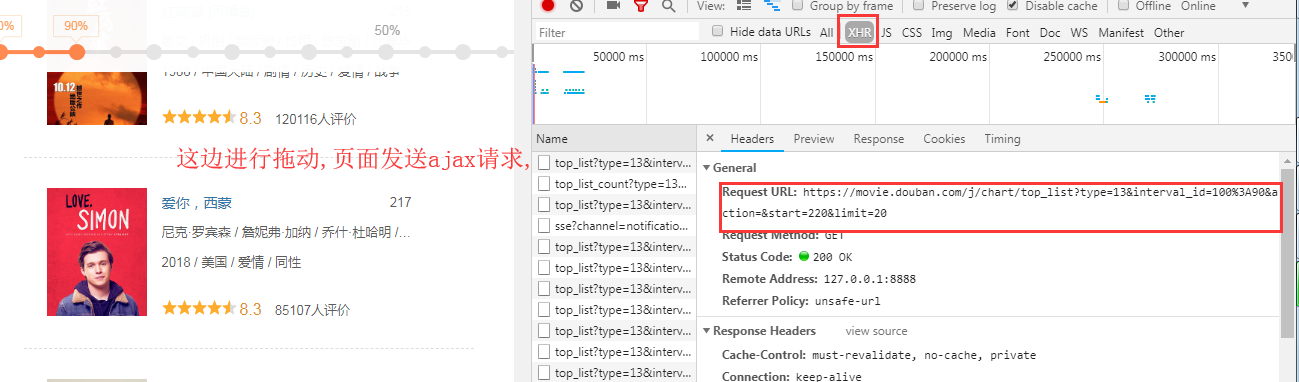
//还需要看响应头的信息,content_type

/

import requests

url='https://movie.douban.com/j/chart/top_list'

headers={
    'User-Agent':'Mozilla/5.0 (Windows NT 6.1; WOW64) AppleWebKit/537.36 (KHTML, like Gecko) Chrome/63.0.3239.132 Safari/537.36'
}

param={
    'type':'13', #type就是对应的电影的类型
    'interval_id':'100:90',
    'action':'',
    'start':'0',
    'limit':'20',
}

response=requests.get(url=url,headers=headers,params=param)

json_text=response.json()

json_text  #: 注意此处写的是json_text,而不用print()
#print(type(json_text)) #是一个列表
get请求对应的是:param
post请求对应的是:data
基于requests模块ajax的post请求
-
需求:爬取肯德基餐厅查询http://www.kfc.com.cn/kfccda/index.aspx中指定地点的餐厅数据
注意当请求方式改变时,记得对应改,
import requests

url='http://www.kfc.com.cn/kfccda/ashx/GetStoreList.ashx?op=keyword'

headers={
    'User-Agent':'Mozilla/5.0 (Windows NT 6.1; WOW64) AppleWebKit/537.36 (KHTML, like Gecko) Chrome/63.0.3239.132 Safari/537.36'
}

data={
    'cname':'',
    'pid':'',
    'keyword':'上海',
    'pageIndex':'1',
    'pageSize':'10'
}

response=requests.post(url=url,headers=headers,data=data)

json_text=response.json()

print(json_text)
爬取药品监督管理局信息

示例代码
import requests

start_page=int(input('start:'))  #:开始页面
end_page=int(input('end:'))     #:结束页面

url='http://125.35.6.84:81/xk/itownet/portalAction.do?method=getXkzsList'

headers={
    'User-Agent':'Mozilla/5.0 (Windows NT 6.1; WOW64) AppleWebKit/537.36 (KHTML, like Gecko) Chrome/63.0.3239.132 Safari/537.36'
}

for page in range(start_page,end_page):
    data={
        'on': 'true',
        'page': str(page),#: 是用来确定开始页面的
        'pageSize': '15',
        'productName':'',
        'conditionType': '1',
        'applyname':'',
        'applysn':''
    }

    response=requests.post(url=url,headers=headers,data=data) #返回的是json数据
    json_text=response.json()
    for dic in json_text['list']:
        #print('dic['ID]') 拿到每个子页面的ID,然后跟统一的url进行拼接

        detail_url='http://125.35.6.84:81/xk/itownet/portalAction.do?method=getXkzsById'
        #:把参数进行拼接,
        detail_id={
            'id':dic['ID']
        }

        detail_response=requests.post(url=detail_url,headers=headers,data=detail_id)

        ret=detail_response.content

        with open('./datail','ab+')as f:
            f.write(ret+b'\n')
//

 浙公网安备 33010602011771号