
Equinox OSGi服务器应用程序的配置步骤

本文介绍在Eclipse里如何配置一个简单的基于Eclipse Equinox OSGi实现的Web应用程序,在它的基础上可以构造更加复杂的应用,本文使用的是Eclipse 3.3.1版本,如果你的Eclipse版本在3.2.0或以上应该都可以。
一、支持静态页面和Servlet
1. 创建一个新的plugin项目, net.bjzhanghao.osgi.test,在向导第一步里选中“This plug-in is target,在下一步的“Plug-in Options”里选中“Generate an activator”。

2. 在例子项目的MANIFEST.MF里添加如下依赖项目,这些项目都是Eclipse自带的:
org.eclipse.equinox.http.jetty
org.eclipse.equinox.http.servlet
org.mortbay.jetty
org.apache.commons.logging
javax.servlet
org.eclipse.equinox.http.registry
3. 在例子项目根目录下创建一个放置web文件的目录,如“web_files”,在这个目录下写一个简单的index.html文件。
4. 为项目建一个plugin.xml文件,内容如下:
<plugin>
  <extension point="org.eclipse.equinox.http.registry.resources">
    <resource
      alias="/web"
      base-name="/web_files"/>
  </extension>
</plugin>
注意,这时若MANIFEST.MF里提示错误,只要在Bundle-SymbolicName这一行后面加上“;singleton:=true”即可解决。
5. 现在可以启动这个应用程序了。在Eclipse菜单里选择“Run->Open Run Dialog...”,在左边的 “OSGi Framework”项下创建一个新的启动配置项,在右边先点“Deselect All”清空所有复选框,然后在Workspace下选中 自己的osgi项目,再点“Add Required Bundles”按钮,Eclipse会自动把所依赖的项目选中。 最后按“Debug”按钮启动,内嵌的jetty和我们的项目会一起被启动。
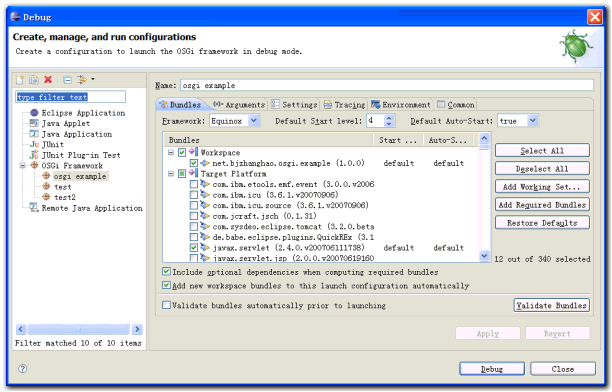
6. 打开浏览器,输入“http://localhost/web/index.html”应该可以看到index.html里的内容。
以上只验证了静态页面,现在来配置一个servlet看看。
7. 在项目里创建一个继承自HttpServlet的类,覆盖doGet()方法,内容是在网页上打印一些文本。
8. 在项目的plugin.xml里添加下面的内容,这些内容指定了servlet的访问路径和实现类:
<extension point="org.eclipse.equinox.http.registry.servlets">
    <servlet
      alias="/exampleServlet"
      class="net.bjzhanghao.osgi.example.servlet.ExampleServlet"/>
</extension>
9. 重新启动项目,在浏览器里输入“http://localhost/exampleServlet”,应该可以看到servlet的输出。
二、支持JSP页面
10. 在index.html所在目录下创建一个简单的jsp文件index.jsp
11. 打开项目的MANIFEST.MF文件,添加如下项目依赖:
org.eclipse.equinox.jsp.jasper,
org.apache.jasper,
org.eclipse.equinox.jsp.jasper.registry,
javax.servlet.jsp,
org.apache.commons.el,
org.eclipse.equinox.http.helper,
org.eclipse.osgi,
org.eclipse.osgi.services
其中org.eclipse.equinox.http.helper需要从cvs里下载得到(目前是在/cvsroot/eclipse下的 equinox-incubator目录里,以后可能会直接放到/cvsroot/eclipse下)。
12. 修改Activator,目的是注册一个处理扩展名为.jsp类型的servlet,感觉这一步以后应该有更简单的方法,例如通过扩展点。
public class Activator implements BundleActivator {

    private ServiceTracker httpServiceTracker;

    String jspContext = "/jsps";
    String jspFolder = "/web_files";

    public void start(BundleContext context) throws Exception {
        httpServiceTracker = new HttpServiceTracker(context);
        httpServiceTracker.open();
    }

    public void stop(BundleContext context) throws Exception {
        httpServiceTracker.open();
    }

    private class HttpServiceTracker extends ServiceTracker {

        public HttpServiceTracker(BundleContext context) {
            super(context, HttpService.class.getName(), null);
        }

        public Object addingService(ServiceReference reference) {
            final HttpService httpService = (HttpService) context
                    .getService(reference);
            try {
                HttpContext commonContext = new BundleEntryHttpContext(context
                        .getBundle(), jspFolder);
                httpService.registerResources(jspContext, "/", commonContext);

                Servlet adaptedJspServlet = new ContextPathServletAdaptor(
                        new JspServlet(context.getBundle(), jspFolder),
                        jspContext);
                httpService.registerServlet(jspContext + "/*.jsp",
                        adaptedJspServlet, null, commonContext);
            } catch (Exception e) {
                e.printStackTrace();
            }
            return httpService;
        }

        public void removedService(ServiceReference reference, Object service) {
            final HttpService httpService = (HttpService) service;
            httpService.unregister(jspContext);
            httpService.unregister(jspContext + "/*.jsp");
            super.removedService(reference, service);
        }
    }
}
13. 打开Debug对话框,选中workspace里的例子osgi项目和org.eclipse.equinox.http.helper项目,再按“Add Required Bundles”按钮,然后启动程序。
14. 在浏览器里输入“http://localhost/jsps/index.jsp”,应该可以看到jsp输出。
例子项目源代码下载(链接)。
参考链接:

 浙公网安备 33010602011771号