
无刷新联动大烧烤(XMLHttpRequest,AJAX Library)
关于无刷新联动,目前实现的方法有很多种,可以使用XMLHttpRequest对象来实现,也可以采用Ajax Library,另外也可以使用AjaxControlToolkit里的控件来实现.刚刚这些天在一个项目里使用到了这个功能.下面简单介绍下实现的思路.希望对初学者在学习上有所帮助.
通常联动又分静态联动(数据不变)和动态联动(数据会变动),比如省市区县这里固定数据就是很少变动的。又比如一个公司里,下面分得有不同的部分,各部门下又可能有不能的小组......这样的关系,各个小组都有可能随时都会变动的,撤消也可能会增加小组等。下面我就一动态联动简单介绍下。
准备工作:
● 建立数据库
 Code
Code ● 初始化数据
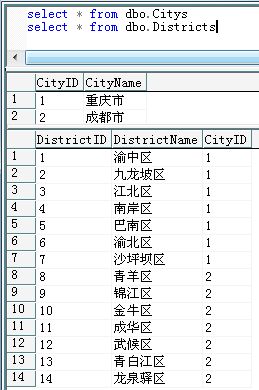
● 建立相关类和WebService
City
 DistrictAjaxPattern.WebService
一、使用XMLHttpRequest实现
建立两个aspx文件,AjaxClient.asp,AjaxServer.aspx,下面是两个文件的CS代码定义:
 public partial class AjaxClient : System.Web.UI.Page
2
 {
{3
 protected void Page_Load(object sender, EventArgs e)
4
 {
{5
if (!IsPostBack)6
{7
this.ddlCitys.DataSource = new WebService().GetCitys();8
this.ddlCitys.DataTextField = "CityName";9
this.ddlCitys.DataValueField = "CityID";10
this.ddlCitys.DataBind();11
ddlCitys.Items.Insert(0, new ListItem("--请选择--", "0"));12
ddlDistricts.Items.Insert(0, new ListItem("--请选择--", "0"));13
14
this.ddlCitys.Attributes.Add("onchange", "getDistrictByCityID(this.value);");15
this.ddlDistricts.Attributes.Add("onchange", "displayResults();");16
 }
}17
}18
 }
}在AjaxClient.aspx里放置了两个下拉列表控件,一个用来显示城市,一个用来显示区。在AjaxClient的服务端我们为城市绑定好数据,这里是通过调用WebService里的GetCitys()得到的一个数组,详细可以看上面的WebService的详细定义代码,这里我们还为这两个控件设置了客户端事件及响应事件的方法。下面我们看看AjaxServer.aspx的定义:
public partial class AjaxServer : System.Web.UI.Page2
{3
protected void Page_Load(object sender, EventArgs e)4
{5
int cityID = 0;6
if (Request["CityID"] != null)7
{8
int.TryParse(Request["CityID"], out cityID);9
}10
GetDistricts(cityID);11
}12
13
private void GetDistricts(int cityID)14
{15
District[] dist = new WebService().GetDistricts(cityID);16
StringBuilder sb = new StringBuilder();17
sb.Append(@"<?xml version=""1.0"" ?>");18
sb.Append(@"<Districts>");19
foreach (District d in dist)20
{21
sb.Append(@"<District id='" + d.DistrictId + "' cityID='" + d.CityID + "'>" + d.DistrictName + "</District>");22
}23
sb.Append(@"</Districts>");24
Response.Clear();25
Response.ContentType = "text/xml";26
Response.Write(sb.ToString());27
Response.End();28
}29
}上面的代码不难理解,在Page_Load里获取AjaxClient.aspx传递过来的CityID这个参数,然后通过这个参数的值调用下面定义的GetDistricts方法,在这方法里通过调用WebService里的方法得到查询数据库得到一个数组对象。然后在把这个数组对象解吸为XML并Response给客户端。客户端的JavaScript定义如下:
<script type="text/javascript">2
////初始化客户端控件引用3
var ddlCitys=document.getElementById("<% = ddlCitys.ClientID %>");4
var ddlDistricts=document.getElementById("<% = ddlDistricts.ClientID %>");5
6
//初始化HttpRequest7
var HttpRequest = false;8
if(window.XMLHttpRequest)9
{10
HttpRequest = new XMLHttpRequest();11
}12
else13
{14
HttpRequest = new ActiveXObject("Microsoft.XMLHTTP");15
}16
17
resetDistrit();18
19
function getDistrictByCityID(cityID)20
{21
if(!HttpRequest) return;22
if(cityID<0) return;23
24
var uri="AjaxServer.aspx?CityID="+cityID; 25
HttpRequest.open("GET",uri);26
HttpRequest.onreadystatechange=function()27
{28
if (HttpRequest.readyState == 4 && HttpRequest.status == 200)29
{30
var xml=HttpRequest.responseXML;31
var disctricts=xml.getElementsByTagName("District");32
ddlDistricts.options.length=0;33
34
for(i=0;i<disctricts.length;i++)35
{36
var value=disctricts[i].firstChild.nodeValue;37
var id=disctricts[i].attributes[0].value;38
ddlDistricts.options[i]=new Option(value,id);39
}40
}41
ddlDistricts.disabled=false;42
}43
HttpRequest.send(null);44
}45
46
function displayResults()47
{48
var result="";49
var citys=document.getElementsByName(ddlCitys);50
var district=document.getElementsByName(ddlDistricts);51
if(ddlDistricts.selectedIndex>0)52
{53
result += ddlCitys.options[ddlCitys.selectedIndex].text +" ";54
result += ddlDistricts.options[ddlDistricts.selectedIndex].text; 55
}56
document.getElementById("Results").innerHTML=result;57
}58
59
function resetDistrit()60
{61
ddlDistricts.options.length=0;62
ddlDistricts.disabled=true;63
}64
</script> 来分析下上面的JavaScript的定义,getDistrictByCityID方法就是通过CityID做为参数向AjaxServer.aspx发起请求,然后返回一个XML对象,然后通过getDistrictByCityID方法的回调函数来处理返回的XML,解析后把值绑定到ddlDistrict这个下拉列表控件上,这样使用XMLHttpRequest就实现了异步发起请求并处理回调的方式实现了无刷新联动。运行如下:
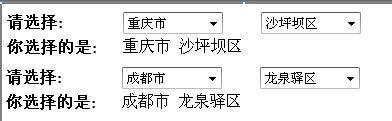
二、使用AJAX Library实现
这里我简单介绍下使用AJAX Library的实现,通过ScritrpManager访问WebService的方法调用方法得到一个数组对象,在客户端通过JavaScript解析数组实现,先看看WebService里的方法定义:
[WebMethod]2
public District[] GetDistricts(int cityID)3
{4
List<District> list = new List<District>();5
DataTable dt = DataAccess.GetDistricts(cityID);6
foreach (DataRow row in dt.Rows)7
{8
list.Add(new District(9
int.Parse(row["DistrictID"].ToString()),10
row["DistrictName"].ToString(),11
int.Parse(row["CityID"].ToString())));12
}13
return list.ToArray();14
}此方法返回一个数组到客户端,客户端通过回调函数来处理这个数组并把数据绑定到下拉列表控件上。这里同上一样先初始化一个下拉列表控件的数据:
public partial class AjajLibrary : System.Web.UI.Page2
{3
protected void Page_Load(object sender, EventArgs e)4
{5
if (!IsPostBack)6
{7
this.ddlCitys.DataSource = new WebService().GetCitys();8
this.ddlCitys.DataTextField = "CityName";9
this.ddlCitys.DataValueField = "CityID";10
this.ddlCitys.DataBind();11
12
ddlCitys.Items.Insert(0, new ListItem("--请选择--", "0"));13
this.ddlCitys.Attributes.Add("onchange", "onCityChanged(this.value);");14
this.ddlDistricts.Attributes.Add("onchange", "onDistrictChanged();");15
}16
}17
}引入Webservice:
<asp:ScriptManager ID="ScriptManager1" runat="server">2
<Services>3
<asp:ServiceReference Path="WebService.asmx" InlineScript="true" />4
</Services>5
</asp:ScriptManager><script type="text/javascript">2
//初始化控件引用3
var ddlCitys = $get("<% = ddlCitys.ClientID %>");4
var ddlDistrict = $get("<% = ddlDistricts.ClientID %>");5
6
var obj="";7
8
function onCityChanged(cityID)9
{10
if(cityID > 0)11
{12
AjaxPattern.WebService.GetDistricts(cityID,onGetDistrictCallBack);13
}14
}15
16
function onDistrictChanged()17
{18
obj += ddlCitys.options[ddlCitys.selectedIndex].text + " ";19
obj += ddlDistricts.options[ddlDistricts.selectedIndex].text;20
21
$get("results").innerHTML = obj;22
}23
24
function onGetDistrictCallBack(dates)25
{ 26
for(var i=0;i<dates.length;i++)27
{28
var value = dates[i].DistrictName; 29
var id=dates[i].DistrictID;30
ddlDistrict.options[0]=new Option(value,id);31
}32
33
}34
</script>三、使用AjaxControlToolkit控件实现
这部分是最简单的,在这里我就不做介绍了。有兴趣的可以查阅相关资料进行了解,官方文档里也有详细Demo.

 浙公网安备 33010602011771号