

cocos2d-x初体验
在cocos2d-x提供的工程样例(HelloWorld)的init函数中添加以下功能:
功能1:实现精灵的动作
图片资源:
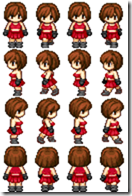 player.png
代码:
        // 得到设备屏幕的大小
	CCSize s = CCDirector::sharedDirector()->getWinSize();

	// 加载精灵图片
	CCTexture2D *texture = CCTextureCache::sharedTextureCache()->addImage("player.png");
	// 创建精灵角色的帧纹理,四个方向
	CCSpriteFrame *frame0 = CCSpriteFrame::frameWithTexture(texture, CCRectMake(32*0, 48*0, 32, 48));
	CCSpriteFrame *frame1 = CCSpriteFrame::frameWithTexture(texture, CCRectMake(32*1, 48*0, 32, 48));
	CCSpriteFrame *frame2 = CCSpriteFrame::frameWithTexture(texture, CCRectMake(32*2, 48*0, 32, 48));
	CCSpriteFrame *frame3 = CCSpriteFrame::frameWithTexture(texture, CCRectMake(32*3, 48*0, 32, 48));

	// 把精灵角色的帧纹理加到动画管理器中
	CCMutableArray<CCSpriteFrame*> *animFrames = new CCMutableArray<CCSpriteFrame*>(4);
	animFrames->addObject(frame0);
	animFrames->addObject(frame1);
	animFrames->addObject(frame2);
	animFrames->addObject(frame3);

	// 创建精灵角色的动作对象,这里设置成0.2秒变帧
	CCAnimation *animation = CCAnimation::animationWithFrames(animFrames, 0.2f);
	// 将管理器中的资源释放掉
	animFrames->release();
	// 创建精灵对象,这里把图片资源的第一行元素当前默认动画效果
	CCSprite *sprite = CCSprite::spriteWithSpriteFrame(frame0);
	// 设置精灵对象在屏幕上的位置,
	sprite->setPosition(ccp(s.width/2, s.height/2));

	// 把精灵对象添加到显示层中
	this->addChild(sprite);

	// 创建动画的实例
	CCAnimate *animate = CCAnimate::actionWithAnimation(animation, false);
	// 让精灵开始动画
	sprite->runAction(CCRepeatForever::actionWithAction(animate));
效果图:
![image_thumb[2]](http://images.cnblogs.com/cnblogs_com/anndaming/201202/201202120037067129.png "image_thumb[2]")
功能2:实现遮罩效果
图片资源:
 light.png
代码(紧跟功能1):
首先实现这么一个函数:
//************************************
// Method:    spriteWithFile
// FullName:  spriteWithFile
// Access:    public
// Returns:   cocos2d::CCSprite *
// Qualifier: 根据文件名得到文件资源
// Parameter: const char * filename
//************************************
cocos2d::CCSprite *spriteWithFile(const char *filename)
{
	cocos2d::CCSprite *pobSprite = new CCSprite();
	if(pobSprite && pobSprite->initWithFile(filename))
	{
		pobSprite->autorelease();	// 把资源的释放权交给引擎
		return pobSprite;			// 这样就得到绑定指定资源的角色对象
	}

	CC_SAFE_DELETE(pobSprite);

	return NULL;
}
在init函数中追加:
	// 为光圈创建一个实例
	CCSprite *sprite1 = CCSprite::spriteWithFile("light.png");
	// 设置光圈的位置
	sprite1->setPosition(ccp(100, 100));
	// 把光圈添加到显示层中
	this->addChild(sprite1, 2);
	// 设置光圈的动画
	sprite1->runAction(CCRepeatForever::actionWithAction(
		// 将光圈的动画设置成序列化,采用双补间动画方式
		(CCActionInterval *)CCSequence::actions(CCMoveBy::actionWithDuration(3.0f, ccp(300, 0)),
		CCMoveBy::actionWithDuration(0.1f, ccp(-300,0)), NULL)));
	// 创建遮罩对象
	darknessLayer = CCRenderTexture::renderTextureWithWidthAndHeight(s.width, s.height);
	// 设备遮罩的位置
	darknessLayer->setPosition(ccp(s.width/2, s.height/2));
	// 将遮罩效果加到显示层中
	this->addChild(darknessLayer, 20);
	// 定义遮罩效果的色彩
	darknessLayer->clear(0,0,0,0.5f);
最后在HelloWorld中复写draw方法如下:
void HelloWorld::draw()
{
	// 恢复遮罩效果的色彩
	darknessLayer->clear(0,0,0,0.5f);

	cocos2d::CCLayer::draw();
}
效果图:
![image_thumb[4]](http://images.cnblogs.com/cnblogs_com/anndaming/201202/201202120037084786.png "image_thumb[4]")


 浙公网安备 33010602011771号