
一步一步学Silverlight 2系列(24):与浏览器交互相关辅助方法
 Silverlight 2 Beta 1版本发布了,无论从Runtime还是Tools都给我们带来了很多的惊喜,如支持框架语言Visual Basic, Visual C#, IronRuby, Ironpython,对JSON、Web Service、WCF以及Sockets的支持等一系列新的特性。《一步一步学Silverlight 2系列》文章将从Silverlight 2基础知识、数据与通信、自定义控件、动画、图形图像等几个方面带您快速进入Silverlight 2开发。本文是Silverlight 2与浏览器交互的最后一篇,将介绍相关的辅助类方法。
概述
Silverlight 2 Beta 1版本发布了,无论从Runtime还是Tools都给我们带来了很多的惊喜,如支持框架语言Visual Basic, Visual C#, IronRuby, Ironpython,对JSON、Web Service、WCF以及Sockets的支持等一系列新的特性。《一步一步学Silverlight 2系列》文章将从Silverlight 2基础知识、数据与通信、自定义控件、动画、图形图像等几个方面带您快速进入Silverlight 2开发。
本文是Silverlight 2与浏览器交互的最后一篇,将介绍相关的辅助类方法。
获取浏览器信息
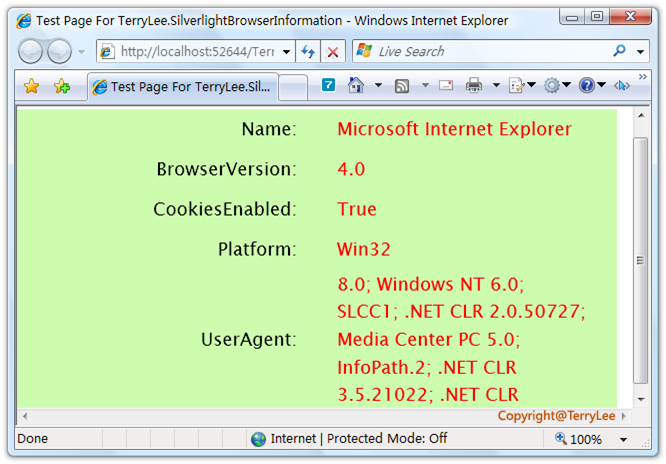
在Silverlight 2中提供了获取浏览器信息的一个类BrowserInformation,可供我们直接调用,如获取浏览器名称及浏览器版本,是否禁用Cookies等信息。做一个简单的示例,定义XAML如下:
<Grid x:Name="LayoutRoot" Background="#CDFCAE">
    <Grid.RowDefinitions>
        <RowDefinition Height="40"></RowDefinition>
        <RowDefinition Height="40"></RowDefinition>
        <RowDefinition Height="40"></RowDefinition>
        <RowDefinition Height="40"></RowDefinition>
        <RowDefinition Height="140"></RowDefinition>
    </Grid.RowDefinitions>
    <Grid.ColumnDefinitions>
        <ColumnDefinition Width="300"></ColumnDefinition>
        <ColumnDefinition Width="300"></ColumnDefinition>
    </Grid.ColumnDefinitions>

    <TextBlock Text="Name:" Style="{StaticResource title}"
               Grid.Row="0" Grid.Column="0"></TextBlock>
    <TextBlock x:Name="Name" Style="{StaticResource content}"
               Grid.Row="0" Grid.Column="1"></TextBlock>

    <TextBlock Text="BrowserVersion:" Style="{StaticResource title}"
               Grid.Row="1" Grid.Column="0"></TextBlock>
    <TextBlock x:Name="BrowserVersion" Style="{StaticResource content}"
               Grid.Row="1" Grid.Column="1"></TextBlock>

    <TextBlock Text="CookiesEnabled:" Style="{StaticResource title}"
               Grid.Row="2" Grid.Column="0"></TextBlock>
    <TextBlock x:Name="CookiesEnabled" Style="{StaticResource content}"
               Grid.Row="2" Grid.Column="1"></TextBlock>

    <TextBlock Text="Platform:" Style="{StaticResource title}"
               Grid.Row="3" Grid.Column="0"></TextBlock>
    <TextBlock x:Name="Platform" Style="{StaticResource content}"
               Grid.Row="3" Grid.Column="1"></TextBlock>

    <TextBlock Text="UserAgent:" Style="{StaticResource title}"
               Grid.Row="4" Grid.Column="0"></TextBlock>
    <TextBlock x:Name="UserAgent" Style="{StaticResource content}"
               Grid.Row="4" Grid.Column="1" TextWrapping="Wrap"></TextBlock>
</Grid>
private void UserControl_Loaded(object sender, RoutedEventArgs e)
{
    BrowserInformation browser = HtmlPage.BrowserInformation;

    Name.Text = browser.Name;
    BrowserVersion.Text = browser.BrowserVersion.ToString();
    CookiesEnabled.Text = browser.CookiesEnabled.ToString();
    Platform.Text = browser.Platform;
    UserAgent.Text = browser.UserAgent;
}
运行之后,如下图所示:
HttpUtility方法
类似于WebForm开发中一样,在Silverlight 2中同样提供了一一些HttpUtility方法,共有四个HtmlEncode、HtmlDecode、UrlEncode、UrlDecode,看一个简单的例子:
<Grid x:Name="LayoutRoot" Background="#CDFCAE">
    <Grid.RowDefinitions>
        <RowDefinition Height="75"></RowDefinition>
        <RowDefinition Height="75"></RowDefinition>
        <RowDefinition Height="75"></RowDefinition>
        <RowDefinition Height="75"></RowDefinition>
    </Grid.RowDefinitions>
    <Grid.ColumnDefinitions>
        <ColumnDefinition Width="400"></ColumnDefinition>
        <ColumnDefinition Width="200"></ColumnDefinition>
    </Grid.ColumnDefinitions>

    <TextBox x:Name="txtHtmlEncode" Grid.Row="0" Grid.Column="0"
             Width="300" Height="40"></TextBox>
    <Button x:Name="btnHtmlEncode" Grid.Row="0" Grid.Column="1"
            Background="Red" Width="120" Height="40" Content="HtmlEncode"
            Click="btnHtmlEncode_Click"></Button>

    <TextBox x:Name="txtHtmlDecode" Grid.Row="1" Grid.Column="0"
             Width="300" Height="40"></TextBox>
    <Button x:Name="btnHtmlDecode" Grid.Row="1" Grid.Column="1"
            Background="Red" Width="120" Height="40" Content="HtmlDecode"
            Click="btnHtmlDecode_Click"></Button>

    <TextBox x:Name="txtUrlEncode" Grid.Row="2" Grid.Column="0"
             Width="300" Height="40"></TextBox>
    <Button x:Name="btnUrlEncode" Grid.Row="2" Grid.Column="1"
            Background="Red" Width="120" Height="40" Content="UrlEncode"
            Click="btnUrlEncode_Click"></Button>

    <TextBox x:Name="txtUrlDecode" Grid.Row="3" Grid.Column="0"
             Width="300" Height="40"></TextBox>
    <Button x:Name="btnUrlDecode" Grid.Row="3" Grid.Column="1"
            Background="Red" Width="120" Height="40" Content="UrlDecode"
            Click="btnUrlDecode_Click"></Button>
</Grid>
编写按钮处理事件:
private void btnHtmlEncode_Click(object sender, RoutedEventArgs e)
{
    this.txtHtmlDecode.Text = HttpUtility.HtmlEncode(this.txtHtmlEncode.Text);
}

private void btnHtmlDecode_Click(object sender, RoutedEventArgs e)
{
    this.txtHtmlEncode.Text = HttpUtility.HtmlDecode(this.txtUrlDecode.Text);
}

private void btnUrlEncode_Click(object sender, RoutedEventArgs e)
{
    this.txtUrlDecode.Text = HttpUtility.UrlEncode(this.txtUrlEncode.Text);
}

private void btnUrlDecode_Click(object sender, RoutedEventArgs e)
{
    this.txtUrlEncode.Text = HttpUtility.UrlDecode(this.txtUrlDecode.Text);
}
运行后测试如下:

结束语
本文简单介绍了Silverlight 2与浏览器交互的相关辅助类方法。
支持TerryLee的创业产品Worktile
Worktile,新一代简单好用、体验极致的团队协同、项目管理工具,让你和你的团队随时随地一起工作。完全免费,现在就去了解一下吧。
https://worktile.com
Worktile,新一代简单好用、体验极致的团队协同、项目管理工具,让你和你的团队随时随地一起工作。完全免费,现在就去了解一下吧。
https://worktile.com

 浙公网安备 33010602011771号