
一步一步学Silverlight 2系列(15):数据与通信之ASMX
 Silverlight 2 Beta 1版本发布了,无论从Runtime还是Tools都给我们带来了很多的惊喜,如支持框架语言Visual Basic, Visual C#, IronRuby, Ironpython,对JSON、Web Service、WCF以及Sockets的支持等一系列新的特性。《一步一步学Silverlight 2系列》文章将从Silverlight 2基础知识、数据与通信、自定义控件、动画、图形图像等几个方面带您快速进入Silverlight 2开发。本文将简单介绍在Silverlight 2中如何与ASMX进行通信。
概述
Silverlight 2 Beta 1版本发布了,无论从Runtime还是Tools都给我们带来了很多的惊喜,如支持框架语言Visual Basic, Visual C#, IronRuby, Ironpython,对JSON、Web Service、WCF以及Sockets的支持等一系列新的特性。《一步一步学Silverlight 2系列》文章将从Silverlight 2基础知识、数据与通信、自定义控件、动画、图形图像等几个方面带您快速进入Silverlight 2开发。
本文将简单介绍在Silverlight 2中如何与ASMX进行通信。
简单示例
本文的示例非常简单,其过程也跟我们在一步一步学Silverlight 2系列(14):数据与通信之WCF中差不多,我们仍然显示一个最新随笔的列表,最终完成后效果如下所示:

定义一个业务实体Post。
public class Post
{
    public int Id { get; set; }

    public string Title { get; set; }

    public string Author { get; set; }
}
在Web项目中添加一个Web Service文件,命名为BlogService.asmx
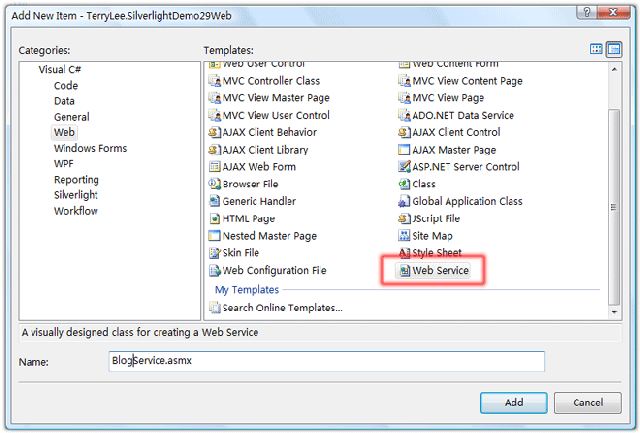
实现该服务,定义一个GetPosts方法:
public class BlogService : WebService
{
    [WebMethod]
    public Post[] GetPosts()
    {
        List<Post> posts = new List<Post>()
        {
            new Post{ Id=1, Title="一步一步学Silverlight 2系列(13):数据与通信之WebRequest", Author="TerryLee" },
            new Post{ Id=2, Title="一步一步学Silverlight 2系列(12):数据与通信之WebClient", Author="TerryLee" },
            new Post{ Id=3, Title="一步一步学Silverlight 2系列(11):数据绑定", Author="TerryLee" },
            new Post{ Id=4, Title="一步一步学Silverlight 2系列(10):使用用户控件", Author="TerryLee" },
            new Post{ Id=5, Title="一步一步学Silverlight 2系列(9):使用控件模板", Author="TerryLee" },
            new Post{ Id=6, Title="一步一步学Silverlight 2系列(8):使用样式封装控件观感", Author="TerryLee" }
        };

        return posts.ToArray();
    }
}
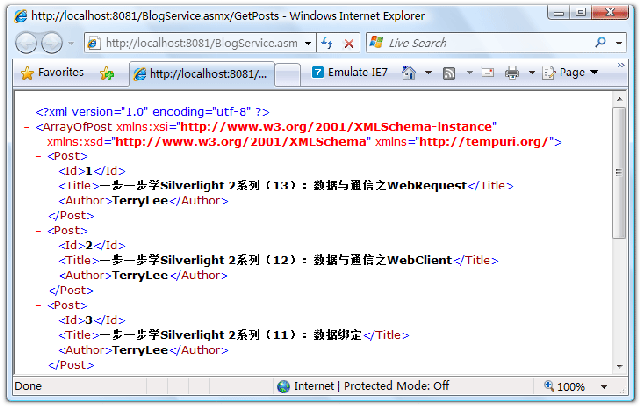
同样设置Web Development Server的端口号为一个固定值,这里设为8081,然后在浏览器中测试服务是否正确:

点击调用后测试服务正确
在Silverlight项目中,添加对服务引用,

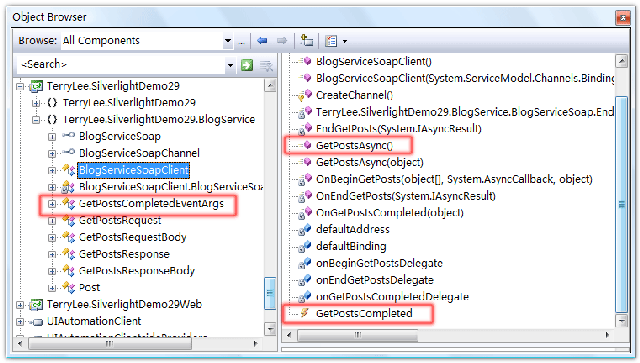
使用对象浏览器查看一下生成客户端代理类中的对象:
编写展示界面,XAML如下,与上一篇中的示例一样:
<Grid Background="#46461F">
    <Grid.RowDefinitions>
        <RowDefinition Height="40"></RowDefinition>
        <RowDefinition Height="*"></RowDefinition>
    </Grid.RowDefinitions>
    <Grid.ColumnDefinitions>
        <ColumnDefinition></ColumnDefinition>
    </Grid.ColumnDefinitions>
    <Border Grid.Row="0" Grid.Column="0" CornerRadius="15"
        Width="240" Height="36" Background="Orange"
        Margin="20 0 0 0" HorizontalAlignment="Left">
        <TextBlock Text="最新随笔" Foreground="White"
               HorizontalAlignment="Left" VerticalAlignment="Center"
               Margin="20 0 0 0"></TextBlock>
    </Border>
    <ListBox x:Name="Posts" Grid.Row="1" Margin="40 10 10 10">
        <ListBox.ItemTemplate>
            <DataTemplate>
                <StackPanel Orientation="Horizontal">
                    <TextBlock Text="{Binding Id}" Height="40" Foreground="Red"></TextBlock>
                    <TextBlock Text="{Binding Title}" Height="40"></TextBlock>
                    <TextBlock Text="{Binding Author}" Height="40" Foreground="Orange"></TextBlock>
                </StackPanel>
            </DataTemplate>
        </ListBox.ItemTemplate>
    </ListBox>
</Grid>
实现调用ASMX,并进行数据的绑定。仍然采用异步模式,所使用的方法如上图中红色框中的部分。过程与WCF通信差不多,只不过不再需要指定Bingding等信息:
public partial class Page : UserControl
{
    public Page()
    {
        InitializeComponent();
    }

    private void UserControl_Loaded(object sender, RoutedEventArgs e)
    {
        BlogServiceSoapClient client = new BlogServiceSoapClient();
        client.GetPostsCompleted += new EventHandler<GetPostsCompletedEventArgs>(client_GetPostsCompleted);
        client.GetPostsAsync();
    }

    void client_GetPostsCompleted(object sender, GetPostsCompletedEventArgs e)
    {
        if (e.Error == null)
        {
            Posts.ItemsSource = e.Result;
        }
    }
}
一个完整的Silverlight 2中调用ASMX的示例就完成了,运行后效果如下:
结束语
本文简单介绍了在Silverlight 2中如何调用ASMX,你可以从这里下载示例代码。
Worktile,新一代简单好用、体验极致的团队协同、项目管理工具,让你和你的团队随时随地一起工作。完全免费,现在就去了解一下吧。
https://worktile.com

 浙公网安备 33010602011771号