概述
Silverlight 2 Beta 1版本发布了,无论从Runtime还是Tools都给我们带来了很多的惊喜,如支持框架语言Visual Basic, Visual C#, IronRuby, Ironpython,对JSON、Web Service、WCF以及Sockets的支持等一系列新的特性。《一步一步学Silverlight 2系列》文章带您快速进入Silverlight 2开发。
本文将简单介绍在Silverlight 2中如何使用WebRequest进行数据的提交和获取。
简单示例
在本文中,我们仍然使用在一步一步学Silverlight 2系列(12):数据与通信之WebClient中用过的示例,只不过稍微做一点小的改动,使用WebRequest提交书籍编号数据,并根据书籍号返回价格信息。最终运行的结果如下图:
编写界面布局,XAML如下:
<Grid Background="#46461F">
<Grid.RowDefinitions>
<RowDefinition Height="40"></RowDefinition>
<RowDefinition Height="*"></RowDefinition>
<RowDefinition Height="40"></RowDefinition>
</Grid.RowDefinitions>
<Grid.ColumnDefinitions>
<ColumnDefinition></ColumnDefinition>
</Grid.ColumnDefinitions>
<Border Grid.Row="0" Grid.Column="0" CornerRadius="15"
Width="240" Height="36"
Margin="20 0 0 0" HorizontalAlignment="Left">
<TextBlock Text="书籍列表" Foreground="White"
HorizontalAlignment="Left" VerticalAlignment="Center"
Margin="20 0 0 0"></TextBlock>
</Border>
<ListBox x:Name="Books" Grid.Row="1" Margin="40 10 10 10"
SelectionChanged="Books_SelectionChanged">
<ListBox.ItemTemplate>
<DataTemplate>
<StackPanel>
<TextBlock Text="{Binding Name}" Height="32"></TextBlock>
</StackPanel>
</DataTemplate>
</ListBox.ItemTemplate>
</ListBox>
<Border Grid.Row="2" Grid.Column="0" CornerRadius="15"
Width="240" Height="36" Background="Orange"
Margin="20 0 0 0" HorizontalAlignment="Left">
<TextBlock x:Name="lblPrice" Text="价格:" Foreground="White"
HorizontalAlignment="Left" VerticalAlignment="Center"
Margin="20 0 0 0"></TextBlock>
</Border>
</Grid>编写HttpHandler,注意我使用了context.Request.Form["No"],在后面我们将使用WebRequest在RequestReady方法中将数据写入请求流:
public class BookHandler : IHttpHandler
{
public static readonly string[] PriceList = new string[] {
"66.00",
"78.30",
"56.50",
"28.80",
"77.00"
};
public void ProcessRequest(HttpContext context)
{
context.Response.ContentType = "text/plain";
context.Response.Write(PriceList[Int32.Parse(context.Request.Form["No"])]);
}
public bool IsReusable
{
get
{
return false;
}
}
}
在界面加载时绑定书籍列表,关于数据绑定可以参考一步一步学Silverlight 2系列(11):数据绑定。
private void UserControl_Loaded(object sender, RoutedEventArgs e)
{
List<Book> books = new List<Book>() {
new Book("Professional ASP.NET 3.5"),
new Book("ASP.NET AJAX In Action"),
new Book("Silverlight In Action"),
new Book("ASP.NET 3.5 Unleashed"),
new Book("Introducing Microsoft ASP.NET AJAX")
};
Books.ItemsSource = books;
}
接下来在SelectionChanged事件中实现用户选择书籍时,我们使用WebRequest提交书籍编号,并且获得价格数据,仍然采用异步模式,提供RequestReady和ResponseReady两个回调函数:
private string bookNo;
void Books_SelectionChanged(object sender, SelectionChangedEventArgs e)
{
bookNo = Books.SelectedIndex.ToString();
Uri endpoint = new Uri("http://localhost:49955/BookHandler.ashx");
WebRequest request = WebRequest.Create(endpoint);
request.Method = "POST";
request.ContentType = "application/x-www-form-urlencoded";
request.BeginGetRequestStream(new AsyncCallback(RequestReady), request);
request.BeginGetResponse(new AsyncCallback(ResponseReady), request);
}
实现RequestReady方法,将书籍的编号写入请求流中。
void RequestReady(IAsyncResult asyncResult)
{
WebRequest request = asyncResult.AsyncState as WebRequest;
Stream requestStream = request.EndGetRequestStream(asyncResult);
using (StreamWriter writer = new StreamWriter(requestStream))
{
writer.Write(String.Format("No={0}", bookNo));
writer.Flush();
}
}
实现ResponseReady方法,显示返回的结果。
void ResponseReady(IAsyncResult asyncResult)
{
WebRequest request = asyncResult.AsyncState as WebRequest;
WebResponse response = request.EndGetResponse(asyncResult);
using (Stream responseStream = response.GetResponseStream())
{
StreamReader reader = new StreamReader(responseStream);
lblPrice.Text = "价格:" + reader.ReadToEnd();
}
}
最后运行的结果如下:
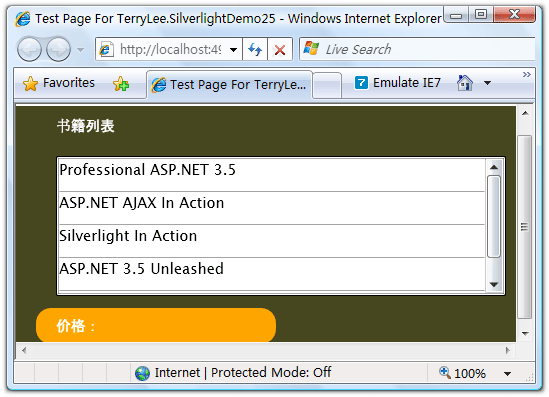
用户选择一本书籍后,将显示其价格:
结束语
本文简单介绍了在Silverlight 2中如何使用WebRequest提交和获取数据,你可以从这里下载示例程序。
下一篇:一步一步学Silverlight 2系列(14):数据与通信之WCF
posted @ 2008-03-09 17:12
TerryLee 阅读(20589)
评论(97) 编辑 收藏
发表评论
@Q.Lee.lulu
一会儿就发第14篇,很快就完:)
System.Security.SecurityException”类型的异常在 System.Windows.dll 中发生,但未在用户代码中进行处理
其他信息: Security error.
这个是什么问题,能否解决?
thanks
测试webrequest的时候就是出现这个错。
调试你的代码也是出现这个错。
不知道什么原因?
request.BeginGetResponse(new AsyncCallback(ResponseReady), request);
就是这个代码出错!
@高
我不太清楚是哪儿的问题,上面的代码我测试过,没有问题
我测试的时候也报Server Error.一样的错误.
为什么我找不到[System]System.Net.WebRequest类?
--引用--------------------------------------------------
John Rambo: 为什么我找不到[System]System.Net.WebRequest类?
--------------------------------------------------------
手工加一遍System.Net就可以了,不知是什么原因!!
beta2在Stream requestStream = request.EndGetRequestStream(asyncResult);会报错。其会直接执行HttpHandler里的方法,但是参数根本就没写进去。
--引用--------------------------------------------------
飄lá┽蕩去: beta2在Stream requestStream = request.EndGetRequestStream(asyncResult);会报错。其会直接执行HttpHandler里的方法,但是参数根本就没写进去。
--------------------------------------------------------
我跟踪调试以后也遇到相同问题,但不知道是不是因为beta2的问题。
@Fisker Shao
在Beta 2中是有变化!
--引用--------------------------------------------------
TerryLee: @Fisker Shao
在Beta 2中是有变化!
--------------------------------------------------------
我也是遇到了这个问题,那在beta2中这个问题有没有解决方法呢?
写的很好,很容易看明白!例子简单,比较全面!
希望楼主能加入点自己的理解,这样我们可以更深入的理解SL.
@JanIvan
呵呵,过奖
可惜由于版本的升级,这里的文章有些会出错
更深入的分析在后面我会写一些文章:)
@chenyang22
不知道你用的是哪个版本的?
这里的源代码是基于Silverlight 2 Beta 1的,另外由于源代码太大,删除了引用的程序集,请先看清楚报什么错误,再说好不好!
这样写稍微有点问题:
WebRequest request = WebRequest.Create(endpoint);
request.Method = "POST";
request.ContentType = "application/x-www-form-urlencoded";
request.BeginGetRequestStream(new AsyncCallback(RequestReady), request);
request.BeginGetResponse(new AsyncCallback(ResponseReady), request);
BeginGetResponse 不能注册这么早,我把它放在
void RequestReady(IAsyncResult asyncResult)
这个函数的末尾。
否则,如果你是在上传文件,会发现服务器端打开的文件流长度总为 0, 一打开就关闭了。
Stream requestStream = request.EndGetRequestStream(asyncResult);
这个执行后 request 已经结束了,但实际要 post 的内容还没来得及发送,就执行到了获取 response 的环节。
按照25楼的修改
执行到
lblPrice.Text = "价格:" + reader.ReadToEnd();
报错:
Invalid cross-thread access
我用的是silverlight 2 beta 2版本
不知是怎么回事
我用的是silverlight 2 beta 2中文版本,没有报错,也没有提示,但是没实现功能,选择书籍时却没有出现对应的价格
@Lunardfsf
无非两个问题:
1.跨线程更新UI
2.跨域调用
根据这两点重新检查一下,看有没有这两个问题存在。
很高兴看到您写的关于silverlight的文章。我现在用B2开发。有关WebRequest请求都不能用
Uri location = new Uri("http://www.cookies.test.cn/peopleData.xml"" target="_new" rel="nofollow">http://www.cookies.test.cn/peopleData.xml", UriKind.RelativeOrAbsolute);
WebRequest request = WebRequest.Create(location);
request.ContentType = "application/x-www-form-urlencoded";
request.BeginGetResponse(new AsyncCallback(this.OpenStreamCompleted), request);
}
void OpenStreamCompleted(IAsyncResult ar)
{
WebRequest request = ar.AsyncState as WebRequest;
WebResponse response = request.EndGetResponse(ar);
Stream responseStream = response.GetResponseStream();
using (StreamReader streamreader = new StreamReader(responseStream))
{
XDocument document = XDocument.Load(streamreader);
// Output the content of the document here.
var foundPeople = document.Descendants("person")
.Where(p => Convert.ToInt32(p.Element("age").Value) > 20)
.Select(p => new
{
Name = p.Element("firstname").Value + " "
+ p.Element("lastname").Value,
Age = Convert.ToInt32(p.Element("age").Value),
Phone = p.Elements("phone").Select(ph => ph.Value).ToArray(),
}
);
foreach (var person in foundPeople)
{
HtmlPage.Window.Alert(person.Phone[0].ToString());
}
}
}
http://www.cookies.test.cn/peopleData.xml 这地址是可以访问的,peopleData.xml权限也没问题可是报用户代码未处理 System.Net.ProtocolViolationException
错误。麻烦您指点一下。谢谢
@xiaoguiyan
可能是跨域调用的问题,你需要在www.cookies.test.cn下有一个域访问策略文件。
--引用--------------------------------------------------
木野狐(Neil Chen): 这样写稍微有点问题:
WebRequest request = WebRequest.Create(endpoint);
request.Method = "POST";
request.ContentType = "application/x-www-form-urlencoded";
request.BeginGetRequestStream(new AsyncCallback(RequestReady), request);
request.BeginGetResponse(new AsyncCallback(ResponseReady), request);
BeginGetResponse 不能注册这么早,我把它放在
void RequestReady(IAsyncResult asyncResult)
这个函数的末尾。
否则,如果你是在上传文件,会发现服务器端打开的文件流长度总为 0, 一打开就关闭了。
--------------------------------------------------------
没看懂是怎么改的。
为什么,
context.Response.Write(PriceList[Int32.Parse(context.Request.Form["No"])]);
此context.Request.Form["No"]获取不到数据。
context.Request.Form.Count =0
LZ,这个例子确实有问题,我按照25楼的说法去改了,代码是执行到了,但还是报错
“1.跨域调用,2.跨线程更新UI”
楼主总结的很不错,
--引用--------------------------------------------------
Fisker Shao: --引用--------------------------------------------------
<br>飄l&#225;┽蕩去: beta2在Stream requestStream = request.EndGetRequestStream(asyncResult);会报错。其会直接执行HttpHandler里的方法,但是参数根本就没写进去。
<br>
<br>--------------------------------------------------------
<br>
<br>我跟踪调试以后也遇到相同问题,但不知道是不是因为beta2的问题。
<br>
--------------------------------------------------------
--引用--------------------------------------------------
TerryLee: @Fisker Shao
<br>在Beta 2中是有变化!
--------------------------------------------------------
这几天在学SL..学到这里也遇到这个问题了。。
想了一下午也没有解决, 李老师可以不可以讲下原理
为什么在Beta 2下面会出现这个问题
难道真的没有解决办法吗???
期待中....
@calm
解决办法是安装RTW,呵呵,我想不明白为什么有了RTW还要用Beta 2呢?
李老师:
再请教个问题,今天在老外的文章上面看到这样一个用法,
以前没见过,代码如下:
Dispatcher.BeginInvoke(() => lbValue.Text = "hhhhhh")
这里的()=> 是什么用法??和lambda表达式有点像,但又不知道到底是不是,
还望李老师指点指点..
期待中...
终于弄明白了
Dispatcher.BeginInvoke(() => lbValue.Text = "ggggg");
这里的()=>就是一个lambda表达式 代表有0个输入参数
而() => lbValue.Text = "ggggg"产生的就是一个Action委托实例
Action委拖具有0个输入参数和0个返回值
lambda表达式只有在有1个参数的时候括号才能省略,当具有0个或多个输入参数时括号不能省略..:)
RTW版,在调用 HttpWebRequest.BeginGetResponse() 之前,Request 流必须关闭.
还有就是设计到跨域的问题,同步一个线程之后再给lblPrice.Text赋值即可
@shixiongyan
我发现按照木野狐的方法,把BeginGetResponse放到BeginGetRequest的函数最后(另外参照木野狐的方法解决了跨域),代码能够正常运行.
另外怎么查看Silverlight的版本?
代码如下,调试通过
void Books_SelectionChanged(object sender, SelectionChangedEventArgs e)
{
bookNo = Books.SelectedIndex.ToString();
Uri endpoint = new Uri("http://localhost:49955/BookHandler.ashx");
WebRequest request = WebRequest.Create(endpoint);
request.Method = "POST";
request.ContentType = "application/x-www-form-urlencoded";
request.BeginGetRequestStream(new AsyncCallback(RequestReady), request);
// request.BeginGetResponse(new AsyncCallback(ResponseReady), request);
}
void RequestReady(IAsyncResult asyncResult)
{
WebRequest request = asyncResult.AsyncState as WebRequest;
Stream requestStream = request.EndGetRequestStream(asyncResult);
using (StreamWriter writer = new StreamWriter(requestStream))
{
writer.Write(String.Format("No={0}", bookNo));
writer.Flush();
}
request.BeginGetResponse(new AsyncCallback(ResponseReady), request);
}
void ResponseReady(IAsyncResult asyncResult)
{
WebRequest request = asyncResult.AsyncState as WebRequest;
WebResponse response = request.EndGetResponse(asyncResult);
using (Stream responseStream = response.GetResponseStream())
{
StreamReader reader = new StreamReader(responseStream);
// lblPrice.Text = "价格:" + reader.ReadToEnd();
lblPrice.Dispatcher.BeginInvoke(new UpdatePriceDelegate(UpdatePrice),reader.ReadToEnd());
}
}
private void UpdatePrice(string price)
{
lblPrice.Text = "price:" + price;
}
private delegate void UpdatePriceDelegate(string price);
照楼上那样改了,怎么还是context.Request.QueryString["No"]=null啊,郁闷
TerryLee哥
ListBox不支持鼠标滚轮的吗?
会军大哥...如果我把图书价格换成中文的后,然后发布成网站再浏览的话回调显示的中文是乱码~~~~~~~~~~~~~~~~~~~~
context.Response.Write(PriceList[Int32.Parse(context.Request.Form["No"].ToString())]);
我这里显示,找不到
@kideve
--引用--------------------------------------------------
kideve: context.Response.Write(PriceList[Int32.Parse(context.Request.Form["No"].ToString())]);
我这里显示,找不到
--------------------------------------------------------
public void ProcessRequest(HttpContext context)
{
context.Response.ContentType = "text/plain";
context.Response.Write(PriceList[Int32.Parse(context.Request.Form["No"])]);
}
找不到啥?
--引用--------------------------------------------------
TerryLee: @Z-Suker
设置一下编码应该就可以了。
--------------------------------------------------------
请问改怎么设啊?就是在Response.ContentType = "text/plain";吧?
那改怎么设置才能让中文显示不乱码呢?
@Z-Suker
应该是context.Response.Encoding属性吧,记不太清楚了。
同样遇到context.Request.QueryString["No"]=null的问题
按照48楼的代码修改,已经调通,价格可以显示,用的B2
我想问一下李老大,
在异步更新UI可以这样使用
Dispatcher.BeginInvoke(() => lblPrice.Text ="55.5");
那我如果想获取lblPrice.Text的值到一个变量应该如何做了。
我这样写好像不起作用呀。
string strPrice = "";
Dispatcher.BeginInvoke(() => strPrice = lblPrice.Text );
@byjboyking
能够起作用的。但是因为是异步调用,所以要在调用返回之后才能 check 到这个改变后的值。
遇到了“Unhandled Error in Silverlight 2 Application 跨线程访问无效”问题,RTW版,请教怎么解决啊?
刚开始学习中 使用的是silverlight 2 版
遇同样错误
经不断尝试
发现 问题原因
request.BeginGetRequestStream(new AsyncCallback(ResquestReady), request);
request.BeginGetResponse(new AsyncCallback(ResponseReady), request);
同进进行注册 则 silverlight 源未将数据发送至 IHttpHandler 就已经开始接收 注册的两个不同线程对同一IHttpHandler 请求 互相打架
其实只需要注册
request.BeginGetResponse(new AsyncCallback(ResponseReady), request);
事件
在 write.Write(string.Format("obj={0}", da.Text));
写完数据流后 直接在 后面继写接收请求的代码 确保请求与响应在同一线程内操作
然后页面UI更新时用 (页面更新的ui ID).Dispatcher.BeginInvoke(() =>{//代码段.....}) 来创建新的异步调用 从而保证将在数据完全返回时执行的代码
初学者 多线程还没有学过对线程的纯属个人理解 如有名词或者概念说错的,还请多多包涵 指证
不过代码执行方式没有问题
遇到context.Request.QueryString["No"]=null的问题
还是要这样写才行:
Uri endpoint = new Uri(String.Format("http://localhost:49955/BookHandler.ashx?No={0}",lstBook.SelectedIndex));
这样就出正确的值, 不知为何写成 writer.Write(String.Format("No={0}", bookNo)); 总是出第0行的值
--引用--------------------------------------------------
bluedream: 遇到context.Request.QueryString["No"]=null的问题
还是要这样写才行:
Uri endpoint = new Uri(String.Format("<a href="http://localhost:49955/BookHandler.ashx?No=" target="_new" rel="nofollow">http://localhost:49955/BookHandler.ashx?No=</a>{0}",lstBook.SelectedIndex));
这样就出正确的值, 不知为何写成 writer.Write(String.Format("No={0}", bookNo)); 总是出第0行的值
--------------------------------------------------------
同问:遇到context.Request.QueryString["No"]=null的问题
版本silverlight 2.0
不知道怎么解决?请教李大哥
您好,Book.cs这个文件对应的Book类有没有办法提取出来,放在一个ClassLibrary项目中,然后Silverlight程序应用ClassLibrary下的Book类。
我试过了,好像是不行的,请问有没有其他办法?
我下载了示例程序,啥都没改,运行时提示BookHandler.ashx.cs中的
context.Request.Form["No"]为空,请问是什么原因?
@desperado
该示例程序是在Beta 1的环境下写的,可能是运行时出错了,建议你在RTW下重新实现一遍。
@sapphireren
不可以,因为Silverlight和.NET是两个不同的CLR。
2.0beta2版本的小卒子
多谢TERRY的德文章让我继续前进。
48楼和64楼的评论在beta2中通过谢谢两位
------- @木野狐(Neil Chen)
我用的silverlight3,在做Terry大哥的事例,出现2个问题。一个是cross-thread,另外一个是关于异步调用的时间先后问题。
按照 @木野狐(Neil Chen)的说法,我把代码坐了适当的调整,可以跑了。
原先我用ThreadPool.RegisterWaitForSingleObject(...),发现不太支持里面.
代码改动 :
1. 将 request.BeginGetResponse(new AsyncCallback(ResponseReady), request);移到RequestReady函数的尾部 -- 解决异步调用问题;
2.在ResponseReady函数中,将lblPrice.Text = "价格:" + reader.ReadToEnd();改成
string price = reader.ReadToEnd();
if (this.lblPrice.CheckAccess())
{
this.lblPrice.Text = "价格:" + price;
}
else
{
this.Dispatcher.BeginInvoke(new UIContextChangedEventHandler(UIContextChanged), price);
}
3.新加一个函数和一个代理
public delegate void UIContextChangedEventHandler(object state);
private void UIContextChanged(object state)
{
this.lblPrice.Text = "价格:" + (String)state;
}
李大哥,你好
在webRequest通信中实例我没有调通报错了 网页错误详细信息
用户代理: Mozilla/4.0 (compatible; MSIE 8.0; Windows NT 5.1; Trident/4.0; .NET CLR 2.0.50727; .NET CLR 3.0.4506.2152; .NET CLR 3.5.30729)
时间戳: Sun, 6 Sep 2009 14:29:47 UTC
消息: Silverlight 应用程序中未处理的错误
代码: 4004
类别: ManagedRuntimeError
消息: System.Exception: 远程服务器返回了错误: NotFound。
位于 silverWebRequest.MainPage.ResponseReady(IAsyncResult asyncResult)
位于 System.Net.Browser.BrowserHttpWebRequest.<>c__DisplayClassd.<InvokeGetResponseCallback>b__b(Object state2)
位于 System.Threading._ThreadPoolWaitCallback.WaitCallback_Context(Object state)
位于 System.Threading.ExecutionContext.Run(ExecutionContext executionContext, ContextCallback callback, Object state)
位于 System.Threading._ThreadPoolWaitCallback.PerformWaitCallbackInternal(_ThreadPoolWaitCallback tpWaitCallBack)
位于 System.Threading._ThreadPoolWaitCallback.PerformWaitCallback(Object state)
行: 57
字符: 13
代码: 0
URI: http://localhost:6700/silverWebRequestTestPage.aspx
楼上的这个问题我现在也碰到了,利用HttpWebRequest请求时,经常会报“ 远程服务器返回了错误: NotFound。”,这个错误时有时无,搞不清楚是什么原因引起的。代码应该没问题是标准的HTTP请求的代码,服务器访问的文件也正常。这个问题现在搞的我头都大了,同志们还有谁碰到过?
总是出现context.Request.Form["Num"]==null的异常,经过楼上的整改,还是有问题,确认其他代码无误后,对这句话产生怀疑,
最后改为context.Request.QueryString["Num"]成功得到结果
Uri endpoint = new Uri("http://localhost:2908/BookHandler.ashx?No=" + bookNo);
WebRequest request = WebRequest.Create(endpoint);
在Silverlight 4中,执行到这里时,request有异常:
Credentials 'request.Credentials' threw an exception of type 'System.NotImplementedException' System.Net.ICredentials {System.NotImplementedException}
继续执行下去,在RequestReady方法中
Stream requestStream = request.EndGetRequestStream(asyncResult);抛出异常。
请问李老师这是为什么?也请遇到此问题的高手帮忙解决一下。非常感谢!
-----------------------------
按照48楼修改后,再把PostList_SelectionChanged 方法内的request.BeginGetResponse(new AsyncCallback(ResponseReady), request); 这句删掉。就OK了。
我用silverlight3运行 :出现跨线程无效。。。
我的SL4.0代码
int id;
private void booklist_SelectionChanged(object sender, SelectionChangedEventArgs e)
{
id = this.booklist.SelectedIndex;
Uri endpoint=new Uri(string.Format("http://localhost:10858/showprice.ashx?id={0}",id));
WebRequest request = WebRequest.Create(endpoint);
request.Method = "POST";
request.ContentType = "application/x-www-form-urlencoded";
request.BeginGetRequestStream(new AsyncCallback(RequestReady), request);
}
void RequestReady(IAsyncResult result)
{
WebRequest request = result.AsyncState as WebRequest;
Stream stream = request.EndGetRequestStream(result);
using (StreamWriter sw = new StreamWriter(stream))
{
//这里用这样的方式传过去id始终为0 不知道为何
//sw.Write(string.Format("id={0}", id));
//sw.Flush();
}
request.BeginGetResponse(new AsyncCallback(ResponseReady), request);
}
void ResponseReady(IAsyncResult result)
{
WebRequest request = result.AsyncState as WebRequest;
WebResponse response = request.EndGetResponse(result);
Stream stream = response.GetResponseStream();
using (StreamReader sr = new StreamReader(stream))
{
this.Dispatcher.BeginInvoke(new Setpricevalue(setvalue),sr.ReadToEnd());
}
}
public delegate void Setpricevalue(object price);
public void setvalue(object price)
{
this.pricetb.Text = "价格:" + price;
}
bata 2 依然出现安全性错误 按照以上各楼的方法均改了一遍 还是没调通 郁闷ing
这个报错应该是因为
request.BeginGetResponse(new AsyncCallback(ResponseReady), request);
直接写在
request.BeginGetRequestStream(new AsyncCallback(RequestReady), request);
后面产生的,就像“木野狐”兄说的那样
把request.BeginGetResponse(new AsyncCallback(ResponseReady), request);放到RequestReady最后执行就可以了。
但是这时候又会报另一个错误"Invalid cross-thread access"
这是因为跨线程访问UI的原因,把下面代码
void ResponseReady(IAsyncResult asyncResult)
{
WebRequest request = asyncResult.AsyncState as WebRequest;
WebResponse response = request.EndGetResponse(asyncResult);
using (Stream responseStream = response.GetResponseStream())
{
StreamReader reader = new StreamReader(responseStream);
lblPrice.Text = "价格:" + reader.ReadToEnd();
}
}
改成如下代码即可
private void ResponseReady(IAsyncResult asyncResult)
{
WebRequest request = asyncResult.AsyncState as WebRequest;
WebResponse response = request.EndGetResponse(asyncResult);
using (Stream responseStream = response.GetResponseStream())
{
StreamReader streamReader = new StreamReader(responseStream);
UpdatePrice("价格:" + streamReader.ReadToEnd());
}
}
private void UpdatePrice(string text)
{
if (Dispatcher.CheckAccess())
lblPrice.Text = text;
else
Dispatcher.BeginInvoke(new Action<string>(UpdatePrice), text);
}
一直关注楼主,在这个例子中有个奇怪的问题
//这种WebRequest获取不到No,WebClient可以获取
context.Response.Write(priceList[Convert.ToInt32(context.Request.QueryString["No"])]);
//这种WebClient获取不到No,WebRequest可以获取,两种正好相反
context.Response.Write(priceList[Convert.ToInt32(context.Request.Form["No"])]);
我用的是silverlight4.0 不知道你们遇到过吗?
