
Atlas学习手记(25):使用行为增强用户界面(五):AutoComplete Behavior
前面说过使用服务端的AutoComplete Extender,本文看一下如何使用AutoComplete Behavior来实现自动完成功能。
主要内容
1.AutoComplete Behavior简介
2.完整示例
一.AutoComplete Behavior简介
前面说过使用服务端的AutoComplete Extender,本文看一下如何使用AutoComplete Behavior来实现自动完成功能。AutoComplete Behavior完全使用客户端脚本实现,它的基本定义形式如下:
 <textBox> <behaviors> <autoComplete completionInterval="1000|interval between drop-down updates" completionList="HTML element used for drop-down box" completionSetCount="10|number of values shown in drop-down list" dataContext="source for data binding operations" id="identifier for looking up the component by name" minimumPrefixLength="3|minimum prefix length" propertyChanged="event handler" serviceMethod="name of auto completion Web service method" serviceURL="URL of auto completion Web service" > <bindings> <!-- bindings --> </bindings> <propertyChanged> <!-- actions --> </propertyChanged> </autoComplete> </behaviors></textBox>
其中它的属性解释如下(Dflying Chen):
1.serviceURL:提供自动完成功能的服务器端Web Service的路径。
2.serviceMethod:提供自动完成功能的服务器端的Web Method名称,该Web Method应该有类似的签名:public String[] GetSuggestions(string prefixText, int count)。其中prefixText为客户端传入的当前输入的字符串,count为返回的提示列表中的最大条目数,同时它应该返回一个string数组,表示提示列表。
3.minimumPrefixLength:开始提供自动完成列表的文本框内最少的输入字符数量。默认值为3。如果用户刚刚输入一两个字母,您就迫不及待的提供给他一长串的列表,这既没什么意义,也会极大浪费服务器与网络资源。只有用户输入了等于或超过某个数目(由本属性设定)时,给出的建议才是有价值的,Atlas也才会查询服务器端的相应方法并显示给用户提示列表。
4.completionInterval:每次查询后台的间隔时间,默认值是1000(毫秒)。如果该值太大,则给用户带来程序反应迟钝的印象,如果太小,则加重服务器与网络负担。一般来讲,500-2000是一个比较合理的值。
5.completionList:显示提示列表的DOM元素。如果不指定,Atlas会自动在相关的TextBox下面创建一个DIV来显示。一般情况下我们无须指定这个属性。
6.completionSetCount:提示列表中的最大项目数,默认值为10。
二.完整示例
下面看一个完整的示例,前面的两步跟AutoComplete Extender是一样的,也需要准备相关的数据和编写WebService。
1.准备相关的数据源,这里使用一个本文文件作为我们的数据源,当然你也可以从数据库中读数据,拷贝如下单词为words.txt并保存在App_Data文件夹:
 单词库
单词库2.编写Web Service用来提供单词列表,这里我们并不关心具体的实现逻辑,只关心Web Method接收什么样的参数,最后返回一个string数组即可。
using System;using System.IO;using System.Web;using System.Collections;using System.Collections.Generic;using System.Threading;using System.Web.Services;using System.Web.Services.Protocols;using System.Xml.Serialization; /// <summary>
 /// Summary description for AutoCompleteService
 /// </summary>[WebService(Namespace = "http://tempuri.org/")][WebServiceBinding(ConformsTo = WsiProfiles.BasicProfile1_1)]public class AutoCompleteService : System.Web.Services.WebService {
 public AutoCompleteService () {
 //Uncomment the following line if using designed components //InitializeComponent();
  } private static string[] autoCompleteWordList = null; [WebMethod] public String[] GetWordList(string prefixText, int count) { if (autoCompleteWordList == null) { string[] temp = File.ReadAllLines(Server.MapPath("~/App_Data/words.txt")); Array.Sort(temp, new CaseInsensitiveComparer()); autoCompleteWordList = temp; } int index = Array.BinarySearch(autoCompleteWordList, prefixText, new CaseInsensitiveComparer()); if (index < 0) { index = ~index; } int matchingCount; for (matchingCount = 0; matchingCount < count && index + matchingCount < autoCompleteWordList.Length; matchingCount++) { if (!autoCompleteWordList[index + matchingCount].StartsWith(prefixText, StringComparison.CurrentCultureIgnoreCase)) { break; } } String[] returnValue = new string[matchingCount]; if (matchingCount > 0) { Array.Copy(autoCompleteWordList, index, returnValue, 0, matchingCount); } return returnValue; }}
3.添加相关的HTML控件,这里用两个,我们分别演示默认的方式和自定义Drop-Down的方式:
<div><h3>AutoComplete Behavior Example</h3>默认的方式<br /><input id="textBox1" type="text" style="width: 300px;" /><br /><br />自定义Drop-Down<br /><input id="textBox2" type="text" style="width: 300px;" /></div><div id="list" style="opacity:0.8;filter:alpha(opacity=75); font-size:10pt; font-family:宋体"></div>4.编写Atlas脚本,添加两个AutoComplete Behavior,第一个不需要指定completionList,而第二个指定completionList:
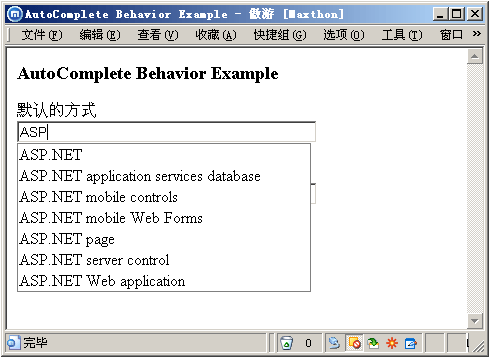
<script type="text/xml-script"> <page xmlns:script="http://schemas.microsoft.com/xml-script/2005"> <components> <textBox id="textBox1"> <behaviors> <autoComplete serviceURL="AutoCompleteService.asmx" serviceMethod="GetWordList" minimumPrefixLength="2" completionSetCount="10" completionInterval="500" /> </behaviors> </textBox> <textBox id="textBox2"> <behaviors> <autoComplete serviceURL="AutoCompleteService.asmx" serviceMethod="GetWordList" minimumPrefixLength="2" completionSetCount="10" completionList="list" completionInterval="500" /> </behaviors> </textBox> </components> </page></script>编译运行后效果如下:
默认方式
自定义Drop-Down

完整示例下载:https://files.cnblogs.com/Terrylee/AutoCompleteBehaviorDemo.rar
Worktile,新一代简单好用、体验极致的团队协同、项目管理工具,让你和你的团队随时随地一起工作。完全免费,现在就去了解一下吧。
https://worktile.com

 浙公网安备 33010602011771号