
木野狐 (Neil Chen)

Google Gears 体验(1):本机数据库

GoogleGears 是一个开源的浏览器扩展,用于创建可离线使用的 web 应用程序,目前尚在 beta 阶段。

其主页地址在:http://code.google.com/apis/gears/
网上论坛:http://groups.google.com/group/google-gears/
Blog: http://gearsblog.blogspot.com/ (好像暂时不能访问了。。。)

GoogleGears 主要包含3个模块:

1. 本地 web 服务器(用于提供 HTML, JavaScript, 图片等的访问请求)
2. 数据库
3. WorkerPool
  通过异步的方式在后台进行资源访问的操作(比如同步本地用户数据到服务器),
  使浏览器程序保持快速响应。

首先,需要安装 GoogleGears:
http://code.google.com/apis/gears/install.html

那么如何在自己的应用程序上线后,检查客户电脑上是否安装了 GoogleGears 呢?
首先必须在页面里面包含这一段 js:
http://code.google.com/apis/gears/tools/gears_init.js
然后,可以通过相关对象来判断并提示用户安装。
示例代码如下:

<script src="gears_init.js"></script>
<script>
  
if (!window.google || !google.gears) {
    location.href 
= "http://gears.google.com/?action=install&message=<your welcome message>" +
                    
"&return=<your website url>";
  }
</script>

我们看到其中提示用户安装的地址允许定制两个自定义信息:

  message: 用户提示信息,不超过150个字。
  return:  安装完毕后返回的地址,也就是我们自己的 web 程序页面。

看一下 gears_init.js 会发现,对 Windows 而言,实际上 GoogleGears 在客户端安装了一个 ActiveX 对象:

factory = new ActiveXObject('Gears.Factory');

GoogleGears 的所有功能调用都是通过操纵该对象来完成的。


下面来学习几个例子。

1. 数据库 Demo
http://code.google.com/apis/gears/samples/hello_world_database.html

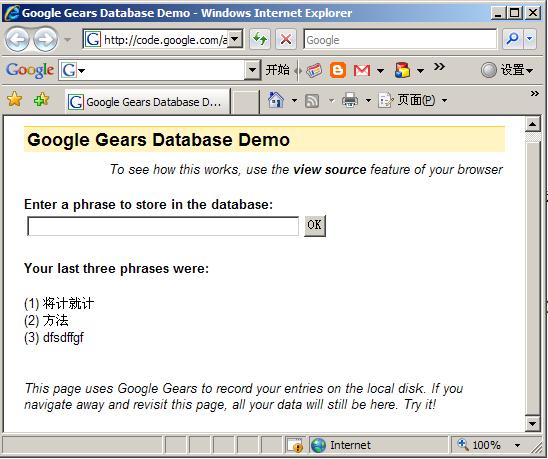
这个例子允许用户输入一些信息,并显示出最近输入的3条。在用户下次访问时仍然存在。
其界面如下:
gears1.JPG

首先在 HTML 页面里面包含如下代码,用于 gears 的安装探测,这个是每个页面必须的:

<script type="text/javascript"  src="gears_init.js"></script>

下面执行一些初始化工作,并打开数据库:

// 数据库连接对象
var db;
init();

// 打开本页面对应的本地数据库.
function init() {
  
if (!window.google || !google.gears) {
    
return;
  }
  
try {
    db 
= google.gears.factory.create('beta.database', '1.0');
  } 
catch (ex) {
    setError('Could not create database: ' 
+ ex.message);
  }
  
if (db) {
    db.open('database
-demo'); // 打开数据库
    // 创建表的语法
    db.execute('create table if not exists Demo' +
               ' (Phrase varchar(
255), Timestamp int)');

    
// 
  }
  
// 
}

获取最新的3条记录,并删除其他老的记录的实现代码:

var recentPhrases = ['', '', ''];
try {
 
// 这里返回的实际上是一个记录集的游标(cursor),和 ASP 的经典写法很类似。
 var rs = db.execute('select * from Demo order by Timestamp desc');
 
var index = 0;
 
while (rs.isValidRow()) {
  
if (index < 3) {
   recentPhrases[index] 
= rs.field(0);
  } 
else {
   
// 这里可以看到 Tempstamp(时间戳)被当作主键使用了。
   db.execute('delete from Demo where Timestamp=?', [rs.field(1)]);
  }
  
++index;
  rs.next();
 }
 rs.close();
catch (e) {
 
throw new Error(e.message);
}

用户输入数据提交时,用如下逻辑实现插入数据的功能:

function handleSubmit() {
  
if (!google.gears.factory || !db) {
    
return;
  }

  
var elm = document.getElementById('submitValue');
  
var phrase = elm.value;
  
// 注意 getTime() 方法返回的是日期对象相当于某个基准时间的毫秒数,是一个大整数
  var currTime = new Date().getTime();

  
// 插入新记录
  // Gears 数据库能自动转义/反转义插入的值。
  // (The Gears database automatically escapes/unescapes inserted values.)
  db.execute('insert into Demo values (??)', [phrase, currTime]);

  
// Update the UI.
  elm.value = '';
  displayRecentPhrases();
}

关闭浏览器后,重新打开看这个页面,果然数据还在。可以将 Google 的这个 demo 页面代码复制到本地,
打开 html 离线执行,其功能是一样的。

 

posted on 2007-06-08 12:50 木野狐(Neil Chen) 阅读(4464) 评论(18)  编辑 收藏 网摘 所属分类: 网页技术

评论

#1楼 2007-06-08 13:16 volnet(可以叫我大V)      

恩,不错   回复  引用  查看    

#2楼[楼主] 2007-06-08 13:27 木野狐      

@volnet(可以叫我大V)
看到你的 Blog 也在介绍相关内容,希望多交流。
  回复  引用  查看    

#3楼 2007-06-08 19:52 yao

"可离线使用的 web 应用程序"

怎么象apllo啊.

  回复  引用    

#4楼 2007-06-08 19:53 yao

apollo
  回复  引用    

#5楼 2007-06-08 20:12 Cat Chen      

有中文注释的代码,不错不错。   回复  引用  查看    

#6楼[楼主] 2007-06-08 22:43 木野狐      

@yao
呵呵,看你的 blog 对 Flash 很有研究。可惜我不懂 Flash, 估计 Apollo 对我来说挺难入手的了 :(

@Cat Chen
谢谢 :)
  回复  引用  查看    

#7楼 2007-06-09 08:38 Wisdom-zh      

感觉封装的挺好的啊   回复  引用  查看    

#8楼 2007-06-09 08:56 布尔      

为什么在线的database和下载到本地的页面的数据不一致呢?考虑一下什么场景下用这样的服务呢?   回复  引用  查看    

#9楼[楼主] 2007-06-09 09:39 木野狐      

@布尔
比如做 POS 系统,需要有一定的脱机可用性,并且某个柜台终端产生的销售数据之类,定期和服务器做数据同步。
  回复  引用  查看    

#10楼 2007-06-09 13:45 Rover      

微软提出智能客户端,可现今还是web程序居多,google的这个东西刚好给web程序本地离线运行的的功能,的确不错http://code.google.com/apis/gears/resources/figure_5.jpg" width=642 border=0>
  回复  引用  查看    

#11楼 2007-06-10 00:27 Cat Chen      

Blog: http://gearsblog.blogspot.com/" target="_new">http://gearsblog.blogspot.com/ (好像暂时不能访问了。。。)
--
blogspot在大陆被封掉是众所周知的了,旗下的所有blogger都无法访问,不过想访问的人应该都知道怎样绕过GFW了吧,那就够了。

其实blogspot下面的技术blogger还是不少的,这样一封真的很麻烦,最近“事端”又多,封杀网站的数量不断上升,查阅资料时真麻烦。
  回复  引用  查看    

#12楼[楼主] 2007-06-10 10:30 木野狐      

@Cat Chen
原来是这样,我说怎么这个 blog 访问不正常。之前自己还注册过一个呢。
  回复  引用  查看    

#13楼 2007-07-09 21:35 蛙蛙池塘      

太好了,太好了   回复  引用  查看    

#14楼 2007-11-14 09:11 zhoucloud[未注册用户]

那个本地数据库文件保存在什么位置呢?
我曾经全盘查询过,也没有找到。
SQLite是单个文件为一个数据库存储的,我没有发现那个文件。
  回复  引用    

#15楼[楼主] 2007-11-14 11:56 木野狐(Neil Chen)      

to zhoucloud:
参看下列文档片断:
(在 http://code.google.com/apis/gears/api_database.html#directories
另外,这里也提到 Google gears 对 SqlLite 是做了一点修改的。

Location of Database File

Database files that your application creates are stored on the user's computer in a location that is determined by the browser being used and the platform.

Windows Vista - Internet Explorer

Location: {FOLDERID_LocalAppDataLow}\Google\Google Gears for Internet Explorer
Example: C:\Users\Bob\AppData\LocalLow\Google\Google Gears for Internet Explorer

Windows Vista - Firefox - Database files are stored in the user profile directory.

Location: C:\Users\<username>\AppData\Local\Mozilla\Firefox\Profiles\{profile}.default\Google Gears for Firefox
Example: C:\Users\Bob\AppData\Local\Mozilla\Firefox\Profiles\uelib44s.default\Google Gears for Firefox

Windows XP - Internet Explorer - Database files are stored in the user profile directory.

Location: C:\Documents and Settings\<username>\Local Settings\Application Data\Google\Google Gears for Internet Explorer
Example: C:\Documents and Settings\Bob\Local Settings\Application Data\Google\Google Gears for Internet Explorer

Windows XP - Firefox - Database files are stored in the user profile directory.

Location: C:\Documents and Settings\<username>\Local Settings\Application Data\Mozilla\Firefox\Profiles\{profile}\Google Gears for Firefox
Example: C:\Documents and Settings\Bob\Local Settings\Application Data\Mozilla\Firefox\Profiles\uelib44s.default\Google Gears for Firefox

Mac OS/X - Firefox - Database files are stored in the user profile directory.

Location: Users/<username>/Library/Caches/Firefox/Profiles/{profile}.default/Google Gears for Firefox
Example: Users/Bob/Library/Caches/Firefox/Profiles/08ywpi3q.default/Google Gears for Firefox

Linux - Firefox - Database files are stored in the user home directory.

Location: ~bob/.mozilla/firefox/<firefox's profile id>/Google Gears for Firefox
Example: ~bob/.mozilla/firefox/08ywpi3q.default/Google Gears for Firefox


Local Modifications to SQLite

This section describes modifications that Google Gears makes to SQLite.
Attached databases

The SQLite ATTACH and DETACH commands can be used to open an arbitrary SQLite database on the user's disk. For this reason, these commands have been disabled in Google Gears. In the future this functionality may be exposed in a way which respects the same-origin security policy.
PRAGMA settings

The SQLite PRAGMA command allows setting and inspection of various platform settings, including certain settings which could potentially be used to compromise security. At this time, Google Gears disables PRAGMA, though it is possible that specific PRAGMA uses may be re-enabled or exposed in the Database interface.

The default PRAGMA settings for Google Gears which differ from the SQLite defaults:

* PRAGMA encoding = 'UTF-8';
This controls the encoding used to store textual data on disk. UTF-16 encoding on disk is almost never a win on desktop machines, it is generally faster to read the smaller amount of UTF-8 data and decode it on the fly.
* PRAGMA auto_vacuum = 1;
Over time database files can become filled with gaps where data has been deleted. These gaps can be recovered with the VACUUM command, but VACUUM can lock the database for extended periods of time, making it a challenge to integrate into interactive applications. auto_vacuum mode recovers these gaps incrementally as they are generated.
* PRAGMA page_size = 4096;
Desktop operating systems mostly have default virtual memory and disk block sizes of 4k and higher.
* PRAGMA cache_size = 2048;
Provides 8M of page cache.
* PRAGMA synchronous = NORMAL;
Synchronous controls whether data is synchronized to disk before COMMIT commands return (commands not in transactions are implicitly wrapped in one). Setting synchronous to OFF can provide a significant performance boost, at the expense of potential data corruption. Much of the benefit of turning synchronous off can generally be achieved by using a combination of large transactions and WorkerPool.
  回复  引用  查看    

#16楼 2007-11-14 17:31 超级无敌大熊猫      

多谢楼主,我找到了
C:\Documents and Settings\Administrator\Local Settings\Application Data\Google\Google Gears for Internet Explorer\code.google.com\http_80
BTW:我的系统是windows 2003的
  回复  引用  查看    

#17楼 2007-11-20 04:20 zipli[未注册用户]

不知道是Gears对IE的支持不好还是微软故意为难,我用Firefox浏览的话Google的这个例子在线离线都可以正常使用,但用IE7浏览的话如果断线就不能再离线浏览了,我在网上刨了几个例子都这个问题.   回复  引用    

#18楼[楼主] 2007-11-20 21:58 木野狐(Neil Chen)      

@zipli
我是用 IE 实验的啊,没有问题。
看看是否你机器环境有问题。
  回复  引用  查看    


发表评论

昵称: [登录] [注册]

主页:

邮箱:(仅博主可见)

评论内容:

  登录  注册

[使用Ctrl+Enter键快速提交评论]

0 776421


相关文章:

相关链接: