

ASP.NET DEMO 8: 为 GridView/DataGrid 整行添加服务器事件
2007-07-15 00:37 晓风残月 阅读(3699) 评论(2) 收藏 举报需求说明
GridView/DataGrid 本身均支持行选择事件(通过设置Button/LinkButton.CommandName="Selected",并在 SelectedIndexChanged 事件中处理)。
然而,有时候我们希望用户点击 GridView/DataGrid 一行中任意位置都可以实现触发一个事件,并在服务端对此行进行相应处理,现在我们就实现此功能。
实现方式
这里我们采取的方法有点 "hack" :
通过客户端 javascript 引发行中隐藏的按钮(Button/LinkButton 均可以)的 click 事件。
主要代码
 <asp:GridView ID="GridView1" runat="server" AutoGenerateColumns="false" OnRowCommand="GridView1_RowCommand" OnRowDataBound="GridView1_RowDataBound"> <Columns> <asp:TemplateField HeaderText="ProductName" > <ItemTemplate>
 <%# Eval("ProductName") %>
 <asp:Button ID="btnHiddenPostButton" CommandName="HiddenPostButtonCommand" runat="server" Text="HiddenPostButton" style="display:none" /> </ItemTemplate> </asp:TemplateField> <asp:BoundField DataField="UnitPrice" HeaderText="UnitPrice" /> </Columns> </asp:GridView>
protected void GridView1_RowDataBound(object sender, GridViewRowEventArgs e) { Button btnHiddenPostButton = e.Row.FindControl("btnHiddenPostButton") as Button;
 if (btnHiddenPostButton != null) {
 e.Row.Attributes["onclick"] = String.Format("javascript:document.getElementById('{0}').click()", btnHiddenPostButton.ClientID); // 额外样式定义 e.Row.Attributes["onmouseover"] = "javascript:this.style.background='red'"; e.Row.Attributes["onmouseout"] = "javascript:this.style.background=''"; e.Row.Attributes["style"] = "cursor:pointer"; e.Row.Attributes["title"] = "单击选择当前行";
 } // 若希望将隐藏按钮单独放于一列,则设置此列隐藏,占位符 <cellIndex> 表示此列索引 //e.Row.Cells[<cellIndex>].Attributes["style"] = "display:none";
 } protected void GridView1_RowCommand(object sender, GridViewCommandEventArgs e) { int rowIndex = -1; GridViewRow row = null; switch (e.CommandName) { case "HiddenPostButtonCommand": // 模板列 Control cmdControl = e.CommandSource as Control; // 表示触发事件的 IButtonControl,保持统一性并便于后续操作,我们这里直接转化为控件基类 Control row = cmdControl.NamingContainer as GridViewRow; // 当前行 // 如何访问单元格值 // string txt = row.Cells[0].Text; // 如何获取模板列中的 Label // string lbl = row.FindControl("MyLabelID") as Label; // 执行更多的自定义操作 //
  // Response.Write(String.Format("GridView Version 当前第 {0} 行:", row.RowIndex + 1)); break; // case "Command2": // more cases // } }
测试效果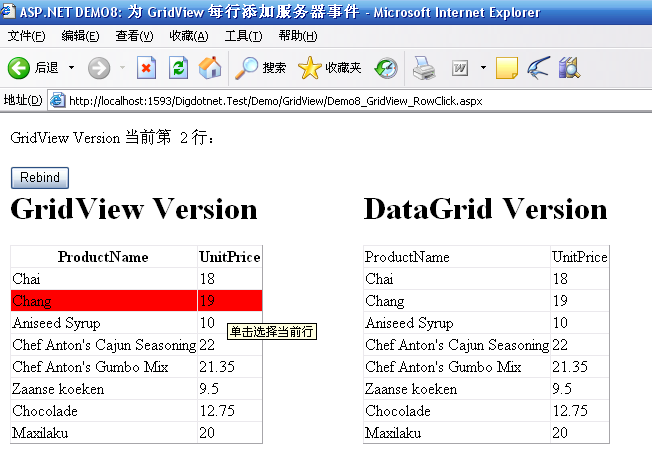
源码下载

 浙公网安备 33010602011771号