


(二)RI主程序分析
本篇源码下载:MyRI_0.zip
继上篇介绍完RI的架构,我们来Step by Step实现这个系统。读者将跟随我在5个课程中完成它。
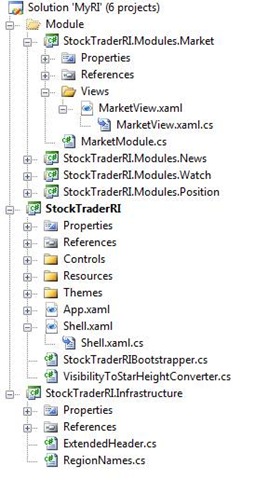
本篇只是搭建一个壳,包括主应用程序Shell,公共类库Infrastructure,以及4个暂时没有任何功能的Module,最终的效果是,通过Shell加载并运行这4个Module。
本章貌似没有什么难度。首先按部就班在主应用程序中添加Shell和StockTraderRIBootstrapper,注意GetModuleCatalog方法中Module的加载顺序:
MarketModule -> PositionModule -> WatchModule -> NewsModule
我们对Mudule功能的扩充也是按照这个顺序。
接下来,添加这4个模块。统一使用如下格式的依赖注入(以MarketModule为例):
public class MarketModule : IModule
{
    private readonly IRegionViewRegistry regionViewRegistry;

    public MarketModule(IRegionViewRegistry registry)
    {
        this.regionViewRegistry = registry;
    }

    #region IModule Members

    public void Initialize()
    {
        regionViewRegistry.RegisterViewWithRegion("MarketRegion", typeof(Views.MarketView));
    }

    #endregion
}
相应地创建View,暂时什么逻辑都不用加。
同时,在主程序的Shell.xaml中,定义了4个Region,参考下图:
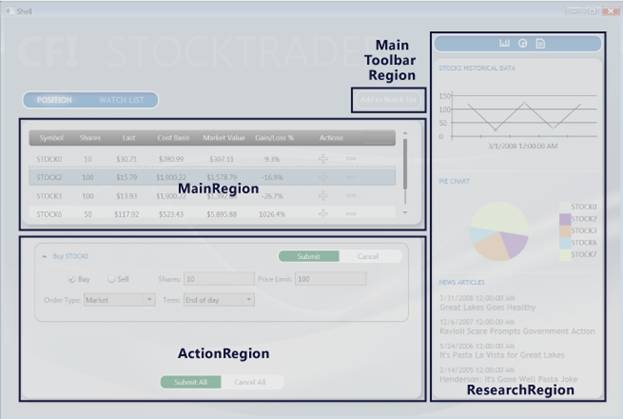
这些Region定义在公共类库Infrastructure的RegionNames枚举中,我们之前有提到过:
public static class RegionNames
{
    public const string MainToolBarRegion = "MainToolBarRegion";
    public const string MainRegion = "MainRegion";
    public const string OrdersRegion = "OrdersRegion";
    public const string SecondaryRegion = "SecondaryRegion";
    public const string ActionRegion = "ActionRegion";
    public const string ResearchRegion = "ResearchRegion";
}
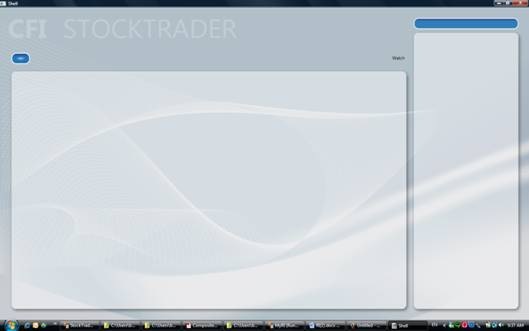
第一阶段效果图如下,对,啥都没有:
是不是感觉不过瘾?于是我们在Shell中也使用了MVP模式,做法如下:
1)创建IShellView,对外暴露ShowView方法,并使Shell这个View实现这个接口:
public interface IShellView
{
    void ShowView();
}
public partial class Shell : Window, IShellView { public Shell() { InitializeComponent(); } #region IShellView Members public void ShowView() { this.Show(); } #endregion }
2)创建ShellPresenter
public class ShellPresenter
{
    public ShellPresenter(IShellView view)
    {
        View = view;

    }

    public IShellView View { get; private set; }
}
3)重写StockTraderRIBootstrapper的ConfigureContainer方法,注册IShellView和Shell之间的映射关系:
protected override void ConfigureContainer()
{
    Container.RegisterType<IShellView, Shell>();

    base.ConfigureContainer();
}
4)改写StockTraderRIBootstrapper方法的CreateShell方法:
protected override DependencyObject CreateShell()
{
    ShellPresenter presenter = Container.Resolve<ShellPresenter>();
    IShellView view = presenter.View;

    view.ShowView();

    return view as DependencyObject;
}
我们发现,这里使用的是Presenter-first的方式——即先创建Presenter,再创建View。以上四个步骤,是创建一个MVP模式的标准流程(本例没有Model,充其量也就算VP模式)。在接下来的章节,我们将看到View-first、VM等诸多变体。
在主程序中,原本还有实现ILoggerFacade以记录Log,也就是EnterpriseLibraryLoggerAdapter这个类,目前暂时用不到,我们会在稍后部分看到它的玩法。

 浙公网安备 33010602011771号