

开源DataGridView扩展(6) 简单实现checkbox行选级联。
< 他们有差别吗?>
一、需求
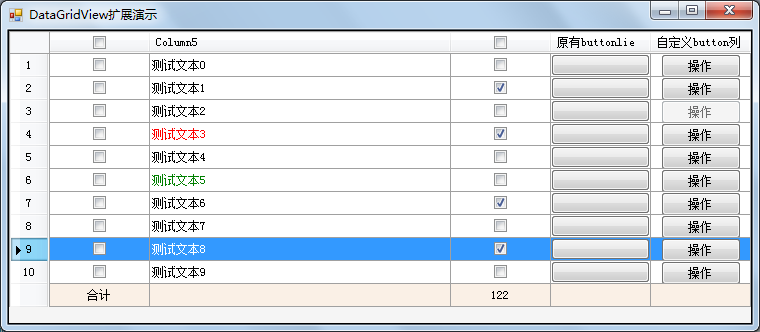
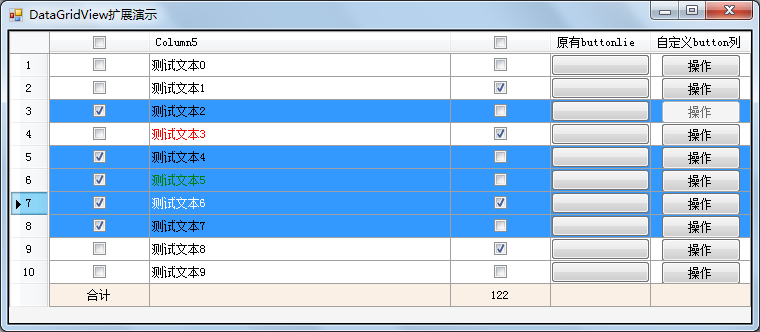
为甚有这种想法呢,那是来自需求的压迫,可怜我们这些苦逼的程序猿及攻城狮们只能彻夜难眠、苦思冥想、几十亿个脑细胞兄弟们前赴后继最终才能取得芝麻点大的胜利,好吧我们来看需求。
1. 现在要一个表格,表格的第一列是一个选中操作的复选框,要求能再复选框选中时,也对此行进行行选。
二、分析设计
First,让我们来看下,GridView中本身带了哪些我们能用的方法:
a. 自身带有checkbox列,我们也自定义了我们的扩展checkbox列。
b. 表格本身具有行选属性。
c. 表格本身带有多行选择属性。
好吧到然后了,通过利用这些已有的属性我们简单实现之,在checkbox的选中事件中进行行选操作。然后就实现啦。。。
Wait,这样真的就这么简单的实现了,让我们仔细想想是不是哪里不对劲啊?
Yeah,问题又来了:
1) 表格的列是在用的时候才设计checkbox列的,那么怎样才能让这些功能在DataGridView中实现呢?
2) 我们知道checkbox不一定只是为了选中某一行,它还是一个状态的控件,比如他要代表是否,我们不能同意而论啊?
Ok,来吧,让我们重新的整理一下:首先我们采用绑定的方式来设置标志复选框,即指定多个复选框的其中一个为标志行选的复选框。其次,在CellPainting事件中选中该标志复选框为选中的行或者设置行单元格颜色等。然后就没有然后了。。。
三、实现
首先,设置一个标志列名,如果此属性设置为checkbox的列名,则表示该checkbox列是标志列。
1: private string m_FlagColumnName = string.Empty;2: [Category("ut"), Browsable(true), Description("选中标志选中列的一项"), Localizable(true)]3: [DefaultValue(null), Editor(typeof(DataGridViewFlagRowEditor), typeof(System.Drawing.Design.UITypeEditor))]4: public string FlagColumnName5: {6: get7: {8: return m_FlagColumnName;9: }10: set11: {12: m_FlagColumnName = value;13: if (!string.IsNullOrEmpty(m_FlagColumnName))14: base.SelectionMode = DataGridViewSelectionMode.FullRowSelect;15: }16: }
在CellPainting里处理吧:
1: DataGridViewCheckBoxCellEx paintCell;2: protected override void OnCellPainting(DataGridViewCellPaintingEventArgs e)3: {4: if (e.ColumnIndex < 0 || e.RowIndex < 0) return;5: if (!this.Columns.Contains(FlagColumnName)) return;6: paintCell = this.Rows[e.RowIndex].Cells[FlagColumnName] as DataGridViewCheckBoxCellEx;7: if (paintCell != null && paintCell.Checked)8: {9: //e.CellStyle.BackColor = e.CellStyle.SelectionBackColor;10: this.Rows[e.RowIndex].Selected = true;11: }12:13: base.OnCellPainting(e);14: }
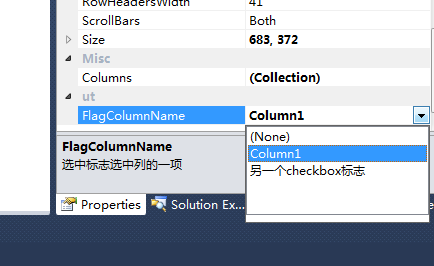
其实,最重点的在哪里?我们如何将FlagColumnName设置与标志checkbox的名字一致呢?手动?不至于吧,所以这里用到了Editor
1: namespace DataGridViewEx.DataGridViewExs.EditorEx2: {3: /// <summary>4: ///DataGridViewEx中的RowFlag标识设计器5: /// </summary>6: public class DataGridViewFlagRowEditor : UITypeEditor7: {8: const string NullValue = "(None)";9: private IWindowsFormsEditorService m_editorService = null;10: public DataGridViewFlagRowEditor()11: : base()12: {13: }14:15: public override object EditValue(System.ComponentModel.ITypeDescriptorContext context,16: IServiceProvider provider, object value)17: {18: if (context != null && context.Instance != null && provider != null)19: {20: m_editorService = provider.GetService(typeof(IWindowsFormsEditorService)) as IWindowsFormsEditorService;21: DataGridViewCheckBoxColumnEx column = null;22: List<string> columnNameList = new List<string>();23:24: foreach (IComponent c in context.Container.Components)25: {26: if (c is DataGridViewCheckBoxColumnEx)27: {28: column = (DataGridViewCheckBoxColumnEx)c;29: columnNameList.Add(column.Name);30: }31: }32: if (columnNameList.Count > 0 && m_editorService != null)33: {34: int i = 0;35: string selectValue = (string)value;36: ListBox listBox = new ListBox();37: listBox.SelectedIndexChanged += new EventHandler(listBox_SelectedIndexChanged);38: listBox.Items.Add(NullValue);39: foreach (string name in columnNameList)40: {41: i = listBox.Items.Add(name);42: if (name == selectValue)43: listBox.SelectedIndex = i;44: }45: m_editorService.DropDownControl(listBox);46: if (listBox.SelectedItem != null)47: {48: if (listBox.SelectedItem.ToString() == NullValue)49: return string.Empty;50: return listBox.SelectedItem;51: }52: }53: }54: return value;55: }56:57: private void listBox_SelectedIndexChanged(object sender, EventArgs e)58: {59: if (m_editorService != null)60: m_editorService.CloseDropDown();61: }62:63: /// <summary>64: /// Gets the editor style used by the EditValue method.65: /// </summary>66: /// <param name="context">An ITypeDescriptorContext that can be used to gain additional context information.</param>67: /// <returns>A UITypeEditorEditStyle value that indicates the style of editor used by EditValue. If the UITypeEditor does not support this method, then GetEditStyle will return None</returns>68: public override UITypeEditorEditStyle GetEditStyle(ITypeDescriptorContext context)69: {70: if (context != null && context.Instance != null)71: {72: return UITypeEditorEditStyle.DropDown;73: }74: return base.GetEditStyle(context);75: }76: }77: }
这里的Editor是Winform中自定义控件的一个很好的功能,即UI设计器的扩展。这里通过Editor使得我们的FlagColumnName通过设计器中寻找到可选的所有的DataGridViewCheckboxColumnEx供用户选择:
四、源码及演示程序下载。
演示程序: FlagCheckboxColumn.rar
开源项目:http://sourceforge.net/p/datagridviewex/code-0/3/tree/trunk/DataGridViewEx/
出处:http://gxjiang.cnblogs.com/
文章版权归本人所有,欢迎转载,但未经作者同意必须保留此段声明,且在文章页面明显位置给出原文连接,否则保留追究法律责任的权利。

 浙公网安备 33010602011771号