




C#开发高亮语法编辑器(一)——TextBox ,RichTextBox
C#简单实现高亮语法编辑器(一)
——TextBox ,RichTextBox的局限性
一、RichTextBox基本设置
二、实现语法高亮
三、关键字提示
四、实现行号
就简单快速得开发文本编辑器TextBox 最为简单,大家用得也多,缺点是无法实现复杂的操作。RichTextBox虽然是则功能比它强大很多。
这里要实现以下功能的编辑器:
1、实现语法高亮;
2、关键字提示;
3、行号。
显然TextBox 无法完成我们的任务,虽然都派生自TextBoxBase,但就控制力而言RichTextBox比它优秀很多。这里选用RichTextBox尝试开发。
注:以下只讨论简单开发,不考虑复杂的关键字查找机制。
一、RichTextBox基本设置
这里先建立一个工程,建立窗体Form1。
可以简单添加RichTextBox控件,可以在Form1_Load中建立。代码如下:
这样就建立了简单的RichTextBox,宽度和高度都设置了。没有做Form1窗体缩放的处理。
二、实现语法高亮
在RichTextBox里实现语法高亮还是非常简单的。可以使用
如果对关键字进行处理(这里只处理光标向后流动的情况)
首先添加输入事件
建立关键字
当KeyDown事件发生时,向前查找
这样就完成了高亮工作。
三、关键字提示
实现关键字提示也是在KeyDown中实现,在提示字种搜索GetLastWord返回的文字,如果前半部分匹配。那么就建立ListBox控件。
当然,另外一面,如果创建ListBox,而又在RichTextBox 点击了鼠标也去释放。
当然还得在Form1_Load里注册事件
然后设置ListBox 被选择后用被选择的关键字替换前文搜索到的字符。
下面我们来看看实现行号。
四、实现行号
这个是RichTextBox 唯一令我遗憾的地方,居然无法实现行号问题。为什么呢?我首先想到的是自己画。用rich.CreateGraphics()来画。但是,由于画的时候发生在窗体被创建时,所以画不成功,而被RichTextBox 本身的绘制给覆盖了。
然后我选择了在里面添加Label控件
rich.SelectionIndent = 40;是把光标对齐到左边距40的位置,防止光标被Label覆盖。
实现编号还不是太难。麻烦出在如何让Lable能跟随RichTextBox 的滚动条滚动。不说实现的 细节,我就假设,如果滚动条向上滚,那么Lable的Top属性增加,反之则减少。但是,RichTextBox 居然无法对ScollBar进行监测。
根本每办法知道滚动条滚动了多少位置,甚至都没办法知道滚动条滚动的方向。
尝试去除滚动条,然后之间添加新的滚动条
但是非常难于实现同步滚动,位置很难控制。这个就是目前遇到的RichTextBox 的最大局限性了,非常遗憾,无法开发出这个功能。
birdshover
http://www.cnblogs.com/birdshover/
2007年1月30日
——TextBox ,RichTextBox的局限性
一、RichTextBox基本设置
二、实现语法高亮
三、关键字提示
四、实现行号
就简单快速得开发文本编辑器TextBox 最为简单,大家用得也多,缺点是无法实现复杂的操作。RichTextBox虽然是则功能比它强大很多。
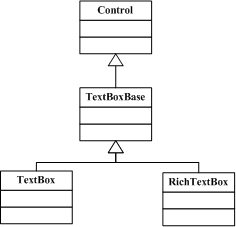
图 1.1 输入框控件关系
这里要实现以下功能的编辑器:
1、实现语法高亮;
2、关键字提示;
3、行号。
显然TextBox 无法完成我们的任务,虽然都派生自TextBoxBase,但就控制力而言RichTextBox比它优秀很多。这里选用RichTextBox尝试开发。
注:以下只讨论简单开发,不考虑复杂的关键字查找机制。
一、RichTextBox基本设置
这里先建立一个工程,建立窗体Form1。
可以简单添加RichTextBox控件,可以在Form1_Load中建立。代码如下:
1 this.WindowState = System.Windows.Forms.FormWindowState.Maximized;
2
3 RichTextBox rich = new RichTextBox();
4 rich.Multiline = true;
5 rich.Height = this.Height - 100;
6 rich.Width = this.Width - 100;
7 rich.Left = 40;
8 rich.Top = 40;
9 rich.WordWrap = true;
10 rich.Text = "12345678";
11 rich.ScrollBars = RichTextBoxScrollBars.ForcedVertical;
12 this.Controls.Add(rich);
2
3 RichTextBox rich = new RichTextBox();
4 rich.Multiline = true;
5 rich.Height = this.Height - 100;
6 rich.Width = this.Width - 100;
7 rich.Left = 40;
8 rich.Top = 40;
9 rich.WordWrap = true;
10 rich.Text = "12345678";
11 rich.ScrollBars = RichTextBoxScrollBars.ForcedVertical;
12 this.Controls.Add(rich);
这样就建立了简单的RichTextBox,宽度和高度都设置了。没有做Form1窗体缩放的处理。
二、实现语法高亮
在RichTextBox里实现语法高亮还是非常简单的。可以使用
1 rich.Select(0,1);
2 rich.SelectionFont = new Font("宋体", 12, (FontStyle.Regular));
3 rich.SelectionColor = Color.Blue;
意思是,先选择第一个字母,按上面的设置,选择到了数字‘1’,然后设置这个字的字体大小,再设置字的颜色。2 rich.SelectionFont = new Font("宋体", 12, (FontStyle.Regular));
3 rich.SelectionColor = Color.Blue;
如果对关键字进行处理(这里只处理光标向后流动的情况)
首先添加输入事件
1 rich.KeyDown += new KeyEventHandler(rich_KeyDown); //这一行添加到Form1_Load中
2
3 void rich_KeyDown(object sender, KeyEventArgs e)
4 {
5 //throw new Exception("The method or operation is not implemented.");
6 }
2
3 void rich_KeyDown(object sender, KeyEventArgs e)
4 {
5 //throw new Exception("The method or operation is not implemented.");
6 }
建立关键字
1 public static List<string> AllClass()
2 {
3 List<string> list = new List<string>();
4 list.Add("function");
5 list.Add("return");
6 list.Add("class");
7 list.Add("new");
8 list.Add("extends");
9 list.Add("var");
10 return list;
11 }
2 {
3 List<string> list = new List<string>();
4 list.Add("function");
5 list.Add("return");
6 list.Add("class");
7 list.Add("new");
8 list.Add("extends");
9 list.Add("var");
10 return list;
11 }
当KeyDown事件发生时,向前查找
1 //返回搜索字符
2 public static string GetLastWord(string str,int i)
3 {
4 string x = str;
5 Regex reg= new Regex(@"\s+[a-z]+\s*",RegexOptions.RightToLeft);
6 x = reg.Match(x).Value;
7
8 Regex reg2 = new Regex(@"\s");
9 x = reg2.Replace(x, "");
10 return s;
11 }
2 public static string GetLastWord(string str,int i)
3 {
4 string x = str;
5 Regex reg= new Regex(@"\s+[a-z]+\s*",RegexOptions.RightToLeft);
6 x = reg.Match(x).Value;
7
8 Regex reg2 = new Regex(@"\s");
9 x = reg2.Replace(x, "");
10 return s;
11 }
1 void rich_KeyDown(object sender, KeyEventArgs e)
2 {
3 RichTextBox rich = (RichTextBox)sender;
4 //throw new Exception("The method or operation is not implemented.");
5 string s = GetLastWord(rich.Text, rich.SelectionStart);
6
7 if (AllClass().IndexOf(s) > -1)
8 {
9 MySelect(rich, rich.SelectionStart, s, Color.CadetBlue, true);
10 }
11 }
2 {
3 RichTextBox rich = (RichTextBox)sender;
4 //throw new Exception("The method or operation is not implemented.");
5 string s = GetLastWord(rich.Text, rich.SelectionStart);
6
7 if (AllClass().IndexOf(s) > -1)
8 {
9 MySelect(rich, rich.SelectionStart, s, Color.CadetBlue, true);
10 }
11 }
1 //设定颜色
2 public static void MySelect(System.Windows.Forms.RichTextBox tb, int i, string s, Color c,bool font)
3 {
4 tb.Select(i - s.Length, s.Length);
5 tb.SelectionColor = c;
//是否改变字体
6 if(font)
7 tb.SelectionFont = new Font("宋体", 12, (FontStyle.Bold));
8 else
9 tb.SelectionFont = new Font("宋体", 12, (FontStyle.Regular));
//以下是把光标放到原来位置,并把光标后输入的文字重置
10 tb.Select(i,0);
11 tb.SelectionFont = new Font("宋体", 12, (FontStyle.Regular));
12 tb.SelectionColor = Color.Black;
13 }
2 public static void MySelect(System.Windows.Forms.RichTextBox tb, int i, string s, Color c,bool font)
3 {
4 tb.Select(i - s.Length, s.Length);
5 tb.SelectionColor = c;
//是否改变字体
6 if(font)
7 tb.SelectionFont = new Font("宋体", 12, (FontStyle.Bold));
8 else
9 tb.SelectionFont = new Font("宋体", 12, (FontStyle.Regular));
//以下是把光标放到原来位置,并把光标后输入的文字重置
10 tb.Select(i,0);
11 tb.SelectionFont = new Font("宋体", 12, (FontStyle.Regular));
12 tb.SelectionColor = Color.Black;
13 }
这样就完成了高亮工作。
三、关键字提示
实现关键字提示也是在KeyDown中实现,在提示字种搜索GetLastWord返回的文字,如果前半部分匹配。那么就建立ListBox控件。
1 void tb_KeyDown(object sender, KeyEventArgs e)
2 {
3 RichTextBox tb = (RichTextBox)sender;
4 if (//条件搜索到匹配字符)
5 {
6 //搜索ListBox是否已经被创建
7 Control[] c = tb.Controls.Find("mylb", false);
8 if (c.Length > 0)
9 ((ListBox)c[0]).Dispose(); //如果被创建则释放
10
11 ListBox lb = new ListBox();
12 lb.Name = "mylb";
13 lb.Items.Add("asdasdasd");
14 lb.Items.Add("asdasdasd");
15 lb.Items.Add("asdasdasd");
16 lb.Items.Add("asdasdasd");
17 lb.Items.Add("asdasdasd");
18 lb.Items.Add("asdasdasd");
19 lb.Items.Add("asdasdasd");
20 lb.Show();
21 lb.TabIndex = 100;
22 lb.Location = tb.GetPositionFromCharIndex(tb.SelectionStart);
23 lb.Left += 10;
24 tb.Controls.Add(lb);
25 }
26 }
2 {
3 RichTextBox tb = (RichTextBox)sender;
4 if (//条件搜索到匹配字符)
5 {
6 //搜索ListBox是否已经被创建
7 Control[] c = tb.Controls.Find("mylb", false);
8 if (c.Length > 0)
9 ((ListBox)c[0]).Dispose(); //如果被创建则释放
10
11 ListBox lb = new ListBox();
12 lb.Name = "mylb";
13 lb.Items.Add("asdasdasd");
14 lb.Items.Add("asdasdasd");
15 lb.Items.Add("asdasdasd");
16 lb.Items.Add("asdasdasd");
17 lb.Items.Add("asdasdasd");
18 lb.Items.Add("asdasdasd");
19 lb.Items.Add("asdasdasd");
20 lb.Show();
21 lb.TabIndex = 100;
22 lb.Location = tb.GetPositionFromCharIndex(tb.SelectionStart);
23 lb.Left += 10;
24 tb.Controls.Add(lb);
25 }
26 }
当然,另外一面,如果创建ListBox,而又在RichTextBox 点击了鼠标也去释放。
1 void rich_MouseClick(object sender, MouseEventArgs e)
2 {
3 RichTextBox tb = (RichTextBox)sender;
4 Control[] c = tb.Controls.Find("mylb", false);
5 if (c.Length > 0)
6 ((ListBox)c[0]).Dispose();
7 }
2 {
3 RichTextBox tb = (RichTextBox)sender;
4 Control[] c = tb.Controls.Find("mylb", false);
5 if (c.Length > 0)
6 ((ListBox)c[0]).Dispose();
7 }
当然还得在Form1_Load里注册事件
1 rich.MouseClick += new MouseEventHandler(rich_MouseClick);
然后设置ListBox 被选择后用被选择的关键字替换前文搜索到的字符。
下面我们来看看实现行号。
四、实现行号
这个是RichTextBox 唯一令我遗憾的地方,居然无法实现行号问题。为什么呢?我首先想到的是自己画。用rich.CreateGraphics()来画。但是,由于画的时候发生在窗体被创建时,所以画不成功,而被RichTextBox 本身的绘制给覆盖了。
然后我选择了在里面添加Label控件
1 Label l = new Label();
2 l.Name = "l";
3 l.Top = 0;
4 l.TextAlign = ContentAlignment.TopRight;
5 l.Width = 40;
6 l.Text = "1";
7 l.Font = new Font("宋体", 12, (FontStyle.Regular));
8 l.Height = this.Height;
9 l.BackColor = Color.Gray;
10 l.BorderStyle = BorderStyle.None;
11 rich.Controls.Add(l);
12
13 rich.SelectionIndent = 40;
2 l.Name = "l";
3 l.Top = 0;
4 l.TextAlign = ContentAlignment.TopRight;
5 l.Width = 40;
6 l.Text = "1";
7 l.Font = new Font("宋体", 12, (FontStyle.Regular));
8 l.Height = this.Height;
9 l.BackColor = Color.Gray;
10 l.BorderStyle = BorderStyle.None;
11 rich.Controls.Add(l);
12
13 rich.SelectionIndent = 40;
rich.SelectionIndent = 40;是把光标对齐到左边距40的位置,防止光标被Label覆盖。
实现编号还不是太难。麻烦出在如何让Lable能跟随RichTextBox 的滚动条滚动。不说实现的 细节,我就假设,如果滚动条向上滚,那么Lable的Top属性增加,反之则减少。但是,RichTextBox 居然无法对ScollBar进行监测。
根本每办法知道滚动条滚动了多少位置,甚至都没办法知道滚动条滚动的方向。
尝试去除滚动条,然后之间添加新的滚动条
1 VScrollBar vs = new VScrollBar();
2 //vs.Dock = DockStyle.Right;
3 vs.Name = "vs";
4 vs.Maximum = 0;
5 vs.Minimum = 0;
6 vs.MaximumSize = new Size(0,0);
7 vs.Top = 0;
8 vs.Left = rich.Parent.Width - 100 -22;
9 vs.Height = rich.Parent.Height - 100 -1;
10 vs.Value = 0;
11 vs.Scroll += new ScrollEventHandler(vs_Scroll);
12
13 rich.Controls.Add(vs);
2 //vs.Dock = DockStyle.Right;
3 vs.Name = "vs";
4 vs.Maximum = 0;
5 vs.Minimum = 0;
6 vs.MaximumSize = new Size(0,0);
7 vs.Top = 0;
8 vs.Left = rich.Parent.Width - 100 -22;
9 vs.Height = rich.Parent.Height - 100 -1;
10 vs.Value = 0;
11 vs.Scroll += new ScrollEventHandler(vs_Scroll);
12
13 rich.Controls.Add(vs);
但是非常难于实现同步滚动,位置很难控制。这个就是目前遇到的RichTextBox 的最大局限性了,非常遗憾,无法开发出这个功能。
birdshover
http://www.cnblogs.com/birdshover/
2007年1月30日


 浙公网安备 33010602011771号