
微软轻量级“代码生成器”—Repository Factory使用(下)
概述
Repository Factory是微软模式与实践小组发布的一个开发指南包,它把之前的Web Service Software Factory(WSSF)集成的Data Access Guidance Package分离出来,形成了一个单独的开发指南包。引用Johnny Halife的话说:“它不是一个对象-关系映射(Object-Relational Mapping,ORM)工具,它的目的是作为一个轻量级的代码生成器,以自动化完成绝大部分生成领域模型对象,并将之持久化到数据库的任务代码。”本文为微软轻量级“代码生成器”—Repository Factory使用下篇。
生成Data Repository 类
接上篇,生成存储过程脚本之后,我们执行脚本,在数据库中生成相应的存储过程。接下来就可以生成Data Repository类了。
Step1:选择Create Data Repository Classes
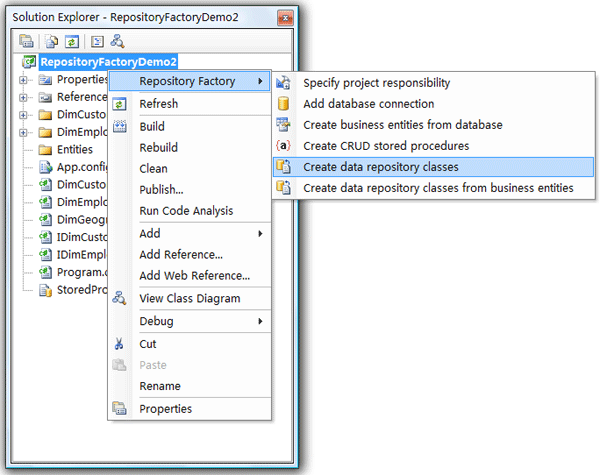
Step2:仍然是指定数据库连接

Step3:指定作为数据访问层的项目
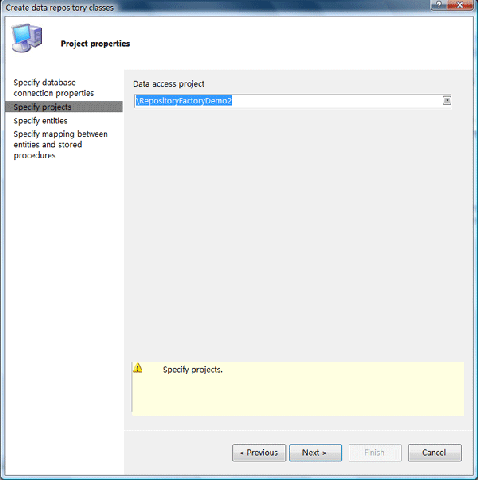
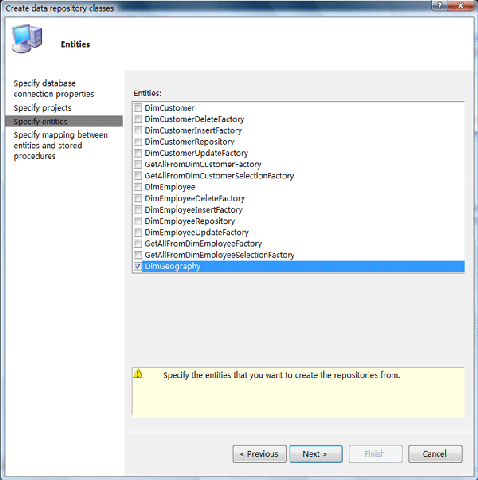
Step4:指定要生成代码的实体
Step5:指定实体和存储过程之间的映射
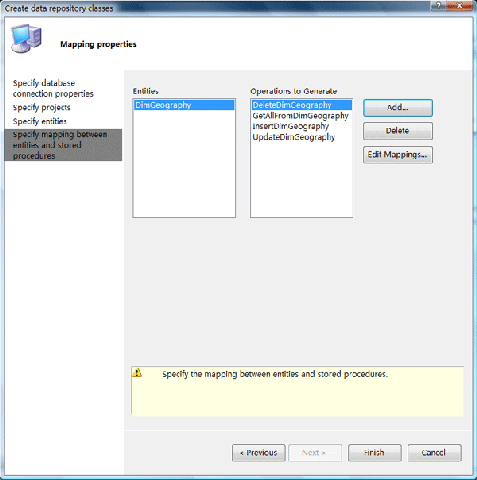
在这一步还可以指定存储过程参数和业务实体属性之间的映射关系
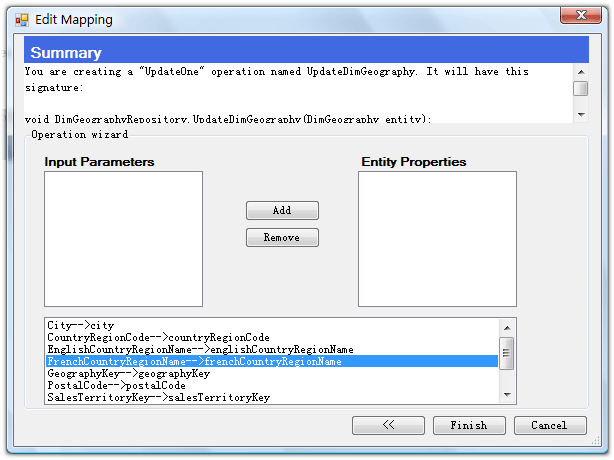
Step6:生成代码:
生成Data Repository代码,生成的代码包括Repository接口和实现,分别针对每种操作生成一个工厂类。
生成的IDimCustomerRepository类:
public interface IDimCustomerRepository
{

    List<DimCustomer> GetAllFromDimCustomer();

    void Add(DimCustomer dimCustomer);

    void Remove(System.Int32 customerKey);

    void Save(DimCustomer dimCustomer);

}
public class DimCustomerRepository : Repository<DimCustomer>, IDimCustomerRepository
{
    public DimCustomerRepository(string databaseName)
        : base(databaseName)
    {
    }

    public DimCustomerRepository()
        : base()
    {
    }


    public List<DimCustomer> GetAllFromDimCustomer()
    {
        ISelectionFactory<NullableIdentity> selectionFactory = new GetAllFromDimCustomerSelectionFactory();

        try
        {
            NullableIdentity nullableIdentity = new NullableIdentity();
            return base.Find(selectionFactory, new GetAllFromDimCustomerFactory(), nullableIdentity);
        }
        catch (SqlException ex)
        {
            HandleSqlException(ex, selectionFactory);
        }

        return new List<DimCustomer>();
    }

    public void Add(DimCustomer dimCustomer)
    {
        DimCustomerInsertFactory insertFactory = new DimCustomerInsertFactory();
        try
        {
            base.Add(insertFactory, dimCustomer);
        }
        catch (SqlException ex)
        {
            HandleSqlException(ex, insertFactory);
        }
    }

    public void Remove(System.Int32 customerKey)
    {
        IDeleteFactory<System.Int32> deleteFactory = new DimCustomerDeleteFactory();

        try
        {
            base.Remove(deleteFactory, customerKey);
        }
        catch (SqlException ex)
        {
            HandleSqlException(ex, deleteFactory);
        }
    }


    public void Save(DimCustomer dimCustomer)
    {
        DimCustomerUpdateFactory updateFactory = new DimCustomerUpdateFactory();
        try
        {
            base.Save(updateFactory, dimCustomer);
        }
        catch (SqlException ex)
        {
            HandleSqlException(ex, updateFactory);
        }
    }

    private void HandleSqlException(SqlException ex, IDbToBusinessEntityNameMapper mapper)
    {
        if (ex.Number == ErrorCodes.SqlUserRaisedError)
        {
            switch (ex.State)
            {
                case ErrorCodes.ValidationError:
                    string[] messageParts = ex.Errors[0].Message.Split(':');
                    throw new RepositoryValidationException(
                        mapper.MapDbParameterToBusinessEntityProperty(messageParts[0]),
                        messageParts[1], ex);

                case ErrorCodes.ConcurrencyViolationError:
                    throw new ConcurrencyViolationException(ex.Message, ex);

            }
        }

        throw new RepositoryFailureException(ex);
    }
}
DimCustomerInsertFactory类:
internal class DimCustomerInsertFactory : IDbToBusinessEntityNameMapper, IInsertFactory<DimCustomer>
{
    /// <summary>
    /// Creates the DimCustomerInsertFactory to build an insert statement for
    /// the given DimCustomer object.
    /// </summary>
    /// <param name="DimCustomer">New DimCustomer to insert into the database.</param>
    public DimCustomerInsertFactory()
    {
    }

    #region IInsertFactory<DimCustomer> Members

    public DbCommand ConstructInsertCommand(Database db, DimCustomer dimCustomer)
    {
        DbCommand command = db.GetStoredProcCommand("dbo.InsertDimCustomer");

        if (dimCustomer.AddressLine1 != null)
        {
            db.AddInParameter(command, "addressLine1", DbType.String, dimCustomer.AddressLine1);
        }
        if (dimCustomer.AddressLine2 != null)
        {
            db.AddInParameter(command, "addressLine2", DbType.String, dimCustomer.AddressLine2);
        }
        if (dimCustomer.BirthDate != null)
        {
            db.AddInParameter(command, "birthDate", DbType.DateTime, dimCustomer.BirthDate);
        }
        if (dimCustomer.CommuteDistance != null)
        {
            db.AddInParameter(command, "commuteDistance", DbType.String, dimCustomer.CommuteDistance);
        }
        if (dimCustomer.CustomerAlternateKey != null)
        {
            db.AddInParameter(command, "customerAlternateKey", DbType.String, dimCustomer.CustomerAlternateKey);
        }
        db.AddOutParameter(command, "customerKey", DbType.Int32, 4);
        if (dimCustomer.DateFirstPurchase != null)
        {
            db.AddInParameter(command, "dateFirstPurchase", DbType.DateTime, dimCustomer.DateFirstPurchase);
        }
        if (dimCustomer.EmailAddress != null)
        {
            db.AddInParameter(command, "emailAddress", DbType.String, dimCustomer.EmailAddress);
        }
        if (dimCustomer.EnglishEducation != null)
        {
            db.AddInParameter(command, "englishEducation", DbType.String, dimCustomer.EnglishEducation);
        }
        if (dimCustomer.EnglishOccupation != null)
        {
            db.AddInParameter(command, "englishOccupation", DbType.String, dimCustomer.EnglishOccupation);
        }
        if (dimCustomer.FirstName != null)
        {
            db.AddInParameter(command, "firstName", DbType.String, dimCustomer.FirstName);
        }
        if (dimCustomer.FrenchEducation != null)
        {
            db.AddInParameter(command, "frenchEducation", DbType.String, dimCustomer.FrenchEducation);
        }
        if (dimCustomer.FrenchOccupation != null)
        {
            db.AddInParameter(command, "frenchOccupation", DbType.String, dimCustomer.FrenchOccupation);
        }
        if (dimCustomer.Gender != null)
        {
            db.AddInParameter(command, "gender", DbType.String, dimCustomer.Gender);
        }
        if (dimCustomer.GeographyKey != null)
        {
            db.AddInParameter(command, "geographyKey", DbType.Int32, dimCustomer.GeographyKey);
        }
        if (dimCustomer.HouseOwnerFlag != null)
        {
            db.AddInParameter(command, "houseOwnerFlag", DbType.String, dimCustomer.HouseOwnerFlag);
        }
        if (dimCustomer.LastName != null)
        {
            db.AddInParameter(command, "lastName", DbType.String, dimCustomer.LastName);
        }
        if (dimCustomer.MaritalStatus != null)
        {
            db.AddInParameter(command, "maritalStatus", DbType.String, dimCustomer.MaritalStatus);
        }
        if (dimCustomer.MiddleName != null)
        {
            db.AddInParameter(command, "middleName", DbType.String, dimCustomer.MiddleName);
        }
        if (dimCustomer.NameStyle != null)
        {
            db.AddInParameter(command, "nameStyle", DbType.Boolean, dimCustomer.NameStyle);
        }
        if (dimCustomer.NumberCarsOwned != null)
        {
            db.AddInParameter(command, "numberCarsOwned", DbType.Byte, dimCustomer.NumberCarsOwned);
        }
        if (dimCustomer.NumberChildrenAtHome != null)
        {
            db.AddInParameter(command, "numberChildrenAtHome", DbType.Byte, dimCustomer.NumberChildrenAtHome);
        }
//......
        return command;
    }

    public void SetNewID(Database db, DbCommand command, DimCustomer dimCustomer)
    {
        System.Int32 id1 = (System.Int32)(db.GetParameterValue(command, "customerKey"));
        dimCustomer.CustomerKey = id1;

    }

    #endregion

    #region IDbToBusinessEntityNameMapper Members
    public string MapDbParameterToBusinessEntityProperty(string dbParameter)
    {
        switch (dbParameter)
        {
            case "addressLine1":
                return "AddressLine1";
            case "addressLine2":
                return "AddressLine2";
            case "birthDate":
                return "BirthDate";
            case "commuteDistance":
                return "CommuteDistance";
            case "customerAlternateKey":
                return "CustomerAlternateKey";
            case "dateFirstPurchase":
                return "DateFirstPurchase";
            case "emailAddress":
                return "EmailAddress";
            //......
            default:
                throw new RepositoryInvalidParameterException(dbParameter);
        }
    }
    #endregion
}
并且会在配置文件中,自动配置Repository接口和实现之间的关系:
<?xml version="1.0" encoding="utf-8"?>
<configuration>
  <configSections>
    <section name="repositoryFactory" type="Microsoft.Practices.Repository.Configuration.RepositoryFactorySection, Microsoft.Practices.Repository, Version=1.0.0.0, Culture=neutral, PublicKeyToken=null" />
  </configSections>
  <connectionStrings>
    <add name="RFConnectionString" connectionString="Data Source=Esint-lhj\Sql2005;Initial Catalog=AdventureWorksDW;Persist Security Info=True;User ID=sa;Password=sql2005" providerName="System.Data.SqlClient" />
  </connectionStrings>
  <repositoryFactory>
    <repositories>
      <add interfaceType="RepositoryFactoryDemo2.IDimEmployeeRepository, RepositoryFactoryDemo2"
           repositoryType="RepositoryFactoryDemo2.DimEmployeeRepositoryArtifacts.DimEmployeeRepository, RepositoryFactoryDemo2" />
      <add interfaceType="RepositoryFactoryDemo2.IDimCustomerRepository, RepositoryFactoryDemo2"
           repositoryType="RepositoryFactoryDemo2.DimCustomerRepositoryArtifacts.DimCustomerRepository, RepositoryFactoryDemo2" />
    </repositories>
  </repositoryFactory>
</configuration>
使用生成的代码
如下示例代码所示:
class Program
{
    static void Main(string[] args)
    {
        IDimEmployeeRepository repository = RepositoryFactory.Create<IDimEmployeeRepository>();

        List<DimEmployee> employees = repository.GetAllFromDimEmployee();
    }
}
自定义生成代码的风格
如果上面生成的代码风格,并不适合您现在所在团队的编码规范,譬如说您习惯于以“_”开头来命名业务实体中的私有字段。在Repository Factory中可以自定义生成代码的风格,因为Repository Factory中的代码生成也是基于模板引擎的,您可以通过修改模板来完成自定义生成代码的风格。打开<安装目录>\Microsoft Patterns & Practices\Data Access Guidance Package Setup\Templates,就可以看到生成代码所使用的模板了。模板编写说明:
1.以<#@ Template Language="C#" #>开头来指定一个模板
2.通过Assembly来添加对程序集的引用
<#@ Assembly Name="System.dll" #>
3.通过Import来导入命名空间
<#@ Import Namespace="System.Data" #>
4.通过Property来指定输入的参数
<#@ Property Processor="PropertyProcessor" Name="Entities"#>
5.通过include来引入外部的文件
<#@ include file="Templates\T4\Common\NamingHelper.t4" #>
6.完全使用C#语言来编写代码,是不是也可以通过<#@ Template Language="C#" #>来指定使用VB.NET编写,我没做过尝试:)
<# foreach(Property property in entity.Properties)
{
#>
private <#= (property.IsNullable && property.Type.IsValueType) ? "Nullable<" + property.Type.ToString() + ">" : property.Type.ToString() #> <#= GetFieldName(property.Name) #>;
public <#= (property.IsNullable && property.Type.IsValueType) ? "Nullable<" + property.Type.ToString() + ">" : property.Type.ToString() #> <#= property.Name #>
{
get { return this.<#= GetFieldName(property.Name) #>; }
<#
if(!property.ReadOnly)
{
#>
set { this.<#= GetFieldName(property.Name) #> = value; }
<#
}
#>
}
譬如,想在生成的业务实体私有字段前都加上下划线“_”,可以打开NamingHelper.t4文件,修改其中的GetFieldName方法如下:
private string GetFieldName(string type)
{
return "_" + NamingHelper.GetFieldName(type);
}
这时再使用Repository Factory时可以看到生成的代码如下,私有字段命名前都加上“_”:
private System.String _classField;

public System.String Class
{
    get { return this._classField; }
    set { this._classField = value; }
}

private System.String _colorField;

public System.String Color
{
    get { return this._colorField; }
    set { this._colorField = value; }
}
结束语
通过Repository Factory我们可以很方便的生成自己的数据访问层,减少重复的体力劳动,并且支持灵活的自定义功能。
祝大家编程愉快:)
Worktile,新一代简单好用、体验极致的团队协同、项目管理工具,让你和你的团队随时随地一起工作。完全免费,现在就去了解一下吧。
https://worktile.com

 浙公网安备 33010602011771号