



格式与布局
---恢复内容开始---
<head>
        <meta http-equiv="Content-Type" content="text/html; charset=utf-8"/>
        <title>无标题文档</title>
        <style type="text/css">
        </style>
    </head>
    <body>
      <div style="width:100px; height:100px; background-color:#F00; position:absolute;"></div>
      <div><img  src="../图片/本子.jpg"/></div>
       <div><img  src="../图片/本子.jpg"/></div>
        <div><img  src="../图片/本子.jpg"/></div>
         <div><img  src="../图片/本子.jpg"/></div>
          <div><img  src="../图片/本子.jpg"/></div>
           <div><img  src="../图片/本子.jpg"/></div>
    </body>
代码表示:绝对定位position:absolute(浏览器动跟着动)
<head>
        <meta http-equiv="Content-Type" content="text/html; charset=utf-8" />
        <title>无标题文档</title>
        <style type="text/css">
        </style>
    </head>
    <body>
       <div style="width:100px; height:100px; background-color:#000;"></div>
      <div style="width:100px; height:100px; background-color:#F00; position:relative;top:20px"></div>
    </body>
代码表示:相对定位position:relative移动时相对自己的位置移动,而不是根据浏览器移动
 <head>
        <meta http-equiv="Content-Type" content="text/html; charset=utf-8" />
        <title>无标题文档</title>
        <style type="text/css">
        </style>
    </head>
    <body>
      <div style="width:100px; height:100px; background-color:#F00; position:fixed;bottom:20px; right:20px"></div>
      <div><img  src="../图片/本子.jpg"/></div>
      <div><img  src="../图片/本子.jpg"/></div>
      <div><img  src="../图片/本子.jpg"/></div>
      <div><img  src="../图片/本子.jpg"/></div>
      <div><img  src="../图片/本子.jpg"/></div>
    </body>
上面代码:固定定位position:fixed 怎么拉动滚动条位置都不动。
 <head>
        <meta http-equiv="Content-Type" content="text/html; charset=utf-8" />
        <title>无标题文档</title>
        <style type="text/css">
        </style>
    </head>
    <body>
      <div style="width:100px; height:100px; background-color:#F00; position:fixed;top:20px; left:20px;"></div>
      <div style="width:100px; height:100px; background-color:#3FF; position:relative;"></div>
    </body>
上面代码:分层(z-index)显示: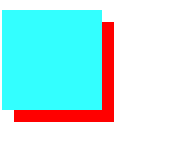
<head>
        <meta http-equiv="Content-Type" content="text/html; charset=utf-8" />
        <title>无标题文档</title>
        <style type="text/css">
        </style>
    </head>
    <body>
      <div style="width:100px; height:100px; background-color:#F00; position:fixed;top:20px; left:20px; z-index:2"></div>
      <div style="width:100px; height:100px; background-color:#3FF; position:relative;"></div>
    </body>
显示: 。
。
流
 <head>
        <meta http-equiv="Content-Type" content="text/html; charset=utf-8" />
        <title>带着小图片</title>
        <style type="text/css">
        *{
            margin:0 auto; padding:0;
            }
        .w{
            float:left;
            }
        </style>
    </head>

    <body>
        <div style="width:604px; height:41px; border:1px solid #e9e9e9;">
        <div class="w">春节</div>
        <div class="w">元宵节</div>
        <div class="w">端午节</div>
        <div class="w">中秋节</div>
        <div class="w">国庆节</div>
        <div style=" width:104px; height:41px;"></div>
        </div>
    </body>
代码显示: float:left/right
       <head>
        <meta http-equiv="Content-Type" content="text/html; charset=utf-8" />
        <title>带着小图片</title>
        <link  rel="shortcut icon" href="../图片/本子.jpg"/>
    </head>


    <body>

    </body>
代码显示:网页title带小图片<link rel="shortcut icon" href=""/>写在head里但不要写在style里,显示: 。
。
<body>
        <div style="width:0px; height:0px; border-bottom:50px solid transparent; border-left:50px solid #00F;
 border-right:#FF0 solid 50px; border-top:50px solid #F00;"></div>
    </body>
显示: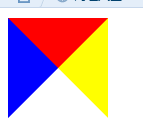 ,边框透明 border:transparent
---恢复内容结束---
<head>
        <meta http-equiv="Content-Type" content="text/html; charset=utf-8"/>
        <title>无标题文档</title>
        <style type="text/css">
        </style>
    </head>
    <body>
      <div style="width:100px; height:100px; background-color:#F00; position:absolute;"></div>
      <div><img  src="../图片/本子.jpg"/></div>
       <div><img  src="../图片/本子.jpg"/></div>
        <div><img  src="../图片/本子.jpg"/></div>
         <div><img  src="../图片/本子.jpg"/></div>
          <div><img  src="../图片/本子.jpg"/></div>
           <div><img  src="../图片/本子.jpg"/></div>
    </body>
代码表示:绝对定位position:absolute(浏览器动跟着动)
<head>
        <meta http-equiv="Content-Type" content="text/html; charset=utf-8" />
        <title>无标题文档</title>
        <style type="text/css">
        </style>
    </head>
    <body>
       <div style="width:100px; height:100px; background-color:#000;"></div>
      <div style="width:100px; height:100px; background-color:#F00; position:relative;top:20px"></div>
    </body>
代码表示:相对定位position:relative移动时相对自己的位置移动,而不是根据浏览器移动
 <head>
        <meta http-equiv="Content-Type" content="text/html; charset=utf-8" />
        <title>无标题文档</title>
        <style type="text/css">
        </style>
    </head>
    <body>
      <div style="width:100px; height:100px; background-color:#F00; position:fixed;bottom:20px; right:20px"></div>
      <div><img  src="../图片/本子.jpg"/></div>
      <div><img  src="../图片/本子.jpg"/></div>
      <div><img  src="../图片/本子.jpg"/></div>
      <div><img  src="../图片/本子.jpg"/></div>
      <div><img  src="../图片/本子.jpg"/></div>
    </body>
上面代码:固定定位position:fixed 怎么拉动滚动条位置都不动。
 <head>
        <meta http-equiv="Content-Type" content="text/html; charset=utf-8" />
        <title>无标题文档</title>
        <style type="text/css">
        </style>
    </head>
    <body>
      <div style="width:100px; height:100px; background-color:#F00; position:fixed;top:20px; left:20px;"></div>
      <div style="width:100px; height:100px; background-color:#3FF; position:relative;"></div>
    </body>
上面代码:分层(z-index)显示:
<head>
        <meta http-equiv="Content-Type" content="text/html; charset=utf-8" />
        <title>无标题文档</title>
        <style type="text/css">
        </style>
    </head>
    <body>
      <div style="width:100px; height:100px; background-color:#F00; position:fixed;top:20px; left:20px; z-index:2"></div>
      <div style="width:100px; height:100px; background-color:#3FF; position:relative;"></div>
    </body>
显示:。
流
 <head>
        <meta http-equiv="Content-Type" content="text/html; charset=utf-8" />
        <title>带着小图片</title>
        <style type="text/css">
        *{
            margin:0 auto; padding:0;
            }
        .w{
            float:left;
            }
        </style>
    </head>

    <body>
        <div style="width:604px; height:41px; border:1px solid #e9e9e9;">
        <div class="w">春节</div>
        <div class="w">元宵节</div>
        <div class="w">端午节</div>
        <div class="w">中秋节</div>
        <div class="w">国庆节</div>
        <div style=" width:104px; height:41px;"></div>
        </div>
    </body>
代码显示:float:l
       <head>
        <meta http-equiv="Content-Type" content="text/html; charset=utf-8" />
        <title>带着小图片</title>
        <link  rel="shortcut icon" href="../图片/本子.jpg"/>
    </head>


    <body>

    </body>
代码显示:网页title带小图片<link rel="shortcut icon" href=""/>写在head里但不要写在style里,显示:。
<body>
        <div style="width:0px; height:0px; border-bottom:50px solid transparent; border-left:50px solid #00F;
 border-right:#FF0 solid 50px; border-top:50px solid #F00;"></div>
    </body>
显示: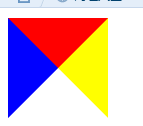 ,边框透明 border:transparent。
