


菜单的显示和隐藏
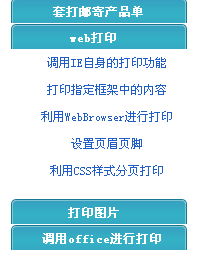
点击大分类,显示小分类,其他大分类的小分类会隐藏,感觉这个实现的还不错,总结下来,以后使用...
代码:
 View Code

<script language="javascript">
function show(obj,maxg,obj2){
if(obj.style.pixelHeight<maxg){
obj.style.pixelHeight+=maxg/10;
obj.filters.alpha.opacity+=20;
obj2.background="images/title_hide.gif";
if(obj.style.pixelHeight==maxg/10)
obj.style.display='block';
myObj=obj;
mymaxg=maxg;
myObj2=obj2;
setTimeout('show(myObj,mymaxg,myObj2)','5');
}
}
function hide(obj,maxg,obj2){
if(obj.style.pixelHeight>0){
if(obj.style.pixelHeight==maxg/5)
obj.style.display='none';
obj.style.pixelHeight-=maxg/5;
obj.filters.alpha.opacity-=10;
obj2.background="images/title_show.gif";
myObj=obj;
mymaxg=maxg
myObj2=obj2;
setTimeout('hide(myObj,mymaxg,myObj2)','5');
}
else if(whichContinue) whichContinue.click();
}
function chang(obj,maxg,obj2){
if(obj.style.pixelHeight){
hide(obj,maxg,obj2);
nopen='';
whichcontinue='';
}else if(nopen){
whichContinue=obj2;
nopen.click();
}else{
show(obj,maxg,obj2);
nopen=obj2;
whichContinue='';
}
}
</script>
function show(obj,maxg,obj2){
if(obj.style.pixelHeight<maxg){
obj.style.pixelHeight+=maxg/10;
obj.filters.alpha.opacity+=20;
obj2.background="images/title_hide.gif";
if(obj.style.pixelHeight==maxg/10)
obj.style.display='block';
myObj=obj;
mymaxg=maxg;
myObj2=obj2;
setTimeout('show(myObj,mymaxg,myObj2)','5');
}
}
function hide(obj,maxg,obj2){
if(obj.style.pixelHeight>0){
if(obj.style.pixelHeight==maxg/5)
obj.style.display='none';
obj.style.pixelHeight-=maxg/5;
obj.filters.alpha.opacity-=10;
obj2.background="images/title_show.gif";
myObj=obj;
mymaxg=maxg
myObj2=obj2;
setTimeout('hide(myObj,mymaxg,myObj2)','5');
}
else if(whichContinue) whichContinue.click();
}
function chang(obj,maxg,obj2){
if(obj.style.pixelHeight){
hide(obj,maxg,obj2);
nopen='';
whichcontinue='';
}else if(nopen){
whichContinue=obj2;
nopen.click();
}else{
show(obj,maxg,obj2);
nopen=obj2;
whichContinue='';
}
}
</script>
页面代码:
View Code
<table cellSpacing="0" cellPadding="0" align="left" border="0" bgcolor="#ffffff" style="width: 25%">
<tr>
<td vAlign=top style="text-align: center; width: 181px;">
<table cellSpacing="0" cellPadding="0" width=222 align=center>
<tr style="CURSOR: hand">
<td width="193"
height=25 align="center"
background="images/title_show.gif" class=list_title id=list1
onclick=chang(menu1,80,list1);
onmouseover="this.typename='list_title2';"
onmouseout="this.typename='list_title';"><span style="color: #ffffff">套打邮寄产品单</span> </td>
</tr>
<tr>
<td align="center" valign="middle" >
<div class=sec_menu id=menu1
style="DISPLAY: none; FILTER: alpha(Opacity=0); width: 158px; height: 0px">
<table cellSpacing="0"
cellPadding="0" width=152 align="center" background="images/bg1.gif" style="padding-left:5px; height: 60px;">
<tr>
<td style="width: 152px; height: 25px"><a href="printhk.aspx" target="BoardList">打印汇款单</a></td>
</tr>
<tr>
<td style="width: 152px; height: 25px"><a href="kuaidi.aspx" target="BoardList">打印快递单</a></td>
</tr>
<tr>
<td height=25 style="width: 152px; height: 25px"><a href="envelop.aspx" target="BoardList">打印信封</a></td>
</tr>
</table>
</div></td></tr></table>
<table cellSpacing="0" cellPadding="0" width=222 align=center>
<tr style="CURSOR: hand">
<td width="183"
height=25 align="center"
background="images/title_show.gif" class=list_title id=list2
onclick=chang(menu2,150,list2);
onmouseover="this.typename='list_title2';"
onmouseout="this.typename='list_title';"><span style="color: #ffffff">web打印</span> </td>
</tr>
<tr>
<td align="center">
<div class=sec_menu id=menu2
style="DISPLAY: none; FILTER: alpha(Opacity=0); width: 158px; height: 0px">
<table cellSpacing=2
cellPadding="0" width=152 align="center" background="images/bg.gif" style="padding-left:5px">
<tr>
<td style="height: 25px"><a href="printIE.aspx" target="BoardList">调用IE自身的打印功能</a></td>
</tr>
<tr>
<td height=25><a href="printContent.aspx" target="BoardList">打印指定框架中的内容</a></td>
</tr>
<tr>
<td height=25><a href="webBrowser.aspx" target="BoardList">利用WebBrowser进行打印</a></td>
</tr>
<tr>
<td height=25><a href="PageSetUp.aspx" target="BoardList">设置页眉页脚</a></td>
</tr>
<tr>
<td height=25><a href="Css.aspx" target="BoardList">利用CSS样式分页打印</a></td>
</tr>
</table>
</div></td></tr></table>
<table cellSpacing="0" cellPadding="0" width=222 align=center>
<tr style="CURSOR: hand">
<td width="184"
height=25 align="center"
background="images/title_show.gif" class=list_title id=list10
onclick=chang(menu10,100,list10);
onmouseover="this.typename='list_title2';"
onmouseout="this.typename='list_title';"><span style="color: #ffffff">打印图片</span> </td>
</tr>
<tr>
<td valign="middle">
<div class=sec_menu id=menu10
style="DISPLAY: none; FILTER: alpha(Opacity=0); width: 158px; height: 0px">
<table width=152 align=center
cellPadding="0" cellSpacing=2 background="images/bg.gif" style="padding-left:5px">
<tr>
<td height=30><a href="PrintTuPian.aspx" target="BoardList">打印自定义大小的图片</a></td>
</tr>
<tr>
<td height=30><a href="Print.aspx" target="BoardList">图片放大缩小并且打印</a></td>
</tr>
<tr>
<td height=25><a href="resume.aspx" target="BoardList">打印简历</a></td>
</tr>
</table>
</div></td>
</tr>
</table>
<table cellSpacing="0" cellPadding="0" width=222 align=center>
<tr style="CURSOR: hand">
<td width="201"
height=25 align="center"
background="images/title_show.gif" class=list_title id=list4
onclick=chang(menu4,80,list4);
onmouseover="this.typename='list_title2';"
onmouseout="this.typename='list_title';"><span style="color: #ffffff">调用office进行打印</span> </td>
</tr>
<tr>
<td valign="middle">
<div class=sec_menu id=menu4
style="DISPLAY: none; FILTER: alpha(Opacity=0); width: 158px; height: 0px">
<table cellSpacing=2
cellPadding="0" width=152 align="center" background="images/bg.gif" style="padding-left:5px">
<tr>
<td height=25><a href="printWord.aspx" target="BoardList">将数据导出到word中并且打印</a></td>
</tr>
<tr>
<td height=25><a href="ExcelPrint.aspx" target="BoardList">使用Excel打印报表</a></td>
</tr>
</table>
</div></td>
</tr>
</table>
<script language="javascript">
var nopen="";
var whichContinue="";
</script>
<tr>
<td vAlign=top style="text-align: center; width: 181px;">
<table cellSpacing="0" cellPadding="0" width=222 align=center>
<tr style="CURSOR: hand">
<td width="193"
height=25 align="center"
background="images/title_show.gif" class=list_title id=list1
onclick=chang(menu1,80,list1);
onmouseover="this.typename='list_title2';"
onmouseout="this.typename='list_title';"><span style="color: #ffffff">套打邮寄产品单</span> </td>
</tr>
<tr>
<td align="center" valign="middle" >
<div class=sec_menu id=menu1
style="DISPLAY: none; FILTER: alpha(Opacity=0); width: 158px; height: 0px">
<table cellSpacing="0"
cellPadding="0" width=152 align="center" background="images/bg1.gif" style="padding-left:5px; height: 60px;">
<tr>
<td style="width: 152px; height: 25px"><a href="printhk.aspx" target="BoardList">打印汇款单</a></td>
</tr>
<tr>
<td style="width: 152px; height: 25px"><a href="kuaidi.aspx" target="BoardList">打印快递单</a></td>
</tr>
<tr>
<td height=25 style="width: 152px; height: 25px"><a href="envelop.aspx" target="BoardList">打印信封</a></td>
</tr>
</table>
</div></td></tr></table>
<table cellSpacing="0" cellPadding="0" width=222 align=center>
<tr style="CURSOR: hand">
<td width="183"
height=25 align="center"
background="images/title_show.gif" class=list_title id=list2
onclick=chang(menu2,150,list2);
onmouseover="this.typename='list_title2';"
onmouseout="this.typename='list_title';"><span style="color: #ffffff">web打印</span> </td>
</tr>
<tr>
<td align="center">
<div class=sec_menu id=menu2
style="DISPLAY: none; FILTER: alpha(Opacity=0); width: 158px; height: 0px">
<table cellSpacing=2
cellPadding="0" width=152 align="center" background="images/bg.gif" style="padding-left:5px">
<tr>
<td style="height: 25px"><a href="printIE.aspx" target="BoardList">调用IE自身的打印功能</a></td>
</tr>
<tr>
<td height=25><a href="printContent.aspx" target="BoardList">打印指定框架中的内容</a></td>
</tr>
<tr>
<td height=25><a href="webBrowser.aspx" target="BoardList">利用WebBrowser进行打印</a></td>
</tr>
<tr>
<td height=25><a href="PageSetUp.aspx" target="BoardList">设置页眉页脚</a></td>
</tr>
<tr>
<td height=25><a href="Css.aspx" target="BoardList">利用CSS样式分页打印</a></td>
</tr>
</table>
</div></td></tr></table>
<table cellSpacing="0" cellPadding="0" width=222 align=center>
<tr style="CURSOR: hand">
<td width="184"
height=25 align="center"
background="images/title_show.gif" class=list_title id=list10
onclick=chang(menu10,100,list10);
onmouseover="this.typename='list_title2';"
onmouseout="this.typename='list_title';"><span style="color: #ffffff">打印图片</span> </td>
</tr>
<tr>
<td valign="middle">
<div class=sec_menu id=menu10
style="DISPLAY: none; FILTER: alpha(Opacity=0); width: 158px; height: 0px">
<table width=152 align=center
cellPadding="0" cellSpacing=2 background="images/bg.gif" style="padding-left:5px">
<tr>
<td height=30><a href="PrintTuPian.aspx" target="BoardList">打印自定义大小的图片</a></td>
</tr>
<tr>
<td height=30><a href="Print.aspx" target="BoardList">图片放大缩小并且打印</a></td>
</tr>
<tr>
<td height=25><a href="resume.aspx" target="BoardList">打印简历</a></td>
</tr>
</table>
</div></td>
</tr>
</table>
<table cellSpacing="0" cellPadding="0" width=222 align=center>
<tr style="CURSOR: hand">
<td width="201"
height=25 align="center"
background="images/title_show.gif" class=list_title id=list4
onclick=chang(menu4,80,list4);
onmouseover="this.typename='list_title2';"
onmouseout="this.typename='list_title';"><span style="color: #ffffff">调用office进行打印</span> </td>
</tr>
<tr>
<td valign="middle">
<div class=sec_menu id=menu4
style="DISPLAY: none; FILTER: alpha(Opacity=0); width: 158px; height: 0px">
<table cellSpacing=2
cellPadding="0" width=152 align="center" background="images/bg.gif" style="padding-left:5px">
<tr>
<td height=25><a href="printWord.aspx" target="BoardList">将数据导出到word中并且打印</a></td>
</tr>
<tr>
<td height=25><a href="ExcelPrint.aspx" target="BoardList">使用Excel打印报表</a></td>
</tr>
</table>
</div></td>
</tr>
</table>
<script language="javascript">
var nopen="";
var whichContinue="";
</script>
多思考,多创新,才是正道!

 浙公网安备 33010602011771号