


第五十七章 Spring之假如让你来写Boot——配置文件篇(上)
Spring源码阅读目录
第一部分——IOC篇
第一章 Spring之最熟悉的陌生人——IOC
第二章 Spring之假如让你来写IOC容器——加载资源篇
第三章 Spring之假如让你来写IOC容器——解析配置文件篇
第四章 Spring之假如让你来写IOC容器——XML配置文件篇
第五章 Spring之假如让你来写IOC容器——BeanFactory和FactoryBean
第六章 Spring之假如让你来写IOC容器——Scope和属性填充
第七章 Spring之假如让你来写IOC容器——属性填充特别篇:SpEL表达式
第八章 Spring之假如让你来写IOC容器——拓展篇
第九章 Spring之源码阅读——环境搭建篇
第十章 Spring之源码阅读——IOC篇
第二部分——AOP篇
第十一章 Spring之不太熟的熟人——AOP
第十二章 Spring之不得不了解的内容——概念篇
第十三章 Spring之假如让你来写AOP——AOP联盟篇
第十四章 Spring之假如让你来写AOP——雏形篇
第十五章 Spring之假如让你来写AOP——Joinpoint(连接点)篇
第十六章 Spring之假如让你来写AOP——Pointcut(切点)篇
第十七章 Spring之假如让你来写AOP——Advice(通知)上篇
第十八章 Spring之假如让你来写AOP——Advice(通知)下篇
第十九章 Spring之假如让你来写AOP——番外篇:Spring早期设计
第二十章 Spring之假如让你来写AOP——Aspect(切面)篇
第二十一章 Spring之假如让你来写AOP——Weaver(织入器)篇
第二十二章 Spring之假如让你来写AOP——Target Object(目标对象)篇
第二十三章 Spring之假如让你来写AOP——融入IOC容器篇
第二十四章 Spring之源码阅读——AOP篇
第三部分——事务篇
第二十五章 Spring之曾经的老朋友——事务
第二十六章 Spring之假如让你来写事务——初稿篇
第二十七章 Spring之假如让你来写事务——铁三角篇
第二十八章 Spring之假如让你来写事务——属性篇
第二十九章 Spring之假如让你来写事务——状态篇
第三十章 Spring之假如让你来写事务——管理篇
第三十一章 Spring之假如让你来写事务——融入IOC容器篇
第三十二章 Spring之源码阅读——事务篇
第四部分——MVC篇
第三十三章 Spring之梦开始的地方——MVC
第三十四章 Spring之假如让你来写MVC——草图篇
第三十五章 Spring之假如让你来写MVC——映射器篇
第三十六章 Spring之假如让你来写MVC——拦截器篇
第三十七章 Spring之假如让你来写MVC——控制器篇
第三十八章 Spring之假如让你来写MVC——适配器篇
第三十九章 Spring之假如让你来写MVC——番外篇:类型转换
第四十章 Spring之假如让你来写MVC——ModelAndView篇
第四十一章 Spring之假如让你来写MVC——番外篇:数据绑定
第四十二章 Spring之假如让你来写MVC——视图篇
第四十三章 Spring之假如让你来写MVC——上传文件篇
第四十四章 Spring之假如让你来写MVC——异常处理器篇
第四十五章 Spring之假如让你来写MVC——国际化篇
第四十六章 Spring之假如让你来写MVC——主题解析器篇
第四十七章 Spring之假如让你来写MVC——闪存管理器篇
第四十八章 Spring之假如让你来写MVC——请求映射视图篇
第四十九章 Spring之假如让你来写MVC——番外篇:属性操作
第五十章 Spring之假如让你来写MVC——融入IOC容器篇
第五十一章 Spring之源码阅读——MVC篇
第五部分——Boot篇
第五十二章 Spring之再进一步——Boot
第五十三章 Spring之假如让你来写Boot——环境篇
第五十四章 Spring之假如让你来写Boot——注解篇(上)
第五十五章 Spring之假如让你来写Boot——注解篇(下)
第五十六章 Spring之假如让你来写Boot——SPI篇
第五十七章 Spring之假如让你来写Boot——配置文件篇(上)
第五十八章 Spring之假如让你来写Boot——配置文件篇(下)
第五十九章 Spring之假如让你来写Boot——番外篇:再谈Bean定义
第六十章 Spring之假如让你来写Boot——自动装配篇
第六十一章 Spring之假如让你来写Boot——番外篇:杂谈Starter
第六十二章 Spring之假如让你来写Boot——番外篇:重构BeanFactory
第六十三章 Spring之假如让你来写Boot——番外篇:再谈ApplicationContext
第六十四章 Spring之假如让你来写Boot——内嵌Web容器篇
第六十五章 Spring之假如让你来写Boot——Main方法启动篇
第六十六章 Spring之最终章——结语篇
文章目录
前言
对于Spring一直都是既熟悉又陌生,说对它熟悉吧,平时用用没啥问题,但面试的时候被问的一脸懵逼,就很尴尬,都不好意思在简历上写着熟悉Spring了

所以决定花点时间研究研究Spring的源码。主要参考的书籍是:《Spring源码深度解析(第2版)》、《Spring揭秘》、《Spring技术内幕:深入解析Spring架构与设计原理(第2版)》
书接上回,在上篇 第五十六章 Spring之假如让你来写Boot——SPI篇 中,A君 顺手把 SPI 进行了拓展。接下来看看 A君 会有什么骚操作吧
尝试动手写IOC容器
出场人物:A君(苦逼的开发)、老大(项目经理)
背景:老大 要求 A君在一周内开发个简单的 IOC容器
前情提要:A君 顺手把 SPI 进行了拓展。。。
四十七版 配置文件
老大 看着 A君 提交上来的代码,忽然皱皱眉,说到: “好了,A君,接下来,就该实现一下了配置文件!”
“配置文件?之前不是已经实现过了吗?” A君 疑惑道
“之前是 IOC容器,现在不一样了,是 SpringBoot 的配置,你应该之前也用过,主要就是YAML和Properties了!有了前面的经验,相信你做起来没什么难度。” 老大 微笑着说道
老大 话都说到这里了,A君 还能说啥,只能无奈回道:“好吧。”
配置源
关于配置部分,A君 早在写 IOC容器 的时候就已经接触过了,不敢说是轻车熟路,也能说是轻车熟路。对于配置来说,可以有多种形式提供,类似于:环境变量、配置文件、PropertySource等。每一种形式描述变量的方式不同,故而表示的信息也就不同。例如最为经典的配置文件,需要标注变量所在列、行、位置等信息。不管怎么样,针对于多种实现,依旧还是定义接口,A君 定义Origin接口,代码如下:
/**
 * 配置属性的来源
 */
public interface Origin {

    static Origin from(Object source) {
        if (source instanceof Origin) {
            return (Origin) source;
        }
        Origin origin = null;
        if (source instanceof OriginProvider) {
            origin = ((OriginProvider) source).getOrigin();
        }
        if (origin == null && source instanceof Throwable) {
            return from(((Throwable) source).getCause());
        }
        return origin;
    }

    static List<Origin> parentsFrom(Object source) {
        Origin origin = from(source);
        if (origin == null) {
            return Collections.emptyList();
        }
        Set<Origin> parents = new LinkedHashSet<>();
        origin = origin.getParent();
        while (origin != null && !parents.contains(origin)) {
            parents.add(origin);
            origin = origin.getParent();
        }
        return Collections.unmodifiableList(new ArrayList<>(parents));
    }

    /**
     * 获取父节点
     *
     * @return
     */
    default Origin getParent() {
        return null;
    }
}
接下来是老样子,就是具体实现了,其他两个实现相对比较简单,配置文件相对来说会复杂些。这里就以配置文件为例。A君 新增TextResourceOrigin类,代码如下:
public class TextResourceOrigin implements Origin {

    /**
     * 资源
     */
    private final Resource resource;

    /**
     * 属性位置
     */
    private final Location location;

    @Override
    public Origin getParent() {
        return Origin.from(this.resource);
    }

    private String getResourceDescription(Resource resource) {
        if (resource instanceof OriginTrackedResource) {
            return getResourceDescription(((OriginTrackedResource) resource).getResource());
        }
        if (resource == null) {
            return "unknown resource [?]";
        }
        if (resource instanceof ClassPathResource) {
            return getResourceDescription((ClassPathResource) resource);
        }
        return resource.getDescription();
    }

    private String getResourceDescription(ClassPathResource resource) {
        try {
            JarUri jarUri = JarUri.from(resource.getURI());
            if (jarUri != null) {
                return jarUri.getDescription(resource.getDescription());
            }
        } catch (IOException ex) {
        }
        return resource.getDescription();
    }

    /**
     * 资源中的位置(行号和列号)
     */
    public static final class Location {

        private final int line;

        private final int column;


    }
	//省略其他代码。。。
}
整体来说,没有什么复杂的点,基本就是一些get/set方法
配置源提供者
有了配置源之后,还有个问题需要考虑:这么找到这个配置源?显然有多个配置源,就有多个寻找方式。那这 A君 熟,定义接口嘛!新增OriginProvider接口,代码如下:
/**
 * 用于将来源信息(Origin)与某个具体对象绑定在一起
 */
@FunctionalInterface
public interface OriginProvider {
    /**
     * 获取配置源
     *
     * @return
     */
    Origin getOrigin();
}
接下来,依旧是实现类,这里主要配置文件,所以依旧以配置文件为例子。A君 新增ConfigDataLocation类,代码如下:
public final class ConfigDataLocation implements OriginProvider {

    public static final String OPTIONAL_PREFIX = "optional:";

    /**
     * 是否可选
     */
    private final boolean optional;
    /**
     * 路径
     */
    private final String value;

    /**
     * 配置文件源
     */
    private final Origin origin;

    public static ConfigDataLocation of(String location) {
        boolean optional = location != null && location.startsWith(OPTIONAL_PREFIX);
        String value = (!optional) ? location : location.substring(OPTIONAL_PREFIX.length());
        if (!StringUtils.hasText(value)) {
            return null;
        }
        return new ConfigDataLocation(optional, value, null);
    }

    public boolean hasPrefix(String prefix) {
        return this.value.startsWith(prefix);
    }

    public String getNonPrefixedValue(String prefix) {
        if (hasPrefix(prefix)) {
            return this.value.substring(prefix.length());
        }
        return this.value;
    }

    @Override
    public Origin getOrigin() {
        return this.origin;
    }

    public ConfigDataLocation[] split() {
        return split(";");
    }

    public ConfigDataLocation[] split(String delimiter) {
        String[] values = StringUtils.delimitedListToStringArray(toString(), delimiter);
        ConfigDataLocation[] result = new ConfigDataLocation[values.length];
        for (int i = 0; i < values.length; i++) {
            result[i] = of(values[i]).withOrigin(getOrigin());
        }
        return result;
    }

    ConfigDataLocation withOrigin(Origin origin) {
        return new ConfigDataLocation(this.optional, this.value, origin);
    }

	//省略其他代码。。。

}
基本上也没什么东西,就一些属性配置。。。
配置源查找器
一般情况下,配置源可能有多个,在这种场景下,自然而然就能想到定义个接口来统一管理,由于配置源不能修改,所以不需要修改添加删除这些操作,只需要实现查找即可。A君 定义OriginLookup接口,代码如下:
/**
 * 用于批量查找来源信息
 *
 * @param <K>
 */
@FunctionalInterface
public interface OriginLookup<K> {

    @SuppressWarnings("unchecked")
    static <K> Origin getOrigin(Object source, K key) {
        if (!(source instanceof OriginLookup)) {
            return null;
        }
        try {
            return ((OriginLookup<K>) source).getOrigin(key);
        } catch (Throwable ex) {
            return null;
        }
    }

    /**
     * 获取配置源
     *
     * @param key
     * @return
     */
    Origin getOrigin(K key);

    /**
     * 不变的
     *
     * @return
     */
    default boolean isImmutable() {
        return false;
    }

    default String getPrefix() {
        return null;
    }
}
好,接下来依旧以配置文件为例,对于一个配置文件来说,主要就两部分内容:一个是路径、另一个是内容。这两个有了之后,只需要一个Map集合就能够将其管理起来了。A君 新增ConfigTreePropertySource类,代码如下:
/**
 * 配置文件集合
 */
public class ConfigTreePropertySource extends EnumerablePropertySource<Path> implements OriginLookup<String> {

    /**
     * 最大深度
     */
    private static final int MAX_DEPTH = 100;

    /**
     * 配置文件集合
     */
    private final Map<String, PropertyFile> propertyFiles;

    /**
     * 配置文件名称
     */
    private final String[] names;

    /**
     * 配置源读取方式
     */
    private final Set<Option> options;


    /**
     * 配置源读取方式
     */
    public enum Option {

        /**
         * 每次都读取
         */
        ALWAYS_READ,

        /**
         * 将文件和目录名称转换为小写
         */
        USE_LOWERCASE_NAMES,

        /**
         * 自动尝试修剪尾随的换行字符
         */
        AUTO_TRIM_TRAILING_NEW_LINE

    }

    public interface Value extends CharSequence, InputStreamSource {

    }

    /**
     * 配置文件
     */
    private static final class PropertyFile {

        private static final TextResourceOrigin.Location START_OF_FILE = new TextResourceOrigin.Location(0, 0);

        private final Path path;

        private final PathResource resource;

        private final Origin origin;

        private final PropertyFileContent cachedContent;

        private final boolean autoTrimTrailingNewLine;

        static Map<String, PropertyFile> findAll(Path sourceDirectory, Set<Option> options) {
            try {
                Map<String, PropertyFile> propertyFiles = new TreeMap<>();
                Files.find(sourceDirectory, MAX_DEPTH, PropertyFile::isPropertyFile, FileVisitOption.FOLLOW_LINKS)
                        .forEach((path) -> {
                            String name = getName(sourceDirectory.relativize(path));
                            if (StringUtils.hasText(name)) {
                                if (options.contains(Option.USE_LOWERCASE_NAMES)) {
                                    name = name.toLowerCase();
                                }
                                propertyFiles.put(name, new PropertyFile(path, options));
                            }
                        });
                return Collections.unmodifiableMap(propertyFiles);
            } catch (IOException ex) {
                throw new IllegalStateException("Unable to find files in '" + sourceDirectory + "'", ex);
            }
        }

    }

    /**
     * 配置文件内容
     */
    private static final class PropertyFileContent implements Value, OriginProvider {

        /**
         * 路径
         */
        private final Path path;
        /**
         * 资源
         */
        private final Resource resource;
        /**
         * 配置源
         */
        private final Origin origin;

        private final boolean cacheContent;

        private final boolean autoTrimTrailingNewLine;

        /**
         * 配置文件内容
         */
        private volatile byte[] content;

        private String autoTrimTrailingNewLine(String string) {
            if (!string.endsWith("\n")) {
                return string;
            }
            int numberOfLines = 0;
            for (int i = 0; i < string.length(); i++) {
                char ch = string.charAt(i);
                if (ch == '\n') {
                    numberOfLines++;
                }
            }
            if (numberOfLines > 1) {
                return string;
            }
            return (string.endsWith("\r\n")) ? string.substring(0, string.length() - 2)
                    : string.substring(0, string.length() - 1);
        }
    }
	//省略其它代码。。。
}
配置文件资源
好了,前面 A君 定义了整个配置源的信息。前面的那个ConfigDataLocation可能包含多个配置文件,因此,每一个配置文件的加载信息仍需一个专门的类来进行描述。A君 添加ConfigDataResource,代码如下:
/**
 * ConfigData的单个资源
 * 实现必须实现有效的equals、hashCode和toString方法
 */
public abstract class ConfigDataResource {

    /**
     * 是否可选
     */
    private final boolean optional;

    //省略其他代码。。
}
接下来,就是给他个标准实现了。配置文件也可以分为很多种表现形式,比如说常见的yml、xml、properties格式,属于标准形式的配置,也有些特殊的配置,如:“配置树”形式组织的配置数据,特别适用于在 Kubernetes 等环境中读取挂载的配置:
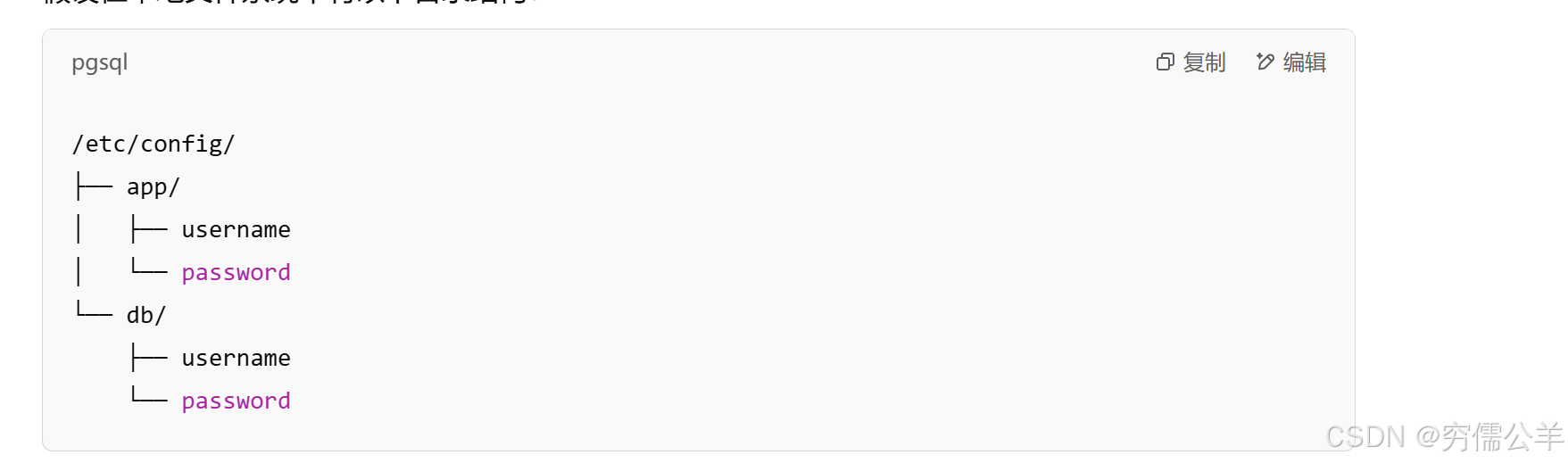
这里就以标准的配置文件为例,无论是哪种格式的配置文件,无非就那点东西:路径、所在文件夹、环境等。也是一个简单的实体类罢了。A君 新增StandardConfigDataResource类。代码如下:
/**
 * 标准配置文件资源
 */
public class StandardConfigDataResource extends ConfigDataResource {

    /**
     * 配置文件信息
     */
    private final StandardConfigDataReference reference;
    /**
     * 资源信息
     */
    private final Resource resource;

    private final boolean emptyDirectory;

	//省略其他代码。。。
}
资源定位器
有了配置文件资源,接下来要做的是如何找到这些资源。要说到资源定位,自然得规定寻找资源的协议,类似于:http、classpath、file,只有明确协议后才能知道用什么方式去寻找,当然了,这是具体实现类要做的事。接口只需要提供是否能解析的方法即可。A君 新增ConfigDataLocationResolver接口,代码如下:
/**
 * 配置文件资源定位
 *
 * @param <R>
 */
public interface ConfigDataLocationResolver<R extends ConfigDataResource> {

    /**
     * 支持的协议
     *
     * @param context
     * @param location
     * @return
     */
    boolean isResolvable(ConfigDataLocationResolverContext context, ConfigDataLocation location);

    /**
     * 解析成对应配置信息
     *
     * @param context
     * @param location
     * @return
     * @throws ConfigDataLocationNotFoundException
     * @throws ConfigDataResourceNotFoundException
     */
    List<R> resolve(ConfigDataLocationResolverContext context, ConfigDataLocation location)
            throws ConfigDataLocationNotFoundException, ConfigDataResourceNotFoundException;

    default List<R> resolveProfileSpecific(ConfigDataLocationResolverContext context, ConfigDataLocation location,
                                           Profiles profiles) throws ConfigDataLocationNotFoundException {
        return Collections.emptyList();
    }
}
老样子,接下来就是具体实现了。这里 A君 就把协议规定成resource,而后就是文件名应该叫什么。这里 A君 开始践行 约定大于配置 的理念,文件名如果没有特殊的要求,默认为application。A君 新增
/**
 * 符合resource:协议的资源定位器
 */
public class StandardConfigDataLocationResolver
        implements ConfigDataLocationResolver<StandardConfigDataResource>, Ordered {

    /**
     * 配置属性名
     */
    static final String CONFIG_NAME_PROPERTY = "spring.config.name";
    /**
     * 资源协议
     */
    private static final String PREFIX = "resource:";
    /**
     * 默认文件名
     */
    private static final String[] DEFAULT_CONFIG_NAMES = {"application"};
    /**
     * 协议正则
     */
    private static final Pattern URL_PREFIX = Pattern.compile("^([a-zA-Z][a-zA-Z0-9*]*?:)(.*$)");
    /**
     * []正则
     */
    private static final Pattern EXTENSION_HINT_PATTERN = Pattern.compile("^(.*)\\[(\\.\\w+)\\](?!\\[)$");

    private static final String NO_PROFILE = null;
    /**
     * 配置文件加载器
     */
    private final List<PropertySourceLoader> propertySourceLoaders;

    /**
     * 配置文件名
     */
    private final String[] configNames;

    private final LocationResourceLoader resourceLoader;


    @Override
    public boolean isResolvable(ConfigDataLocationResolverContext context, ConfigDataLocation location) {
        return true;
    }

    @Override
    public List<StandardConfigDataResource> resolve(ConfigDataLocationResolverContext context,
                                                    ConfigDataLocation location) throws ConfigDataNotFoundException {
        return resolve(getReferences(context, location.split()));
    }

    private Set<StandardConfigDataReference> getReferences(ConfigDataLocationResolverContext context,
                                                           ConfigDataLocation[] configDataLocations) {
        Set<StandardConfigDataReference> references = new LinkedHashSet<>();
        for (ConfigDataLocation configDataLocation : configDataLocations) {
            references.addAll(getReferences(context, configDataLocation));
        }
        return references;
    }

    private Set<StandardConfigDataReference> getReferences(ConfigDataLocationResolverContext context,
                                                           ConfigDataLocation configDataLocation) {
        /**
         * 获取路径
         */
        String resourceLocation = getResourceLocation(context, configDataLocation);
        try {
            /**
             *是文件夹
             */
            if (isDirectory(resourceLocation)) {
                /**
                 * 获取文件夹下所有资源
                 */
                return getReferencesForDirectory(configDataLocation, resourceLocation, NO_PROFILE);
            }
            /**
             * 获取配置文件
             */
            return getReferencesForFile(configDataLocation, resourceLocation, NO_PROFILE);
        } catch (RuntimeException ex) {
            throw new IllegalStateException("Unable to load config data from '" + configDataLocation + "'", ex);
        }
    }

    @Override
    public List<StandardConfigDataResource> resolveProfileSpecific(ConfigDataLocationResolverContext context,
                                                                   ConfigDataLocation location, Profiles profiles) {
        return resolve(getProfileSpecificReferences(context, location.split(), profiles));
    }

    private Set<StandardConfigDataReference> getProfileSpecificReferences(ConfigDataLocationResolverContext context,
                                                                          ConfigDataLocation[] configDataLocations, Profiles profiles) {
        Set<StandardConfigDataReference> references = new LinkedHashSet<>();
        for (String profile : profiles) {
            for (ConfigDataLocation configDataLocation : configDataLocations) {
                String resourceLocation = getResourceLocation(context, configDataLocation);
                references.addAll(getReferences(configDataLocation, resourceLocation, profile));
            }
        }
        return references;
    }

    private String getResourceLocation(ConfigDataLocationResolverContext context,
                                       ConfigDataLocation configDataLocation) {
        /**
         * 获取资源名
         */
        String resourceLocation = configDataLocation.getNonPrefixedValue(PREFIX);
        /**
         * 是个路径
         */
        boolean isAbsolute = resourceLocation.startsWith("/") || URL_PREFIX.matcher(resourceLocation).matches();
        if (isAbsolute) {
            return resourceLocation;
        }
        /**
         * 从父容器中查找
         */
        ConfigDataResource parent = context.getParent();
        if (parent instanceof StandardConfigDataResource) {
            String parentResourceLocation = ((StandardConfigDataResource) parent).getReference().getResourceLocation();
            String parentDirectory = parentResourceLocation.substring(0, parentResourceLocation.lastIndexOf("/") + 1);
            return parentDirectory + resourceLocation;
        }
        return resourceLocation;
    }

    private Set<StandardConfigDataReference> getReferences(ConfigDataLocation configDataLocation,
                                                           String resourceLocation, String profile) {
        if (isDirectory(resourceLocation)) {
            return getReferencesForDirectory(configDataLocation, resourceLocation, profile);
        }
        return getReferencesForFile(configDataLocation, resourceLocation, profile);
    }

    private Set<StandardConfigDataReference> getReferencesForDirectory(ConfigDataLocation configDataLocation,
                                                                       String directory, String profile) {
        Set<StandardConfigDataReference> references = new LinkedHashSet<>();
        /**
         * 获取所有匹配的文件指定名
         */
        for (String name : this.configNames) {
            Deque<StandardConfigDataReference> referencesForName = getReferencesForConfigName(name, configDataLocation,
                    directory, profile);
            references.addAll(referencesForName);
        }
        return references;
    }

    private Set<StandardConfigDataReference> getReferencesForFile(ConfigDataLocation configDataLocation, String file,
                                                                  String profile) {
        Matcher extensionHintMatcher = EXTENSION_HINT_PATTERN.matcher(file);
        boolean extensionHintLocation = extensionHintMatcher.matches();
        /**
         * 是否存在[],存在则去除
         */
        if (extensionHintLocation) {
            file = extensionHintMatcher.group(1) + extensionHintMatcher.group(2);
        }
        for (PropertySourceLoader propertySourceLoader : this.propertySourceLoaders) {
            /**
             * 获取拓展名
             */
            String extension = getLoadableFileExtension(propertySourceLoader, file);
            if (extension != null) {
                /**
                 * 获取全路径,不包含文件格式
                 */
                String root = file.substring(0, file.length() - extension.length() - 1);
                StandardConfigDataReference reference = new StandardConfigDataReference(configDataLocation, null, root,
                        profile, (!extensionHintLocation) ? extension : null, propertySourceLoader);
                return Collections.singleton(reference);
            }
        }
        throw new IllegalStateException("File extension is not known to any PropertySourceLoader. "
                + "If the location is meant to reference a directory, it must end in '/' or File.separator");
    }


    /**
     * 以'/'或者文件分隔符结尾,则返回true
     * 这里感觉有点简单粗暴了
     *
     * @param resourceLocation
     * @return
     */
    private boolean isDirectory(String resourceLocation) {
        return resourceLocation.endsWith("/") || resourceLocation.endsWith(File.separator);
    }

    private List<StandardConfigDataResource> resolve(Set<StandardConfigDataReference> references) {
        List<StandardConfigDataResource> resolved = new ArrayList<>();
        for (StandardConfigDataReference reference : references) {
            resolved.addAll(resolve(reference));
        }
        if (resolved.isEmpty()) {
            resolved.addAll(resolveEmptyDirectories(references));
        }
        return resolved;
    }

	//省略其他代码。。。
}
整体来说也比较简单了,基本就是一些字符串分割,没啥特殊的点
资源文件有很多种类型,相应的解析方式也就有多种。所以还需要提供一个包含所有解析方式的类,以支持更为复杂的场景。那么这些实现类框架怎么知道?显然需要个配置的地方,没错,就是之前提到的 SPI,这里有定义接口,显然是分属于key为接口,value为实现类的场景。例如:

思路理清楚之后,A君 新增ConfigDataLocationResolvers,代码如下:
public class ConfigDataLocationResolvers {

    private final List<ConfigDataLocationResolver<?>> resolvers;

    public ConfigDataLocationResolvers(Binder binder, ResourceLoader resourceLoader) {
    	//SPI扫描对应的实现
        this(binder, resourceLoader, SpringFactoriesLoader
                .loadFactoryNames(ConfigDataLocationResolver.class, resourceLoader.getClassLoader()));
    }

    /**
     * 初始化资源定位器
     *
     * @param binder
     * @param resourceLoader
     * @param names
     */
    ConfigDataLocationResolvers(Binder binder, ResourceLoader resourceLoader, List<String> names) {
        Instantiator<ConfigDataLocationResolver<?>> instantiator = new Instantiator<>(ConfigDataLocationResolver.class,
                (availableParameters) -> {
                    availableParameters.add(Binder.class, binder);
                    availableParameters.add(ResourceLoader.class, resourceLoader);
                });
        this.resolvers = reorder(instantiator.instantiate(resourceLoader.getClassLoader(), names));
    }


    List<ConfigDataResolutionResult> resolve(ConfigDataLocationResolverContext context, ConfigDataLocation location,
                                             Profiles profiles) {
        if (location == null) {
            return Collections.emptyList();
        }
        for (ConfigDataLocationResolver<?> resolver : getResolvers()) {
            if (resolver.isResolvable(context, location)) {
                return resolve(resolver, context, location, profiles);
            }
        }
        throw new UnsupportedConfigDataLocationException(location);
    }

    private List<ConfigDataResolutionResult> resolve(ConfigDataLocationResolver<?> resolver,
                                                     ConfigDataLocationResolverContext context,
                                                     ConfigDataLocation location, Profiles profiles) {
        List<ConfigDataResolutionResult> resolved = resolve(location, false, () -> resolver.resolve(context, location));
        if (profiles == null) {
            return resolved;
        }
        List<ConfigDataResolutionResult> profileSpecific = resolve(location, true,
                () -> resolver.resolveProfileSpecific(context, location, profiles));
        return merge(resolved, profileSpecific);
    }

    private List<ConfigDataResolutionResult> resolve(ConfigDataLocation location, boolean profileSpecific,
                                                     Supplier<List<? extends ConfigDataResource>> resolveAction) {
        List<ConfigDataResource> resources = nonNullList(resolveAction.get());
        List<ConfigDataResolutionResult> resolved = new ArrayList<>(resources.size());
        for (ConfigDataResource resource : resources) {
            resolved.add(new ConfigDataResolutionResult(location, resource, profileSpecific));
        }
        return resolved;
    }
	//省略其他方法。。。
}
整体来说,就是通过 SPI 扫描到所有资源定位器,然后尝试用资源定位器解析不同的协议
这几天以来,A君 忙的头昏脑涨,整个思路有点乱,写的磕磕碰碰。今天就先到这里了,剩下一点内容明天再来。。。

总结
正所谓树欲静而风不止,欲知后事如何,请看下回分解(✪ω✪)

 浙公网安备 33010602011771号