

SpringCloudConfig简单使用
动态修改配置文件信息,避免每次改动都需要发版的问题
SpringCloudConfig是一个分布式的配置管理方案,包含了server端和client两个部分,同时我们需要创建个git仓库,这个仓库就是放配置文件的信息,如下图所示

在我们完成了如图所示的操作后,现在开始创建服务端
<?xml version="1.0" encoding="UTF-8"?>
<project xmlns="http://maven.apache.org/POM/4.0.0"
         xmlns:xsi="http://www.w3.org/2001/XMLSchema-instance"
         xsi:schemaLocation="http://maven.apache.org/POM/4.0.0 http://maven.apache.org/xsd/maven-4.0.0.xsd">
    <modelVersion>4.0.0</modelVersion>

    <groupId>com.config</groupId>
    <artifactId>config-service</artifactId>
    <version>1.0-SNAPSHOT</version>
    <parent>
        <groupId>org.springframework.boot</groupId>
        <artifactId>spring-boot-starter-parent</artifactId>
        <version>2.2.1.RELEASE</version>
        <relativePath/>
    </parent>

    <dependencyManagement>

        <dependencies>
            <dependency>
                <groupId>org.springframework.cloud</groupId>
                <artifactId>spring-cloud-dependencies</artifactId>
                <version>Hoxton.SR3</version>
                <type>pom</type>
                <scope>import</scope>
            </dependency>

            <dependency>
                <groupId>com.alibaba.cloud</groupId>
                <artifactId>spring-cloud-alibaba-dependencies</artifactId>
                <version>2.1.0.RELEASE</version>
                <type>pom</type>
                <scope>import</scope>
            </dependency>
        </dependencies>
    </dependencyManagement>

    <dependencies>
        <!--客户端-->
        <dependency>
            <groupId>org.springframework.cloud</groupId>
            <artifactId>spring-cloud-starter-netflix-eureka-client</artifactId>
        </dependency>
        <!--config配置中⼼服务端-->
        <dependency>
            <groupId>org.springframework.cloud</groupId>
            <artifactId>spring-cloud-config-server</artifactId>
        </dependency>
    </dependencies>

    <build>
        <plugins>
            <plugin>
                <groupId>org.springframework.boot</groupId>
                <artifactId>spring-boot-maven-plugin</artifactId>
            </plugin>
        </plugins>
        <finalName>config</finalName>
    </build>


</project>
server.port=9006


logging.level.com.config=debug
logging.level.web=debug
spring.devtools.add-properties=false

eureka.client.service-url.defaultZone=http://xx:8762/eureka
eureka.instance.prefer-ip-address=true
spring.application.name=lagou-service-autodeliver

spring.cloud.config.server.git.uri=https://xx.com/xx/xx.git
spring.cloud.config.server.git.username=xx
spring.cloud.config.server.git.password=xx
spring.cloud.config.server.git.search-paths=-lagou-config-repo

spring.cloud.config.server.label=master

management.endpoints.web.exposure.include=*
management.endpoint.health.show-details=always
package com.config;

import org.springframework.boot.SpringApplication;
import org.springframework.boot.autoconfigure.SpringBootApplication;
import org.springframework.cloud.client.discovery.EnableDiscoveryClient;
import org.springframework.cloud.config.server.EnableConfigServer;

/**
 * @Description:
 * @Author: Yourheart
 * @Create: 2022/10/21 17:29
 */
@SpringBootApplication
/**
 * 开启配置服务器功能
 */
@EnableConfigServer
/**
 * 开启服务发现
 */
@EnableDiscoveryClient
public class ConfigApplication {
    public static void main(String[] args) {
        SpringApplication.run(ConfigApplication.class,args);
    }
}
到这里服务端的就创建完成了,下面开始客户端的
<?xml version="1.0" encoding="UTF-8"?>
<project xmlns="http://maven.apache.org/POM/4.0.0" xmlns:xsi="http://www.w3.org/2001/XMLSchema-instance"
	xsi:schemaLocation="http://maven.apache.org/POM/4.0.0 https://maven.apache.org/xsd/maven-4.0.0.xsd">
	<modelVersion>4.0.0</modelVersion>
	<parent>
		<groupId>org.springframework.boot</groupId>
		<artifactId>spring-boot-starter-parent</artifactId>
		<version>2.2.1.RELEASE</version>
		<relativePath/>
	</parent>
	<groupId>com.java</groupId>
	<artifactId>pingan</artifactId>
	<version>0.0.1-SNAPSHOT</version>
	<name>pingan</name>
	<description>Demo project for Spring Boot</description>

	<properties>
		<java.version>1.8</java.version>
		<skipTests>true</skipTests>
	</properties>

	<dependencyManagement>

		<dependencies>
			<dependency>
				<groupId>org.springframework.cloud</groupId>
				<artifactId>spring-cloud-dependencies</artifactId>
				<version>Hoxton.SR3</version>
				<type>pom</type>
				<scope>import</scope>
			</dependency>

			<dependency>
				<groupId>com.alibaba.cloud</groupId>
				<artifactId>spring-cloud-alibaba-dependencies</artifactId>
				<version>2.1.0.RELEASE</version>
				<type>pom</type>
				<scope>import</scope>
			</dependency>
		</dependencies>
	</dependencyManagement>

	<dependencies>
		<!--客户端-->
		<dependency>
			<groupId>org.springframework.cloud</groupId>
			<artifactId>spring-cloud-starter-netflix-eureka-client</artifactId>
		</dependency>
		<!--tomcat容器-->
		<dependency>
			<groupId>org.springframework.boot</groupId>
			<artifactId>spring-boot-starter-web</artifactId>
		</dependency>


		<!--Config 客户端依赖-->
		<dependency>
			<groupId>org.springframework.cloud</groupId>
			<artifactId>spring-cloud-config-client</artifactId>
		</dependency>
    </dependencies>

	<build>
		<plugins>
			<plugin>
				<groupId>org.springframework.boot</groupId>
				<artifactId>spring-boot-maven-plugin</artifactId>
			</plugin>
		</plugins>
		<finalName>xx</finalName>
	</build>

</project>
package com.java;

import org.springframework.boot.SpringApplication;
import org.springframework.boot.autoconfigure.SpringBootApplication;
import org.springframework.cloud.client.discovery.EnableDiscoveryClient;

/**
 * @Description:
 * @Author: Yourheart
 * @Create: 2022/10/22 20:59
 */
@SpringBootApplication
@EnableDiscoveryClient
public class LagouResumeApplication {

    public static void main(String[] args) {
        SpringApplication.run(LagouResumeApplication.class,args);
    }

}
server.port=8001

spring.cloud.config.name=local-service
spring.cloud.config.profile=test
#分支名称
spring.cloud.config.label=master
#配置中心地址
spring.cloud.config.uri=http://127.0.0.1:9006

management.endpoints.web.exposure.include=*
如果我们git修改的文件生效,需要使用@RefreshScope,使用方式如下图所示
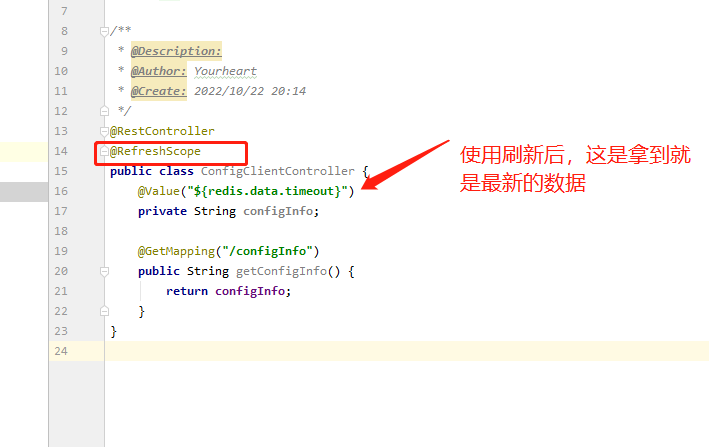
刷新地址http://localhost:8080/actuator/refresh
以上完成是手动刷新配置信息

 浙公网安备 33010602011771号